Does Battery Saver Slow Down Charging?
Battery saver rarely blocks charging completely, but it can reduce how fast your device accepts power. The single spec that matters most is charge current and charger wattage, because those determine how many watts reach the battery. A common mistake is blaming battery saver instead of a bad cable, low-watt charger, or thermal throttling; first check the Fast Charging or Optimized Charging toggle in Settings.
Battery saver may slow charging on some phones by limiting fast-charge profiles and background power; check with a USB meter – slow charge can read around 500 mA, while fast-charge often shows 1500 to 3000 mA, so compare readings with battery saver on and off to confirm the effect.
Does Battery Saver Slow Charging?
Recommended Products


Usually battery saver does not directly reduce the hardware charging current, it mostly limits background tasks, reduces wakeups, and may dim the screen which can make charging feel faster or unchanged. Some manufacturers add specific charging limits inside power saving options, so whether charging is slowed depends on your device and the setting you enable.
Phones, laptops, and power banks handle this differently: phones often have an “optimized” or “adaptive” charge feature bundled with battery saver; laptops may reduce charging speed to limit heat when in power saver; stand-alone power banks rarely change output because they lack a background OS to control charging behavior. Because vendor implementations vary, check the device settings and the charger or port specs before assuming battery saver will change charge speed.
For example, if your phone shows “optimized charging” and is plugged in overnight, the phone may hold the charge at about 80 to 90 percent and finish later to reduce wear; that is a deliberate slow-charge behavior but it is separate from a simple battery saver that only limits apps. If you enable battery saver and do not see any charging change, the phone is likely only capping background tasks and not the charger negotiation.
| Device | Typical battery saver effect on charging | What to check |
|---|---|---|
| Phone | May have separate optimized charging; battery saver usually limits background tasks, indirectly affecting heat and perceived speed. | Check battery/charging settings for “optimized”, test with saver off, use original charger and cable. |
| Laptop | Power profiles can reduce maximum charging current to lower heat or preserve battery chemistry when on battery saver. | Review power plan and firmware battery settings, and test charging while plugged in with performance profile. |
| Power bank | Rarely changes output for device power modes; output is set by the bank’s electronics unless it has smart low-current modes. | Check bank specifications and port markings, and test with and without device battery saver enabled. |
Safety note: If your device gets very hot, the battery swells, or charging behavior is erratic, stop charging and seek service; do not rely on power-saver settings to prevent heat-related battery damage.
How Battery Saver Works
Recommended Products


Battery saver normally does not change the phone’s charging circuitry or the charger negotiation, it reduces the device’s power draw by limiting CPU speed, screen output, background activity, and radios, so any change in how fast the battery fills is usually indirect. Charging speed is set by the charger, the battery management system, and any manufacturer “protect battery” settings, which are separate from the generic battery saver options.
Typical restrictions inside battery saver include reduced CPU frequency, lower display brightness and refresh rate, restricted background sync, limited location checks, and reduced or disabled push notifications and animation. The mode can also restrict background network access and defer app wakelocks so fewer tasks run while charging.
| Control | Battery Saver | Charging-Specific Features |
|---|---|---|
| CPU, screen, background apps | Limits or pauses to reduce drain | Usually unaffected |
| Charging current and voltage | No direct control | Managed by charger, BMS, and OEM battery-care modes |
| Thermal protection | May reduce background heat by lowering load | Can actively throttle charging when hot |
For example, if your screen is off, radios are limited, and background sync is blocked while charging, the phone may report a faster percent-per-minute increase than with saver off, because less power is consumed by the system. That does not mean the charger is delivering a higher peak current, it means more delivered power is available to the battery rather than to running processes.
Safety note: stop charging if the device is hot to the touch, swollen, or if the cable and adapter are damaged. Check charger wattage and cable ratings, and prefer the phone maker’s recommended charging options when trying to diagnose true charge-rate behavior.
Battery Saver vs Charging Speed
Recommended Products

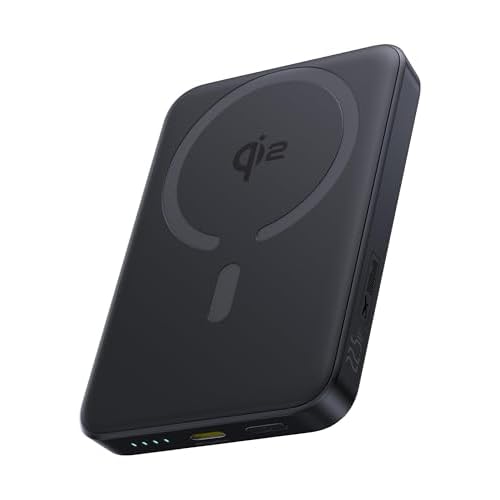
Battery saver settings usually do not directly slow the raw charging current; they cut background activity and reduce CPU use but leave the charger negotiation alone. Charging slowdowns that happen while battery saver is on are more often caused by thermal limits, explicit software charge caps, or adaptive/optimized charging schemes rather than the power-saving flag itself.
Software charging caps are separate features that limit the maximum state of charge or current to extend battery life. Some phones and laptops have a “protect battery” or “charge limit” option that keeps the battery at 80 to 90 percent or reduces charge current, and those features can be enabled independently or bundled with battery saver modes by OEMs.
Thermal throttling reduces charging speed when the battery or device is hot; the battery management system reduces current during the constant-current phase and may stop fast charging early to avoid damage. Chargers, cable heat, and ambient temperature affect how aggressively the controller limits current, so a hot phone will often charge slower even if battery saver is off.
Optimized or adaptive charging delays topping to 100 percent and slows the final stage to reduce time at high voltage, which looks like slow charging during the last 10 to 20 percent.
For example, several phone makers hold charge around 80 percent overnight and finish in the morning, and some laptop utilities postpone full charging when plugged in for long periods.
Capacity, Wattage, Runtime
Recommended Products


Battery saver usually does not change the battery’s capacity or the charger’s maximum wattage, it mainly reduces device power draw so the net charge delivered to the battery can be higher. Some phones or laptops add thermal or “low power charging” rules that will reduce charging current, but that is a device-level limit, not a generic effect of battery saver modes.
Battery capacity is shown as milliamp-hours (mAh) or watt-hours (Wh), and charger power is given in watts (W). A simple estimate for charge time is time = battery Wh ÷ charger W, but real charging is slower near full state of charge because of the charge curve and there are conversion losses and limits imposed by the battery management system.
When battery saver reduces CPU, screen, and background activity, the device draws less current while charging, so more of the charger’s power goes into replenishing the battery rather than running the device. That can shorten the time it takes to go from, say, 20% to 80% in practical use, even when the charger and battery specs are unchanged.
| Spec | What it tells you | Effect on runtime/charging |
|---|---|---|
| mAh / Wh | Energy stored | Determines how long device runs and how much energy needs replacing when charging |
| Charger W | Maximum power available | Higher W shortens charge time up to the device’s acceptance limit |
| Device input limit | Max the BMS/IC will accept | Caps charging speed regardless of charger wattage |
Charger Compatibility & PD
Battery saver settings rarely reduce the negotiated USB-C Power Delivery charging rate directly; the actual limit is almost always the charger, the cable, or PD negotiation between charger and device. Battery saver can lower background power use, which may slightly change how fast the battery percentage rises, but it does not change the charger’s maximum voltage or current.
USB-C Power Delivery is a negotiation protocol where the device and charger agree on voltage and current, commonly at 5, 9, 12, 15, or 20 volts and varying amperage, yielding different wattages. If the charger or cable cannot support the profile the device requests, the session falls back to a lower power level. Some chargers and phones also support PPS, which allows smaller voltage steps and can improve heat and efficiency, but the device must request it.
For example, a 65 watt multiport charger may only deliver 18 watts to one port when other ports are in use, or a cheap cable may drop the session to 5 volts at 1.5 amps. In those cases disabling battery saver will not increase the negotiated PD wattage.
Heat, Safety, Swelling
Recommended Products
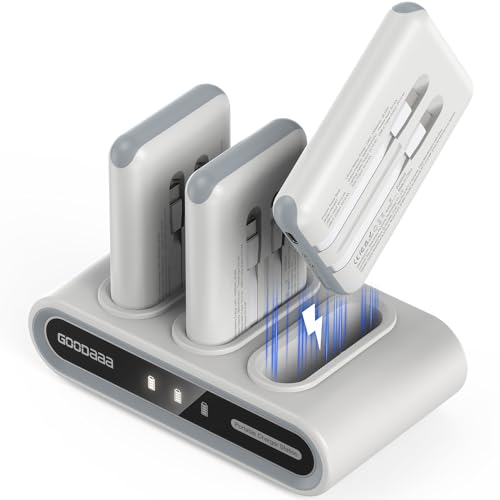

Battery saver modes usually do not reduce the physical charge current; they cut background tasks and screen activity so the device runs cooler, which can indirectly prevent the phone or charger from throttling charge. Separate features named “optimized,” “adaptive,” or “battery health” can intentionally slow charging near full or overnight, so check which feature is active.
Heat speeds chemical breakdown inside lithium cells, raises internal resistance, and can cause built-in thermal protection to lower or pause charging to protect the pack. That means thermal management, not battery saver itself, is often the actual reason you see slower charging under hot conditions.
Safety first: battery saver can help by lowering internal workload and therefore heat, but it is not a substitute for proper charging hardware and attention to thermal or physical warning signs. When in doubt, consult the device’s support documentation and stop charging if the battery bulges, emits odors, or the device overheats.
Troubleshooting Slow Charging
Battery saver can reduce charging speed on some phones because it limits background CPU and may prevent fast-charge protocols from negotiating full power, but it is often only one of several causes. If turning battery saver off restores normal charge power, the saver is the likely cause; if not, follow the checks below to find the real issue.
Buying checklist for new devices and chargers:
Quick Summary
Battery saver usually does not slow wired charging, but optimized charging or thermal limits can reduce or delay charging to protect battery health.
Frequently Asked Questions
Does battery saver mode slow down charging?
Yes, when battery saver mode is activated, it can limit background processes and reduce screen brightness, which may result in a slightly slower charging rate. However, the primary purpose of battery saver mode is to extend battery life, not to significantly impact charging speed.
How do I know if my charger is compatible with my device?
Check the voltage and amperage ratings on both your charger and device. A charger with a voltage rating that matches your device’s requirements, along with a current rating equal to or higher than what your device needs, is usually compatible.
Is it safe to charge my battery overnight?
Generally, it’s safe to charge your battery overnight if your device has overcharge protection built in. Most modern devices are designed to stop charging once they reach 100%, but it’s best to avoid consistently charging overnight to prolong battery life.
How often should I replace my rechargeable batteries?
Rechargeable batteries typically last between 300 to 500 charge cycles before their capacity noticeably declines. If you notice a significant drop in runtime, it may be time to replace them.
What is a common mistake when buying power banks?
A common mistake is not checking the power bank’s output capacity in mAh. Make sure the power bank has at least 1.5 times the capacity of your device’s battery for effective charging, especially for larger devices like tablets.

- 10 Best Battery For Generator Ev Battery Bank Marine 2026 - October 27, 2026
- 10 Best Battery For Generator Ev Battery Bank Lto 2026 - October 27, 2026
- 10 Best Battery For Generator Ev Battery Bank Low Voltage 2026 - October 27, 2026