CR2032 Battery Lifespan by Device and What Affects It
A CR2032 lithium coin cell powers everything from PC motherboards and car key fobs to glucose meters and Bluetooth trackers. How long it actually lasts in your device depends more on the device itself than on the battery. The same CR2032 can run for a decade in a motherboard CMOS slot and die in six months in a security sensor. This guide breaks down real runtime by device, brand shelf life claims, how to test a used or stored cell, and what shortens life in practice.
Quick answer
A CR2032 typically lasts:
- 5 to 10 years in low-drain devices (PC motherboard CMOS, simple digital watches, basic calculators)
- 2 to 4 years in moderate-drain devices (car key fobs, fitness tracker accessories, kitchen scales)
- 6 months to 2 years in higher-drain devices (LED bike lights, wireless security sensors, glucose meters used daily)
- 8 to 10 years sealed on the shelf if stored at room temperature
Actual runtime depends on how often the device wakes, how much current it pulls in bursts, temperature, and how fresh the cell was when you installed it.
That range matters because a battery can sit sealed in a drawer for years and still be fine, then die early once it starts powering something demanding. If you are deciding whether to trust an old spare, replace a weak battery now, or buy extras in bulk, that is the difference worth knowing.
CR2032 Lifespan Ranges
Recommended Products


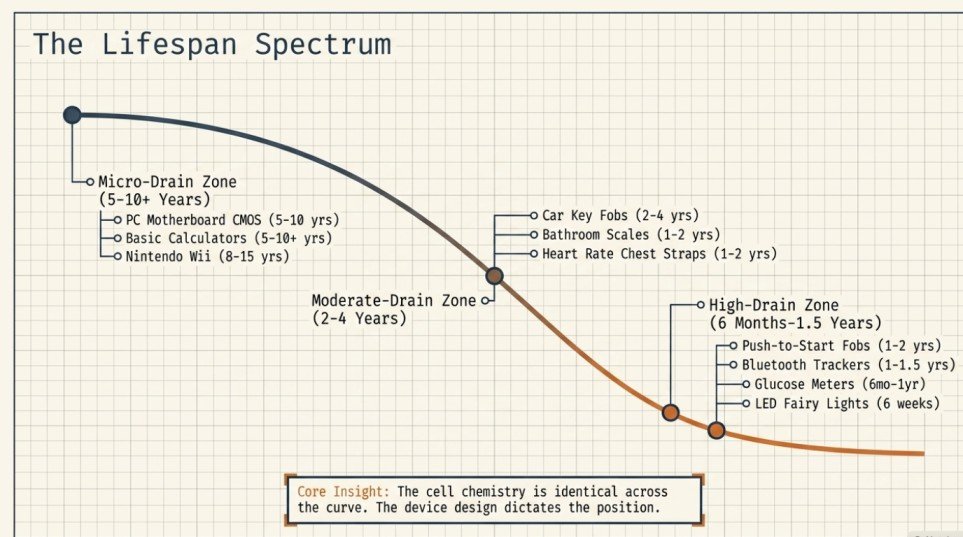
A CR2032 can last a few months in a higher-drain device or well over a decade in a low-drain one. The cell itself is the same size and chemistry either way. The difference comes from how often the device wakes up, how much current it draws, and whether it has to keep a clock or memory running all the time.
| Device type | Typical CR2032 runtime | What that usually means in practice |
|---|---|---|
| PC motherboard CMOS | 5 to 10 years | Very low drain. Keeps the BIOS clock and settings alive. |
| Basic digital watch | 3 to 5 years | Longer if there is no backlight or alarm; shorter if you use extra features. |
| Calculator | 5 to 10+ years | Many calculators sip power so slowly that the battery outlasts normal ownership. |
| Car key fob | 2 to 4 years | Longer with light daily use, shorter with frequent presses or push-to-start proximity fobs. |
| Bluetooth tracker (AirTag, Tile) | 1 to 1.5 years | Broadcasts constantly. Apple states about 1 year for AirTag. |
| Bathroom or kitchen scale | 1 to 2 years | Wakes on step-on. Frequent daily use pulls it toward the low end. |
| Digital thermometer | 1 to 2 years | Short use bursts, but runtime drops fast with daily readings. |
| Blood pressure monitor | 1 to 2 years | Most units use AA batteries for the pump and a CR2032 only for memory backup. |
| Glucose meter | 6 months to 1 year | Can be shorter with several tests per day or continuous data storage. |
| Heart rate chest strap | 1 to 2 years | Depends on how many hours per week you train. Bluetooth transmit drains fastest. |
| Wireless security sensor | 1 to 3 years | Radio transmit intervals matter more than voltage alone. |
| Small LED remote or bike light | 6 months to 1 year | LEDs pull real current. Runtime drops sharply with actual on-time. |
- Treat the table as a normal range, not a promise. Real-world runtime depends on how the device is programmed and how often it is active. A CR2032 that seems weak in one gadget may be perfectly normal in another.
- Low-drain devices last the longest. Motherboard CMOS circuits, calculators, and some watches draw only microamps, so the cell can stretch for years.
- Frequent wakes and wireless transmit shorten life. Key fobs, glucose meters, and fitness sensors pull real current in bursts, so the same battery empties faster.
- Check whether the battery age or the device design is the real problem. If a fresh CR2032 dies much sooner than the device’s usual range, look for constant button presses, stuck switches, dirty contacts, or a hidden always-on feature.
Safety note: replace a coin cell if it leaks, looks swollen, or feels hot in use. Do not mix old and new cells in a device that uses more than one. If the device shows a low-battery warning, trust that signal over guesswork.
Why CR2032 Runtime Varies So Much?
Recommended Products


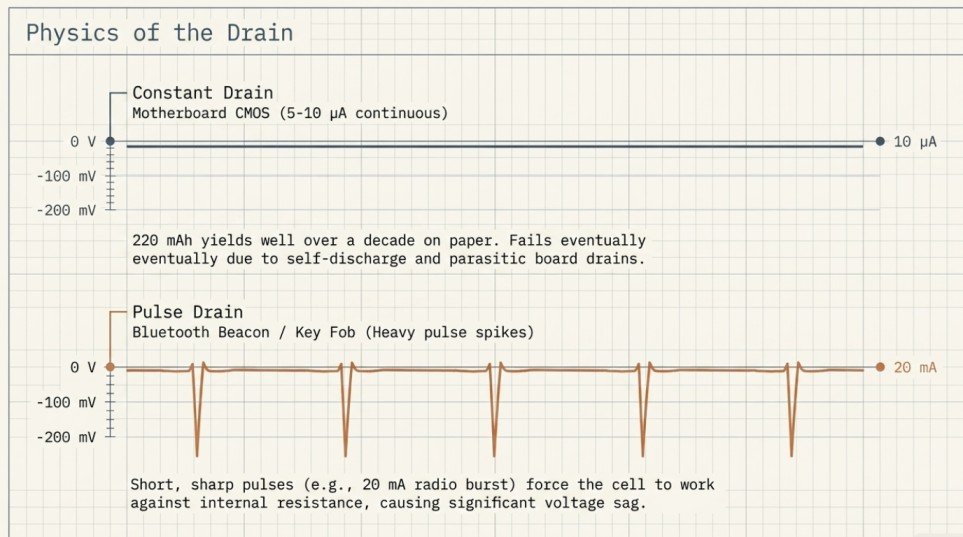
A CR2032 can last months in one device and years in another because the battery is not used at a steady rate. What matters is the device’s average current draw over time, plus short high-current pulses when it wakes, lights a display, beeps, or transmits.
The chemistry and capacity of the cell are fixed at roughly 220 milliamp-hours. The device behavior is what changes the outcome. A low-drain clock or motherboard backup circuit may sip tiny amounts continuously, while a key fob, sensor, or LED can create bursty loads that empty the cell faster than the average number suggests.
Average drain versus pulse drain
A CR2032 is rated at about 220 mAh at low continuous drain. Real life depends on how many milliamps the device pulls each day. A device with a small steady current often runs longer than one that sits idle then demands a brief sharp pulse, because those pulses cause voltage sag and force the cell to work harder against its internal resistance.
Always-on devices versus intermittent use
Always-on loads (a clock, backup memory, an always-listening radio) keep the battery under constant drain, so runtime tracks the standby current closely. Intermittent devices last a long time if they wake rarely, but frequent button presses, alarms, screens, or radio transmissions cut life quickly.
Why CMOS backup lasts so long
Motherboard CMOS backup usually lasts the longest because it only powers a tiny memory and real-time clock circuit, not a display or transmitter. The cell may sit at microamp-level drain for years. A typical PC CMOS pulls around 5 to 10 microamps when the machine is unplugged, which works out to well over a decade on paper. In practice, batteries usually die at 5 to 10 years because of self-discharge and small parasitic drains on the board.
Idle drain per month for hobby projects
If you are designing a low-power circuit around a CR2032, the honest numbers are: about 220 mAh of usable capacity, roughly 1 percent self-discharge per year in storage, and a nominal 3 V that sags to about 2.7 V by end of life. A load of 10 microamps means 22,000 hours (about 2.5 years). A load of 100 microamps means 2,200 hours (about 3 months). A single 20 mA LED pulse for one second takes about 5.5 microamp-hours, so you can pulse 40,000 times before you run out.
- Check the device spec for standby current, transmit frequency, or coin cell requirements before assuming the battery is weak.
- Replace sooner if the device shows dim displays, weak remote range, delayed wakeups, or low-battery warnings.
- Inspect for faults if a new cell dies unusually fast. Corrosion, poor contacts, or a damaged circuit can drain a fresh battery in weeks.
CR2032 Lifespan by Specific Device
Recommended Products


The generic table gets you close. These are the numbers for specific devices people ask about most.
PC motherboard CMOS (desktop)
5 to 10 years is normal. If your desktop is losing time when unplugged or resetting BIOS settings, the CR2032 is the first thing to check. A Dell all-in-one that only gets a year out of a fresh CR2032 usually has either a bad battery holder, a firmware bug, or an unusually high standby drain from the always-on wake circuits. Warranty replacement is worth pursuing if the pattern repeats.
Laptop / notebook CMOS
3 to 7 years is typical. Laptops trickle-charge the CMOS cell from the main battery whenever the machine is on, so the CR2032 lasts longer than in a desktop that sits unplugged. If the main battery is removed and the laptop is unpowered for long stretches, expect the lower end of the range.
PS4 and PS5 CMOS battery
Both the PS4 and PS5 use a CR2032 for their internal clock. Typical life is 5 to 7 years. When the CMOS battery dies, the console loses the date and time, and disc-based games sometimes refuse to launch or apply trophies until you sign back into PlayStation Network to re-sync the clock. Sony’s replacement procedure requires opening the case, so many owners live with the “please set the correct time” prompt for years before replacing the cell.
Nintendo Wii and older consoles
The Wii uses a CR2032 for its internal clock. Life is usually 8 to 15 years thanks to very low standby drain. Symptoms of a dead CMOS: the console asks you to reset the date each boot, and Animal Crossing shows the wrong time or weather.
QNAP NAS and other network storage devices
QNAP NAS units use a CR2032 for BIOS and clock backup. Expect 5 to 8 years. To check the battery, open the case and measure with a multimeter (below 2.7 V under a 15 kilo-ohm load means replace). Symptoms of a failing NAS CMOS: the clock resets after power outages, RAID configuration warnings, or unexpected BIOS resets. Synology, Asustor, and TerraMaster units use CR2032 the same way.
Car key fobs
2 to 4 years for a standard button-press fob. Push-to-start proximity fobs (most modern Audi, BMW, Mercedes, Lexus, Tesla) drain faster because they constantly listen for the car, and often get 1 to 2 years. If your fob only works when you stand right next to the car door, the CR2032 is dying. Cold weather makes voltage sag worse, so a marginal battery often fails first in winter.
Motorcycle key fob or remote
Motorcycle remote fobs typically get 2 to 3 years on a CR2032, similar to car fobs but without the proximity radio drain. Storage in a cold garage extends the calendar life but does not extend cycles of use.
Bluetooth beacons and small trackers
A CR2032 in a Bluetooth beacon typically lasts 1 to 2 years depending on transmit interval. Apple’s AirTag uses CR2032 and is rated for about 1 year of everyday use. Tile Mate is user-replaceable and gives similar runtime. If the beacon transmits every 100 milliseconds, expect closer to 6 months; if once per second, closer to 2 years.
Fairy lights and small LED strings
A CR2032 running a small string of LED fairy lights typically lasts 12 to 30 hours of continuous on-time. That works out to roughly 6 weeks at 30 minutes per day. A single CR2032 cannot power a long LED string for months; if the pack advertises months of life, it usually assumes a few hours of use per week and a very short LED count.
Temperature sensors and smart home sensors
Wireless temperature sensors (Ecobee remote sensors, Aqara, Sonoff) run 1 to 2 years on a CR2032. Reporting frequency drives runtime the most. A sensor that reports every 5 minutes lasts much longer than one that reports every 30 seconds. Refrigerator or freezer sensors run shorter because cold reduces usable capacity.
Metal detectors
Small pinpointer metal detectors that use a CR2032 (rare compared to 9V) typically last 20 to 40 hours of active detection time. Most full-size detectors use AA or 9V batteries, but pen-style pinpointers and pocket detectors sometimes use CR2032.
Blood pressure monitor
Most consumer blood pressure monitors run the pump and display from AA batteries. The CR2032 (when present) only backs up the memory and clock. Expect 3 to 5 years on the memory backup. If your BP monitor’s memory resets each time you change the AA cells, the CR2032 is the culprit.
Heart rate chest strap
Polar H10, Garmin HRM-Dual, Wahoo TICKR: all use a CR2032. Rated life is around 400 hours of use, which works out to 1 to 2 years for most riders and runners. Bluetooth and ANT+ dual-broadcast straps drain faster than single-protocol straps.
Digital scales (kitchen, bathroom, travel)
1 to 2 years is typical for a scale that sees daily use. Travel scales that get used only on trips often get 3 to 5 years because the total wake time is small. If a scale has been sitting unused with the battery installed for years, the readings may drift low or the display may not wake until you replace the cell.
CR2032 Shelf Life: How Long Do Unused Batteries Last?
Recommended Products

A sealed CR2032 stored at room temperature typically lasts 8 to 10 years before it loses enough capacity to matter. Lithium coin cells self-discharge at roughly 1 percent per year, which is why the major brands print 10-year “best if used by” dates on their packaging.
What the manufacturers claim:
- Panasonic CR2032: 10 years shelf life
- Duracell CR2032: 10 years shelf life (“guaranteed for 10 years in storage”)
- Energizer CR2032: 10 years shelf life (Energizer does not claim 12 years; if you see 12-year packaging on Amazon, treat it as a counterfeit warning sign)
- Eveready CR2032: Around 5 to 7 years for the value line
- Maxell CR2032: 10 years shelf life
- Renata (Swiss): 10 years shelf life; commonly used in watches
- Sony CR2032: 10 years (Sony discontinued its own coin cell line and now rebadges Murata; check the fine print)
- GP CR2032: 10 years shelf life
Do sealed CR2032 batteries expire?
Yes, but slowly. A sealed CR2032 does not stop working on the printed date; it just falls below the manufacturer’s guaranteed capacity. A 12-year-old sealed cell often still measures 3.0 V open circuit and still runs a low-drain device fine. The date matters most for high-drain devices (car fobs, glucose meters, security sensors) where a slight loss of usable capacity shows up as noticeably shorter life.
The classic “5-year unused” question
If you installed a CR2032 in a weighing machine 5 years ago and never turned it on, expect it to work but to run about 20 to 30 percent shorter than a fresh cell. A CR2032 installed but idle in a device still loses charge from two sources: the cell’s own self-discharge (about 1 percent per year), and the device’s standby drain (which can be zero or many microamps depending on the design). If the device switches off cleanly and there is no parasitic drain, 5 years of storage leaves about 90 to 95 percent of usable capacity. If the device draws even a small standby current, the number can be much lower.
How to tell the age of a CR2032 you already have
Most CR2032 blister packs print an expiration date on the back. That date is typically 10 years from manufacture, so subtract 10 years to get the production year. If you find loose cells without packaging, look for a lot code stamped on the flat negative side (usually a letter and 3 or 4 digits). The letter is the year (A = 2020, B = 2021, and so on for some brands), and the digits are the week of production. Panasonic and Duracell publish their code formats on their websites; other brands vary.
Does storing CR2032 batteries in the fridge extend life?
Marginally, and it is not worth the risk. Cold storage slows self-discharge slightly, but condensation on the cell contacts causes corrosion when you take it back out, which is a much bigger problem than the tiny capacity gain. Room temperature in a dry drawer is the right storage. Avoid hot places: a car glovebox, an attic, or a shelf next to a router or heater can cut shelf life in half.
How to Check if a CR2032 Is Still Good?
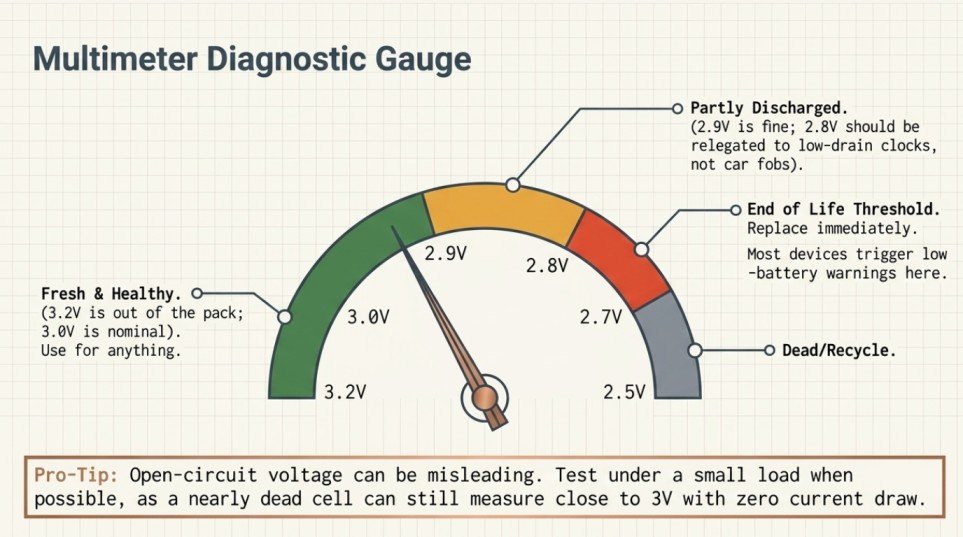
A multimeter and 30 seconds tells you almost everything. Open-circuit voltage alone can be misleading because a nearly dead cell still shows close to 3 V when nothing is drawing current, so a small load test is worth doing on batteries you plan to trust.
Voltage guide for a used CR2032
| Voltage (no load) | Condition | What to do |
|---|---|---|
| 3.2 to 3.3 V | Fresh out of the pack | Use it. Full capacity. |
| 3.0 V | Nominal, healthy | Use it for anything. |
| 2.9 V | Slightly used, still good | Fine for low-drain devices. Fine for anything, really. |
| 2.8 V | Partly discharged | Use in a low-drain device (clock, remote). Not a car fob. |
| 2.7 V and below | End of life for most devices | Replace. Many devices trigger low-battery warnings here. |
| 2.5 V and below | Dead for practical use | Recycle. |
Is a 2.9V CR2032 any good?
Yes. 2.9 V under no load is a healthy CR2032. The nominal rating is 3 V, and cells sit close to that number for most of their life before dropping quickly at the end. If your multimeter shows 2.9 V on a used cell, it still has plenty of runtime left in a low or moderate drain device. Only worry when the voltage falls below 2.7 V.
Does touching both sides of a CR2032 reduce its life?
Not enough to worry about. Human skin resistance is very high (usually more than 100 kilo-ohms), so briefly touching both terminals draws well under 30 microamps. That is roughly the same as the standby drain of a wristwatch. Handle the cell by the edges when you can, mostly because skin oil on the contacts causes long-term corrosion in the battery holder, not because a single touch drains the cell.
What about a swollen or leaking cell?
Do not use it. A swollen coin cell is under internal pressure and can vent, leak, or heat up if you install it. Isolate it in a non-conductive container (a small plastic bag, or the original blister pack) and take it to a battery recycling point. A dead CR2032 left in a watch for years usually corrodes and leaks a whitish crust; clean the holder with isopropyl alcohol and a cotton bud before installing a fresh cell.
What Shortens CR2032 Life
Recommended Products
A CR2032 often lasts years in a low-drain device, but real-world life drops fast if the device asks for more current, sits in heat, or you started with a weak cell. The same coin battery may seem “bad” in one product and normal in another because the load and environment are different.
- Heat, cold, and humidity. Heat speeds up chemical aging, so batteries stored in a hot car, near a router, or inside a warm gadget fade sooner. Cold makes voltage sag under load. Moisture and corrosion damage the contacts even when the cell itself is still partly charged.
- Storage age and self-discharge. A CR2032 has a shelf life but is not fresh forever. Check the date code, or buy from sellers with fast stock turnover. An old cell may already have lost 10 to 20 percent of usable capacity before you install it.
- Brand quality and counterfeit risk. Better-known brands are more consistent in capacity, sealing, and leakage resistance. Cheap no-name cells and counterfeit packs fail early. Buy sealed packaging from a trusted retailer and avoid loose bulk cells with no clear markings.
- Device load profile. Constant radio use, backlights, LED indicators, vibration alerts, or frequent wireless wake-ups drain much faster than a clock or CMOS memory backup. Heavy transmit bursts in key fobs, sensors, and meters shorten life even when the average current looks small on paper.
- High-drain pulses versus standby use. Devices that pull short repeated spikes need a battery with low internal resistance. As the cell ages, voltage drop under those spikes gets worse, so the device may shut down earlier than the remaining capacity suggests.
- Contact quality and fit. Weak spring contacts, dirt, oxidation, or a loose battery holder waste power. If a fresh CR2032 acts weak, clean contacts before you assume the cell is the problem.
For replacement planning, treat the battery life estimate as a range. High-drain devices with radios or lights land at the low end. Simple low-draw devices land at the high end.
Warning Signs a CR2032 Needs Replacing
A CR2032 usually fails gradually. The earliest clues are small behavior changes, not a complete shutdown. Catching them early matters because low coin-cell voltage causes lockouts, lost timekeeping, wrong readings, or devices that seem to work only some of the time.
- Dim displays and weak beeps. On clocks, calculators, scales, and small meters, the screen fades, segments disappear, or the backlight misbehaves. Button presses sound quieter as the battery can no longer supply stable voltage under load.
- Clock resets and lost settings. Motherboards, thermostats, and other always-on devices forget the time, date, or saved preferences after a power interruption. If you reset the same device twice, the CR2032 is near end of life.
- Intermittent or failed readings. Thermometers, glucose meters, fitness sensors, and measurement tools take longer to start, show error codes, or cut out mid-test. That inconsistency usually means the cell can still power light tasks but not short bursts of higher current.
- Key fob range problems. Car key fobs often keep working close to the vehicle before the battery dies completely. If you have to stand next to the car or press the button twice, replace the CR2032 before you get locked out.
- Shorter-than-usual life in one device. If a battery that normally lasts years starts failing after only months, look for a device fault, a poor contact, contamination, or a cell that was stored for years before use. A weak holder can look like a dead battery.
Best practice: replace the cell at the first repeatable warning sign, then retest the device. If problems continue, the device itself may be the issue.
Replacement Timing and Best Practice
CR2032 replacement timing depends more on the device than the battery itself. A coin cell in a low-draw clock or motherboard can last a decade. A key fob, scale, or sensor needs replacement much sooner because it wakes often or sends stronger power bursts.
- Replace on a schedule if the device is critical. For devices that must hold time, memory, or medical readings, change the cell before it fails. A good rule is to swap as soon as the device drifts, resets, or shows a low-battery warning. Write the install date on a piece of masking tape inside the compartment.
- Replace on symptom for non-critical gear. If a remote, calculator, thermometer, or fitness sensor becomes dim, intermittent, slow, or loses pairing, the CR2032 is near end of life. Do not wait for full shutdown if the device matters day to day.
- Change it safely. Open the compartment with the correct tool, avoid shorting the cell across metal contacts, and keep the new battery dry. If the old cell is swollen, hot, or leaking, stop and dispose of it properly.
- Protect settings and memory. Some devices lose settings when the battery is out for more than 30 seconds. Move quickly. For a computer motherboard, note passwords, time, and custom BIOS settings before opening the compartment.
- Swap both when the device uses a pair. If the product calls for two coin cells, replace both at the same time to avoid uneven drain. Use the exact chemistry and size marked on the device.
Choosing the Right CR2032
CR2032 lifespan depends not only on the device, but on whether you bought the right cell in the first place. A genuine 3V lithium manganese dioxide coin cell with fresh packaging gives more predictable life in key fobs, motherboards, meters, and sensors than a bargain pack of unknown origin.
What to check on the label
- Chemistry and size code. A true CR2032 is a 3V lithium manganese dioxide cell. “C” means lithium chemistry, “R” means round, and “2032” means 20 mm wide and 3.2 mm thick. Do not trust any coin cell with “2032” in the name if the chemistry marking is missing.
- Compare CR2032, CR2025, and CR2016 carefully. They all share the 20 mm diameter but differ in thickness: 3.2 mm, 2.5 mm, and 1.6 mm. A thinner cell fits loosely and loses contact, which makes a device seem to drain batteries early even when the cell is fine.
- Buy fresh packaging with visible dates. Look for sealed blister packs, intact foil, and a printed expiration date. For low-drain devices, shelf life matters because an old cell can lose usable capacity before it reaches the device.
- Watch for counterfeit signs. Blurred printing, misspelled brand names, mismatched fonts, light packaging, no batch code, cells sold loose in unsealed bags. A counterfeit or stale cell shortens runtime in any device and may leak or heat abnormally. Energizer specifically does not claim 12-year shelf life on CR2032 packs; if you see it, treat the pack as suspect.
Which brand actually lasts longest?
In independent testing (ProjectFarm on YouTube, Wirecutter, and various forum tests), Energizer Ultimate Lithium, Panasonic, Sony/Murata, and Duracell CR2032 all measure within a few percent of each other on capacity. The main difference is shelf life consistency and leak resistance, not raw runtime. Renata is often preferred for watches. Maxell and GP are budget favorites that test only slightly below the top tier. Cheap generic cells sold on Amazon and eBay from unknown sellers routinely test 20 to 40 percent below rated capacity.
Similar Codes: BR2032, LIR2032, and Common Typos
A few battery codes look like CR2032 but behave differently in real use.
- BR2032: different lithium chemistry (carbon monofluoride instead of manganese dioxide). Same 20 mm by 3.2 mm size, similar voltage but slightly lower. Wider operating temperature range and even lower self-discharge, so BR2032 is often used in industrial and automotive backup applications. Capacity is a little lower than CR2032 (about 190 mAh vs 220 mAh).
- LIR2032: rechargeable lithium-ion, 3.6 V nominal, not 3 V. Capacity is much lower (around 40 mAh). Only use where the device manual specifically lists it as compatible. A LIR2032 in a CR2032 slot can damage the device with higher voltage.
- CR2033: not a standard IEC code. If you see it, it is a typo or misread of CR2032.
- CR2332 and CR2320: real but rare (23 mm diameter). Not compatible with CR2032 holders.
- “2000 mAh CR2032”: a lie. A real CR2032 tops out around 240 mAh. Any listing claiming 2000, 3000, or 5000 mAh is counterfeit and often unsafe.
Quick Summary
- Runtime is set by the device, not the battery. Low-drain (motherboard CMOS, calculators): 5 to 10 years. Moderate (key fobs, scales): 2 to 4 years. Higher (sensors, LED lights, glucose meters): 6 months to 2 years.
- Sealed shelf life is 8 to 10 years. Panasonic, Duracell, Energizer, Maxell, GP, and Renata all claim 10 years. A 5-year-old sealed cell still works in almost anything.
- Voltage guide: 3.0 V and above is healthy, 2.9 V is fine, 2.7 V is end of life for most devices, below 2.5 V is dead.
- Replace by symptom, not the calendar. Watch for dim displays, key fob range loss, weak beeps, or clock resets.
- Storage matters. Room temperature, dry drawer, in the original blister pack. Not the fridge, not the glovebox.
- Buy real cells. No such thing as a 2000 mAh CR2032. Any pack claiming exotic capacity is counterfeit.
Frequently Asked Questions
How long does a CR2032 battery last?
Between 6 months and 10 years, depending on the device. Low-drain devices (motherboards, calculators, watches) get 5 to 10 years. Car key fobs get 2 to 4 years. High-drain sensors, LED lights, and glucose meters get 6 months to 2 years.
How long do CR2032 batteries last unused on the shelf?
Sealed CR2032 batteries last 8 to 10 years at room temperature. Panasonic, Duracell, Energizer, Maxell, and Renata all rate their cells for 10 years of storage. Self-discharge runs at roughly 1 percent per year, so a 5-year-old sealed cell still has around 95 percent of its capacity.
Do CR2032 batteries expire?
Yes, but slowly. The printed expiration date is when the manufacturer stops guaranteeing full capacity. A CR2032 does not stop working on that date; it just falls below the guaranteed spec. A 10-year-old sealed cell often still works fine in a low-drain device.
Is a 2.9V CR2032 still good?
Yes. 2.9 V is a healthy CR2032. The nominal rating is 3 V, and cells hold close to that number for most of their life. Only replace when the voltage drops below 2.7 V under a small load.
How long does a CR2032 last in a car key fob?
Two to four years for a standard button-press fob. Push-to-start proximity fobs (Audi, BMW, Mercedes, Lexus, Tesla) drain faster because they constantly listen for the car, so 1 to 2 years is common. Cold weather makes weak batteries fail first, which is why fobs often die in winter.
How long does a CR2032 last in a PC motherboard (CMOS)?
Five to 10 years for a desktop. Three to seven years for a laptop. If a desktop CMOS battery dies in under two years (a common Dell all-in-one complaint), look for a bad holder, firmware bug, or high standby drain on the board.
How long does a CR2032 last in a PS4 or PS5?
Five to seven years for the internal clock. When it dies, the console loses date and time on unplug, and some disc-based games refuse to launch or apply trophies until you sign back into PSN to re-sync.
How long does a CR2032 last in a QNAP NAS?
Five to eight years for QNAP, Synology, Asustor, and TerraMaster NAS units. Symptoms of a dying CMOS battery: clock resets after power outages, unexpected BIOS warnings, or RAID configuration prompts on boot.
How long does a CR2032 last in AirTag or a Bluetooth beacon?
About 1 year for AirTag (Apple’s rating). One to two years for most Bluetooth beacons, depending on transmit interval. Beacons that ping every 100 milliseconds die faster than ones that ping once per second.
Does heat make CR2032 batteries die faster?
Yes. Heat accelerates self-discharge and chemical aging. A CR2032 stored in a hot car, attic, or next to a router can lose life much faster than one kept at room temperature. Keep spare coin cells cool and dry.
Does storing CR2032 batteries in the fridge extend life?
Not enough to matter, and it introduces condensation risk. Room temperature in a dry drawer is the right storage.
How can I tell the age of a CR2032?
Check the expiration date printed on the blister pack (usually 10 years after manufacture, so subtract 10 to get the production year). Loose cells have a lot code stamped on the negative side: a letter for the year, digits for the week. Panasonic and Duracell publish their formats online.
Which CR2032 brand lasts longest?
Panasonic, Energizer Ultimate Lithium, Duracell, and Sony/Murata all measure within a few percent of each other in independent tests. The real difference is shelf life consistency and leak resistance. Renata is preferred for watches. Cheap generic cells routinely test 20 to 40 percent below rated capacity.
Does touching both sides of a CR2032 reduce its life?
No, not measurably. Skin resistance is too high to drain the cell in a brief touch. Handle by the edges mainly to keep skin oils off the contacts, which prevents long-term corrosion in the battery holder.
Can a dead CR2032 corrode inside a watch or device?
Yes. A dead CR2032 left in a device for years can leak a whitish crust that damages the battery holder and nearby traces. Remove dead cells promptly. If you find corrosion, clean the holder with isopropyl alcohol and a cotton bud before installing a new battery.
Is CR2032 the same as BR2032 or LIR2032?
No. BR2032 is a different lithium chemistry (carbon monofluoride) used in industrial devices; same size, slightly lower voltage and capacity. LIR2032 is rechargeable and delivers 3.6 V, not 3 V. Higher voltage from a LIR2032 can damage devices designed for CR2032.
Why does my CR2032 die in only a few months?
Three common causes. First, the device has a fault (stuck button, hidden always-on radio, board leakage). Second, the cell was counterfeit or stale when you installed it. Third, the battery holder has dirty or corroded contacts, so the cell is doing extra work against high resistance. Check the device, then buy a fresh name-brand replacement, then clean the contacts if the problem repeats.

- 10 Best Battery For Generator Battery Powered Lighting 2026 - October 11, 2026
- 10 Best Battery For Generator Battery Power Upgrade 2026 - October 11, 2026
- 10 Best Battery For Generator Battery Power System 2026 - October 11, 2026