How To Reset Smoke Detector After Changing Battery?
If you’ve ever swapped the battery in a smoke detector only to hear it start chirping again, you know how maddening that sound can be. It usually means the device still thinks something is wrong.
How you clear that error depends entirely on your model, some just need a quick button press, while others require a bit more attention. I put together this breakdown to explain why that reset step matters and which detectors handle it without the headache.
Why Smoke Detectors Chirp After Battery Replacement
Recommended Products


That lingering chirp isn’t a broken alarm; it’s actually doing its job by trying to get your attention. Figuring out why it’s sounding makes fixing it a lot less frustrating.
In my experience, detectors usually chirp after a battery change for one of two reasons. First, many models slip into a low-battery warning mode right before the old cell dies completely.
Dropping in a fresh battery doesn’t always wipe that memory clean, you often have to manually reset the unit so it recognizes the new power source. Second, some alarms treat the swap as a brief power interruption and kick off a self-test cycle.
That chirp is just the detector checking its own sensors and circuits. If you ignore it, the alarm might stay stuck in a limbo state where it isn’t fully monitoring your home.
- A single chirp every 30-60 seconds usually signals a low battery or post-replacement reset need.
- Rapid, repeated chirping often indicates a malfunction or sensor error.
- A continuous alarm means the detector has sensed smoke or a fault.
- No sound after battery replacement may mean the unit is disconnected or dead.
- Check the user manual for model-specific chirp patterns and meanings.
When a Hard Reset Is Necessary
Recommended Products


Not every chirp goes away with a single button press. Sometimes you need a full reset to get things back to normal, especially if the power flickered or dust got into the sensor.
After Power Outages
I would pay special attention to hardwired detectors after a long power outage. Even with a fresh 9V backup battery installed, the unit might need a manual reset to sync back up with your home’s electrical panel.
If your alarms are interconnected, my read is that you’ll likely need to reset all the linked units at once to stop them from triggering each other falsely.
Following False Alarms
Cooking steam and everyday dust are notorious for tripping nuisance alarms. Some detectors lock themselves into a fault mode until you intervene.
Pressing the test or silence button might buy you a few minutes of quiet, but a proper reset ensures the sensor actually recalibrates so it can detect real smoke later.
| Scenario | Likely Cause | Reset Action |
|---|---|---|
| Chirp after battery swap | Low-battery memory | Press and hold test button for 10-15 seconds |
| No chirp, no power | Disconnected wiring | Check wiring and power source |
| Intermittent chirping | Sensor fault or dust | Clean sensor or replace unit |
| All interconnected units chirping | Network sync issue | Reset all units in the chain |
Detectors With the Simplest Reset After Battery Change
Recommended Products


When I look at smoke detectors, I prioritize ones that don’t make you fight them after a simple battery swap. The models below either use intuitive reset buttons, feature self-clearing logic, or skip battery replacements altogether. Here is what stands out based on their specs and design.
|
1
|
SITERWELL Smoke Detector, Photoelectric Fire Alarm with 9V Backup Battery, Hardwired Smoke |

Hardwired model with a dedicated Test/Silence button for quick resets after battery changes.
The SITERWELL hardwired smoke detector uses a multifunctional Test/Silence button that typically clears those annoying low-battery chirps when held down. Because it runs on a dual-power setup, the 9V backup battery takes over seamlessly if your main power drops.
I also appreciate that it uses a photoelectric sensor, which tends to shrug off cooking smoke better than older ionization tech. It’s UL217 certified and lets you link up to 12 units together.
If your home already has hardwired connections, this is a straightforward replacement. Just keep in mind that because the units interconnect, resetting one fault might mean checking the whole chain. The 85dB alarm is plenty loud, and the LED warnings add a helpful visual cue.
My only note is that hardwired installation usually calls for an electrician if you aren’t comfortable working near your breaker panel.
|
2
|
SITERWELL Smoke Detector Photoelectric Smoke Alarm 9V Battery Backup | Hardwired Smoke Det |

5-pack hardwired detectors with a Do Not Disturb mode to mute post-battery chirps for 10 hours.
This SITERWELL 5-pack gives you hardwired interconnectivity and 9V battery backups across multiple rooms. What catches my eye here is the Test/Silence button doubling as a reset, plus a Do Not Disturb mode that suppresses low-battery chirps for about 10 hours.
That feature alone saves you from 3 AM wake-up calls while you wait to grab fresh batteries. The photoelectric sensor responds quickly to actual fires while ignoring most kitchen steam.
Buying in a five-pack makes sense for outfitting a whole floor or a smaller house. The advertised 10-year product life helps limit how often you’re climbing ladders. However, remember that interconnected systems tie everything together, a reset on one unit often requires you to verify the rest.
The 85dB alarm will definitely wake everyone up, though you’ll need existing wiring to make these work.
|
3
|
Kidde Carbon Monoxide Detector, AA Battery Powered CO Alarm with LEDs, Test-Reset Button, |
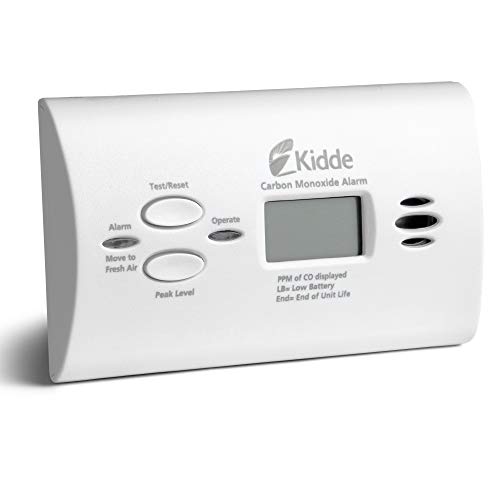
Battery-powered CO detector with a test-reset button for simple post-battery clearing.
Kidde’s AA battery-powered carbon monoxide detector keeps things incredibly simple with a dedicated test-reset button to clear alerts after you swap cells.
It relies on an electrochemical sensor for CO detection, and since it needs no wiring, you can set it on a table or mount it to a wall in minutes.
I like that the green and red LEDs give you an immediate visual check on power and hazard status without having to guess.
I would shortlist this for renters or anyone adding coverage to a room without hardwired infrastructure. Just remember this detects carbon monoxide only, it won’t alert you to smoke. It also operates independently rather than syncing with other alarms.
The Peak Level Memory is a smart addition for tracking past exposure events, but you will need to stay on top of replacing those AA batteries periodically.
|
4
|
X-Sense Smoke Detector, 10-Year Battery, UL 217 Certified, SD2J0AX, 1-Pack | Photoelectric |

10-year sealed battery eliminates the need for replacements and resets after swaps.
The X-Sense SD2J0AX takes the reset question out of the equation entirely by using a sealed 10-year lithium battery. You never swap cells, so you never deal with post-replacement chirps.
It does include a one-button hush and self-test function for the occasional false alarm, and the photoelectric sensor handles cooking fumes well. It meets UL 217 standards and installs without any wiring, making it a very low-maintenance option.
This standalone approach is exactly what I’d suggest if you want to install an alarm and forget about it for a decade. The trade-off is no interconnectivity, each unit works on its own.
Since there’s no wiring, it’s highly renter-friendly, but when that 10-year clock runs out, you replace the entire detector rather than just a battery. Its compact footprint stays out of the way on ceilings or walls.
|
5
|
Kidde Smoke Detector, Hardwired Smoke Alarm with 9-Volt Battery Backup, Test-Reset Button, |

Hardwired Kidde detector with a Test-Hush button to reset after battery or false alarms.
Kidde’s hardwired smoke detector pairs a 9V battery backup with a Test-Hush button designed specifically to silence false alarms and clear faults after a battery change. It uses an ionization sensor, which is particularly responsive to fast-flaming fires, and allows you to interconnect up to 18 alarms.
The 85dB siren and red LED provide both audio and visual warnings when triggered.
For homes already wired for safety, this Kidde model integrates smoothly and makes silencing accidental trips easy. I should point out that ionization sensors historically tend to be a bit more sensitive to burnt toast and cooking smoke compared to photoelectric options.
Also, linking up to 18 units requires careful planning during installation to ensure they communicate properly.
|
6
|
X-Sense Smoke Detector, 10-Year Battery, UL 217 Certified, SD2J0AX, 10-Pack | Photoelectri |

10-pack of X-Sense detectors with sealed batteries and one-button self-test for effortless resets.
This 10-pack of X-Sense photoelectric smoke detectors leans heavily on convenience. The sealed 10-year batteries mean you bypass the battery-swap reset process entirely. Each unit features a one-button hush and self-test function, and the photoelectric sensors help keep cooking-related false alarms to a minimum.
They carry ETL listing to UL 217 standards, making them suitable for bedrooms, hallways, and basements alike.
I see this bulk pack as a practical route for landlords or larger homes needing uniform coverage without ongoing battery chores. The main limitation is the standalone design, these don’t talk to each other, so an alarm in the basement won’t trigger the one upstairs.
Installation is tool-free and fast, but that lack of synchronization is something to weigh against your specific layout.
|
7
|
X-Sense Smoke Detector, 10-Year Battery, UL 217 Certified, SD2J0AX, 5-Pack | Photoelectric |

5-pack of X-Sense detectors with sealed batteries and simple one-button reset.
The 5-pack version of the X-Sense SD2J0AX delivers the same 10-year sealed battery and one-button hush functionality as the single unit. The photoelectric sensor cuts down on nuisance alarms, and the UL 217 certification provides baseline peace of mind.
Since installation requires no tools or wires, setting up multiple rooms happens quickly.
This mid-size bundle hits a sweet spot for average-sized homes or apartments. Like the larger pack, these operate independently, which is the primary drawback if you want whole-house synchronization. Still, the zero-maintenance battery design and low-profile casing make them an easy recommendation for straightforward, DIY-friendly protection.
|
8
|
X-Sense Smoke Detector, 10-Year Battery, UL 217 Certified, SD2J0AX, 3-Pack | Photoelectric |

3-pack of X-Sense detectors with sealed batteries and self-test for minimal reset needs.
X-Sense’s 3-pack offers photoelectric smoke detection powered by a 10-year sealed battery, effectively removing battery-related resets from your maintenance list. The one-button hush handles nuisance alarms, and the UL 217 certification confirms it meets standard safety benchmarks.
Without any wiring required, it’s a natural fit for renters or small layouts needing targeted coverage.
If you only need to cover a few key areas, this smaller pack avoids the expense of a 10-unit bundle. The standalone nature means no interconnect delays, though you miss out on the synced alarm benefit.
I consider the photoelectric sensor a strong selling point here, especially if these are going near a kitchen where cooking fumes are frequent.
|
9
|
SITERWELL Smoke Detector, Photoelectric Fire Alarm with 9V Backup Battery, Hardwired Smoke |

10-pack SITERWELL hardwired detectors with Test/Silence button for post-battery resets.
SITERWELL’s 10-pack hardwired smoke detectors rely on a 9V backup battery and a dedicated Test/Silence button to clear low-battery chirps after a swap. The photoelectric sensor focuses on accurate detection while minimizing false triggers, and the interconnect capability lets you sync up to 12 units.
These carry UL217 10th Edition certification, reflecting updated safety standards.
Outfitting a large property or commercial space is where a 10-pack of hardwired units makes the most sense. The Do Not Disturb mode is a thoughtful addition for managing overnight chirps while you source new batteries.
Keep in mind that hardwiring this many units generally requires professional installation, but the 85dB alarm and LED warnings deliver reliable alerts once everything is running.
|
10
|
SITERWELL Smoke Detector Photoelectric Smoke Alarm 9V Battery Backup | Hardwired Smoke Det |

4-pack SITERWELL hardwired detectors with Do Not Disturb mode for post-reset quiet.
SITERWELL’s 4-pack hardwired smoke detectors include a 9V backup battery and a Test/Silence button to handle resets cleanly. I find the Do Not Disturb mode particularly useful, it suppresses chirps for 10 hours, giving you breathing room.
The photoelectric sensor reduces false alarms, and the ability to interconnect up to 12 units adds flexibility. They are UL217 listed for safety compliance.
This four-pack balances cost and coverage nicely for medium to large homes. While the hardwired setup might mean calling an electrician, the Do Not Disturb feature genuinely improves daily livability by preventing middle-of-the-night noise.
The 85dB alarm remains loud enough to ensure you’re alerted to potential dangers regardless of where you are in the house.
Clearing a fault after a battery change shouldn’t require a manual the size of a novel. Whether you prefer sealed long-life batteries that eliminate the issue entirely, intuitive hush buttons, or hardwired systems with temporary silence modes, the options above handle resets differently.
My advice is to match the mechanism to your home’s existing wiring and how much maintenance you’re willing to tolerate.
Step-by-Step Reset Methods for Common Models
Recommended Products


Every brand handles resets slightly differently. Following the right steps for your specific model is the fastest way to stop the chirping and confirm your alarm is actually working.
For hardwired models with a Test/Silence button: Press and hold the button for 10-15 seconds until the chirp stops and the LED flashes.
For battery-only models: Remove the battery, wait 30 seconds, reinsert it, then press the test button to confirm the reset.
For interconnected units: Reset the primary unit first, then press the test button on all linked detectors to sync.
For models with Do Not Disturb mode: Press the test button once to activate the 10-hour mute, then address the battery issue.
For detectors with sealed batteries: No reset is needed after installation, but test the alarm monthly to ensure functionality.
If the chirp refuses to stop after you’ve tried resetting, my read is that the battery probably isn’t the culprit anymore. Dust or debris trapped inside the sensor chamber frequently causes stubborn false alarms, and I would try gently vacuuming the vents with a soft brush attachment.
For hardwired units, flip your breaker off and on to ensure steady power delivery. Finally, if your detector is pushing past the 10-year mark, no amount of resetting will fix degraded sensors, replacement is the safest move.
Avoiding Future Reset Hassles
You can avoid most post-battery headaches by choosing the right hardware upfront and building a few small habits into your routine.
- Replace batteries on a fixed schedule, such as during daylight saving time changes.
- Use high-quality alkaline or lithium batteries to extend life and reduce leaks.
- Test all smoke detectors monthly by pressing the test button.
- Vacuum detectors every six months to remove dust from the sensor chamber.
- Label each detector with its installation date to track its 10-year lifespan.
- For hardwired models, ensure the backup battery is fresh even if the primary power is stable.
- Avoid placing detectors near kitchens or bathrooms where steam can trigger false alarms.
Opting for a detector with a sealed 10-year battery sidesteps the most common reset trigger entirely. Models like the X-Sense SD2J0AX or Kidde’s hardwired units with long-life backups reduce your involvement to a quick annual test.
If you run an interconnected system, I strongly recommend keeping all units from the same manufacturer and compatible series to prevent sync glitches. And if burnt toast constantly sets off your hallway alarm, switching to photoelectric sensors usually quiets things down significantly compared to older ionization models.
When to Replace Instead of Reset
Recommended Products


Sometimes a persistent chirp isn’t asking for a reset, it’s telling you the device has reached the end of its lifespan.
| Sign | Likely Issue | Action |
|---|---|---|
| Chirps persist after battery replacement and reset | Faulty sensor or circuit | Replace the unit |
| No response to test button presses | Dead detector or wiring issue | Check power, then replace |
| Unit is over 10 years old | Sensor degradation | Replace immediately |
| Visible damage or corrosion | Physical failure | Replace and inspect wiring |
| Frequent false alarms despite cleaning | Sensor malfunction | Replace with a photoelectric model |
Smoke detectors simply don’t last forever. Ten years is the widely accepted ceiling because the internal sensors degrade over time, even if the exterior looks fine. I always suggest flipping the unit over and checking the manufacturing date stamped on the back.
If it’s approaching a decade, replace it regardless of whether a reset temporarily stops the noise. For hardwired setups, bringing in a licensed electrician ensures the new unit is wired correctly and complies with local building codes.
Resetting a smoke detector after a battery change usually comes down to holding the test button for a few seconds or letting the unit finish its self-check cycle. Start by reading your specific model’s manual, since the exact timing varies by brand.
Once the chirping stops, always trigger a test to confirm the alarm actually sounds. And if your detector is over 10 years old, skip the reset entirely, replacing it today is the best way to keep your home protected.

- 10 Best Battery For Generator Ev Battery Bank Marine 2026 - October 27, 2026
- 10 Best Battery For Generator Ev Battery Bank Lto 2026 - October 27, 2026
- 10 Best Battery For Generator Ev Battery Bank Low Voltage 2026 - October 27, 2026