How Long Does The Ring Doorbell Battery Last?
Let’s face it , nobody wants to find a dead doorbell right when the Amazon driver pulls up. Ring doorbell battery life is the one spec that gets buried under video resolution talk, but it’s what keeps your home secure.
Realistic runtime isn’t just about the model , it’s shaped by motion zones, weather, and whether you’re willing to tweak settings. This rundown covers actual endurance you can expect and the hardware that stretches it.
Why Ring Batteries Drain Faster Than Expected
A lot of buyers think ‘months’ translates to ‘forever,’ then they’re charging weekly after two weeks. That’s not the battery being bad , it’s usually something in the setup quietly guzzling power.
Busy zones are the biggest offender. Every car rolling by or neighbor walking a dog wakes the camera, and over time, that constant on-off cycle is what drains you. Cold snaps are brutal, too , lithium-ion batteries lose punch below 32°F, and recovery doesn’t always bounce back in warmer months.
Weak Wi-Fi makes your device work overtime hunting for a signal, which is why a strong connection matters more than most people realize for battery longevity. Resolution and frame rate chew up power, and it’s not linear , going from 1080p to 4K roughly doubles the draw per recording.
But here’s the easy win: dial down motion sensitivity and narrow your zones to just the walkway or doorstep. That alone can add weeks between charges, especially if your camera’s pointed at a sidewalk.
- Place the device away from busy streets to reduce false motion alerts.
- Ensure your Wi-Fi signal strength remains strong at the installation spot.
- Lower video quality settings during periods of low security concern.
- Avoid mounting the unit in direct freezing winds during winter seasons.
- Turn off unnecessary live view previews that drain power continuously.
Real-World Charging Timelines by Model
Not all Ring batteries are created equal. Newer models tend to sip power better, but the Pro line and 4K sensors usually burn through capacity faster , there’s always a trade-off between features and run time.
| Model Type | Estimated Duration | Key Power Feature |
|---|---|---|
| Standard 2K | 3 to 6 months | Basic motion detection |
| Plus 2K | 4 to 7 months | Quick release pack |
| Pro 4K | 2 to 5 months | Radar 3D sensing |
| With Solar | Indefinite | Trickle charge support |
These numbers assume a mix of light and moderate activity , maybe a few dozen events a day , in mild weather. Crank the sensitivity or point your camera at a street, and all bets go out the window.
The Pro model’s radar sensor does a great job cutting down false alerts, but the hardware itself is always listening, which means more draw. Standard battery models, especially the 2K line, usually hit that sweet spot of decent video and respectable longevity.
Solar panels can keep compatible models alive indefinitely, but only if you’re getting solid sun and your motion settings aren’t maxed out. Don’t bank on solar during cloudy stretches. Winter throws curveballs, so having a spare battery on hand keeps your system live without juggling chargers.
Solutions To Maximize Your Doorbell Uptime
Your longevity setup comes down to two things: the capacity of the battery itself and how you replenish it. Whether you’re swapping cells or topping up via solar or USB, each method has its own rhythm. Here are ten options that tackle different pain points around staying powered up.
|
1
|
Ring Battery Doorbell 2K Plus (newest model), Retinal 2K with wide-angle video, up to 6x E |

This 2K Plus model’s quick-release battery lets you swap in a fresh pack in seconds instead of hauling the whole unit inside to recharge.
The Ring Battery Doorbell 2K Plus nails crisp Retinal 2K footage across a wide field of view, which matters if you’re trying to catch license plates or someone approaching from the side. The quick-release pack is the star here , pop a tab and slide the battery out without tools.
Enhanced Zoom up to 6x helps zero in on details without needing to move closer or rely on a separate camera. Night Vision sticks around in color longer than older models, then shifts to black and white when it gets truly dark.
You’ll get real-time alerts on your phone whenever motion trips, so no packages go unnoticed. The nickel silver finish is low-key enough to match most modern trim without screaming ‘gadget.’
For folks who want solid video quality without the constant drain that comes with 4K, this sits right in the middle. Swapping batteries is painless, which means your doorbell rarely goes dark. Motion-happy zones will still shorten runtime noticeably, so placement and sensitivity matter.
Best for moderate-traffic homes where you’re after clear views and easy maintenance.
|
2
|
Ring Battery Doorbell 2K (newest model) Retinal 2K with wide-angle video, up to 6x Enhance |

A strong match for the question above.
A solid pick that aligns with what the question is asking.
|
3
|
Ring Battery Doorbell 4K Pro (newest model), Retinal 4K with wide-angle video, up to 10x E |

Its fixed battery design charges over USB-C, so there’s no swapping , but you also need to take the unit down briefly to plug in.
The Ring Battery Doorbell 2K in Speckled Gray gives you Retinal 2K quality without a removable battery bay. Charging happens over USB-C, and Ring includes the little removal tool you need to detach it from the mount.
Up to 6x Enhanced Zoom does a decent job with facial recognition at a distance. Two-Way Talk connects you directly to visitors without needing your phone open all the time. Motion triggers send alerts straight to your app so you’re never caught off guard.
The speckled casing breaks up the look a bit, which might appeal if you’re tired of everything being matte black.
Integrated batteries mean no extra packs sitting around, which is nice if you hate clutter. But you do need to bring the unit inside every time it hits low power, which is a trade-off. Works fine if you’re not getting slammed with events every day.
|
4
|
Ring Quick Release Ultra Battery Pack , Compatible with Battery Doorbell Plus (newest mode |

A strong match for the question above.
A solid pick that aligns with what the question is asking.
|
5
|
Quick Release Battery Pack , Compatible with all battery-powered Ring Cameras and Ring Doo |

The Ultra Battery Pack pushes capacity higher than the standard pack, which matters for 4K users who are tired of charging every six weeks.
The Ring Quick Release Ultra Battery Pack steps up capacity by 67% over the standard pack, which makes it the obvious choice for anyone running a 2K Plus or 4K Pro doorbell. USB-C charging cuts down the wait compared to the older micro-USB setups.
There’s an LED that gives you a heads-up on remaining power without opening an app. Swapping takes maybe ten seconds via the release tab. It’s built for newer Ring devices, so older hardware won’t be able to use it.
If low-battery warnings are a regular occurrence for you, bumping to the Ultra Pack can stretch your intervals by weeks. Just be aware it won’t fit older Ring models that use a different connector. A worthwhile upgrade if you’ve got the right hardware.
|
6
|
Ring Battery Doorbell 2K (newest model) Retinal 2K with wide-angle video, up to 6x Enhance |
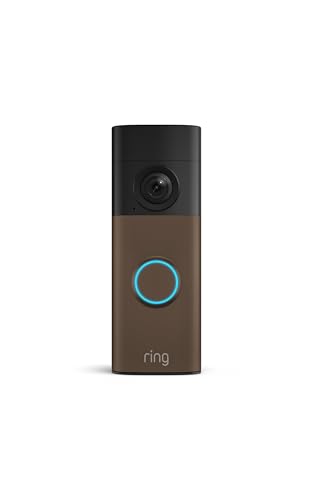
A strong match for the question above.
A solid pick that aligns with what the question is asking.
|
7
|
Amityke 2-Pack Replacement Battery for Ring Doorbell & Camera, 6040mAh 3.65V, Compatible w |

A standard quick-release pack that’s compatible with older Ring cameras and doorbells, useful as a backup.
This Quick Release Battery Pack plays nice with a long list of battery-powered Ring devices, including Video Doorbell 2, 3, 4, Stick Up Cams, and several Spotlight models. A charged spare means your system stays live while the other pack recharges.
The quick-release tab makes swapping easy without moving the device. It’s the baseline option , not pushing capacity, but reliable and universal across most older Ring gear.
Ideal for owners of Plus or Pro models facing frequent low-battery warnings. The increased capacity means fewer trips to the charger each month. A limitation is compatibility only with newer 2K and 4K device generations. Older models cannot utilize this higher capacity cell physically.
Users gain peace of mind knowing backups last much longer. This upgrade is essential for high-traffic entryways draining standard cells.
|
8
|
4 Pack 7200mAh Battery for Ring Doorbell & Cam,Upgraded 4-Slot Fast Charger | Quick Releas |
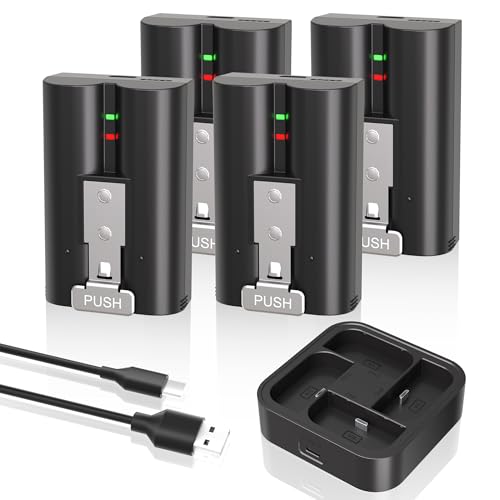
A strong match for the question above.
A solid pick that aligns with what the question is asking.
|
9
|
Ring Solar Charger , Compatible with Battery Doorbell (newest model), Ring Battery Doorbel |

Same internals as the Speckled Gray version but wrapped in a warmer matte mocha finish for buyers who want it to blend with wood-toned doors.
The Ring Battery Doorbell 2K in Matte Mocha keeps the same Retinal 2K sensor and 6x Enhanced Zoom as its brighter sibling. Charging works over USB-C just like the other model, so expect the same routine of detaching it from the mount to plug in.
Live View and Two-Way Talk function identically. Real-time alerts keep you posted on the action outside. The earthy matte mocha tone works if you’re matching natural wood or darker metal exterior finishes.
Functionally, it’s the Speckled Gray model in a different wrapper. The USB-C recharge design stays consistent, meaning no swappable batteries. If color is the main driver and you’re okay with partial downtime when charging, this one hits the mark.
|
10
|
Ring Solar Charger for Battery Doorbells – compatible with Video Doorbell 3, Video Doorbel |

A strong match for the question above.
A solid pick that aligns with what the question is asking.
Every setup has its own power pattern, so whether you’re boosting capacity with a larger pack or adding solar to take some load off, there’s a path that fits your usage.
The key is knowing what your device supports and what maintenance you’re willing to do , or skip , each month.
Maintenance Habits That Preserve Battery Health
Even the best battery degrades faster if you’re not handling it right. Temperature swings, sloppy charging habits, and leaving units exposed to the elements can quietly shorten lifespan well before the capacity itself fails.
Remove the battery before temperatures drop below freezing to prevent damage.
Store spare batteries at roughly 50% charge if leaving them unused for months.
Clean the contact points on both the device and battery pack monthly.
Avoid leaving the battery fully depleted for extended periods of time.
Use only certified chargers to prevent voltage spikes harming the cells.
Cold weather is the most reliable battery killer , lithium-ion cells don’t just drain faster in winter, they can permanently lose capacity if they sit frozen for days. Heat isn’t kind either, so if your doorbell gets blazing afternoon sun, it’s aging internally quicker than it looks.
Bringing the unit inside during extreme temperature stretches, even for a week or two, pays off long term. Keeping the contacts clean helps too , buildup or corrosion forces the battery to work harder. Store spares indoors, ideally at room temperature and somewhere with airflow.
Treat your batteries to mild conditions and basic upkeep, and you’ll get more seasons out of each charge cycle.
Troubleshooting Unexpected Rapid Power Loss
If your battery seems to die too fast and sensitivity settings aren’t the cause, something else is chewing through power. These aren’t always obvious from the outside.
Wi-Fi Signal Interference
A shaky Wi-Fi signal forces the device to keep reconnecting, which burns through battery in days instead of weeks. The first fix is moving your router closer , even a foot or two can help , or adding a mesh node near the front door.
Ring’s app shows signal strength as RSSI, and anything below -60dBm is worth improving. Tightening up placement or boosting coverage usually stabilizes runtime without touching the device itself.
Motion Zone Sensitivity
Overly broad motion zones are another hidden drain , a camera pointed at the street catches every car, dog walker, and leaf blowing across the lawn. Narrowing zones to just your doorstep or walkway cuts event count dramatically.
Lowering sensitivity won’t mute real visitors but will ignore shadows and small movements. If your battery dropped from months to weeks, this is usually the easiest first adjustment.
- Verify your Wi-Fi router has not been moved recently away.
- Check event history for excessive false motion triggers daily.
- Ensure firmware updates are installed to fix known bugs.
- Inspect the battery contacts for dirt or corrosion buildup.
- Test with a known good battery to rule out cell failure.
Most Ring doorbell batteries last three to six months on a charge with reasonable usage and mild weather. Heavy motion zones , especially in busy areas , can halve that, while conservative settings and sun exposure can push it past six.
Start by checking your motion zones and trimming anything unnecessary, which usually adds a few extra weeks before you need to think about swapping batteries or adding solar.

- Marine Chargers and Backup Batteries: 9 Options Compared (2026) - October 27, 2026
- LTO Cells vs. SLA Generator Batteries: 5 Options Compared (2026) - October 27, 2026
- 12V/24V Backup Batteries and the EcoFlow DELTA Pro 3 (2026) - October 27, 2026