What Batteries Do Xbox Controllers Use?
Xbox Wireless controllers don’t ship with built-in power, which usually means a frantic search for AA batteries right when you’re about to start a match. While standard alkalines still work, I’ve noticed most players have moved on to rechargeable packs by now.
This rundown breaks down the actual power options and highlights the battery kits that keep your controller alive through longer sessions.
Why Xbox Controllers Need Replaceable Batteries
Recommended Products

Prime Gaming — Free In-Game Loot
Free monthly games, in-game content and a Twitch channel sub.
Claim Free Loot
Figuring out why Microsoft stuck with removable cells helps explain what you should actually buy. I’ll walk through the trade-offs between swapping AAs and using dedicated rechargeable packs, especially when runtime starts dictating how you play.
Microsoft kept the Xbox Wireless controller design centered around user-replaceable AA batteries, mostly to give players flexibility. You can drop in alkaline AAs if you’re in a rush, or clip in a proprietary rechargeable pack that uses the exact same bay.
The compromise is pretty straightforward: AAs are easy to find anywhere, while integrated packs save you from constantly buying disposable cells over the years.
- Stock AA alkaline cells for quick emergencies
- Invest in NiMH AAs for hundreds of recharges
- Match voltage carefully when mixing rechargeable types
- Store loose batteries away from metal surfaces
AA vs Rechargeable: Runtime Tradeoffs
Runtime depends heavily on cell chemistry and how hard you push the controller’s features. Here’s my read on how different battery types handle extended gaming.
| Battery Type | Typical Runtime | Recharge Cycles |
|---|---|---|
| Alkaline AAs | 20-30 hours | Single use |
| NiMH AAs | 15-25 hours | 500-2000 |
| Rechargeable packs | 20-40 hours | 300-5000 |
Alkaline AAs deliver a strong initial voltage, which matters if you’re running wireless headsets or keeping the controller LEDs bright. NiMH cells hold their charge better when sitting idle, though their voltage drops gradually, which can slightly dim accessories.
Dedicated rechargeable packs slide directly into the controller cavity, skipping the extra weight of standard AAs while matching or beating their runtime based on their milliwatt-hour ratings.
Battery Packs to Keep Your Xbox Controller Powered
The products below map directly to the scenarios I just outlined. Rather than just listing specs, I’ve tied each pick back to how it handles real-world charging habits and runtime expectations for Xbox controllers.
|
1
|
DINOSTRIKE 4X 6200mWh Battery Pack Compatible with Xbox One/Series S/X Controller Charging |

Four high-capacity packs plus an LED dock mean you won’t be waiting around for a charge mid-session.
The Dinostrike kit bundles four 6200mWh packs with a touch-control charging dock that cycles through seven ambient LED modes. Each pack slides into compatible Xbox One or Series controllers, giving you roughly twenty hours of gameplay per cell.
The included USB-C cable powers the dock from any standard wall adapter, topping off all four units in under five hours.
My read is this makes the most sense for households where multiple people share controllers, since everyone gets a dedicated pack ready to swap in. The only catch is the bulkier form factor, which isn’t ideal if you travel with your setup unless you stash it in a pouch.
|
2
|
Xbox Rechargeable Battery + USB-C® Cable |
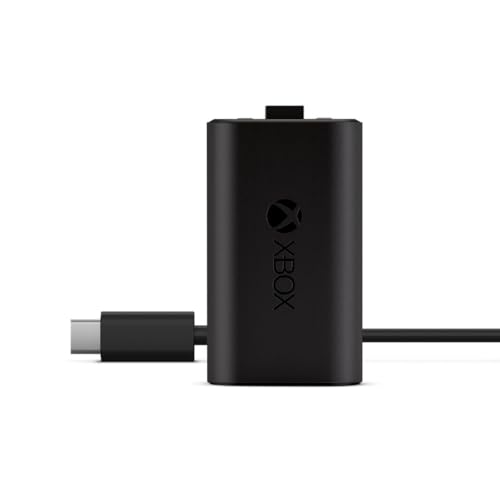
The Microsoft-branded pack guarantees fitment with genuine controllers without guessing about third-party tolerances.
The official Xbox Rechargeable Battery includes one high-capacity cell paired with a braided USB-C cable. It charges in under four hours and supports pass-through charging, so you don’t have to pause your game while the battery refills.
I’d shortlist this if you prefer factory-certified parts and want to avoid the fitment issues that sometimes pop up with third-party brands. The limitation is obvious, though: it’s a single pack, so you’ll need to buy more if you want a backup during long co-op nights.
|
3
|
Rechargeable Controller Battery Pack for Xbox,2x4800mWh(2000mAh) Batteries Pack with USB-C |

A high mWh rating combined with dual charging paths keeps downtime to a minimum.
This twin-pack offers two 4800mWh NiMH batteries alongside four covers split between Xbox One and Series X/S molds. A compact USB-C charger replenishes both cells in roughly two and a half hours, and you don’t even need to pull them out of the controller to do it.
This suits budget-conscious players who just want decent runtime without paying for premium branding or RGB lighting effects. The weakness here is the lack of advanced overcurrent protection that you’d typically find in pricier branded alternatives.
|
4
|
Ukor Fast Charging 2x6200mWh Rechargeable Battery Packs with Charger for Xbox One/Xbox Ser |

Dual 6200mWh packs with simultaneous fast charging close the gap between empty and ready-to-play.
Ukor supplies two high-density 6200mWh packs and a matching dock designed for safe overnight charging thanks to internal overcharge boards. Clear red-green LEDs show charge progress, and the silicone base keeps the dock from sliding around during intense gaming.
I would point solo players with several legacy Xbox One controllers toward this one, as it standardizes power across older hardware. Just note that connecting via Micro-USB instead of Type-C will likely result in slower trickle charge rates than the advertised peak times.
|
5
|
GKHERD Rechargeable Controller Battery Pack for Xbox One/Xbox Series X|S, 2x6660mWh Batter |

Lithium construction pushes cycle counts higher and refill speeds faster than competing NiMH options.
Gkherd features two 6660mWh lithium batteries engineered for over 3,000 cycles, outlasting typical NiMH units by roughly three times over normal use patterns. An integrated Type-C port lets you charge straight through the controller, so gameplay doesn’t stop while the cell refills.
This is built for daily drivers who game often enough to justify the upfront cost through sheer longevity. The drawback is that lithium cells are more sensitive to heat, so I wouldn’t leave these baking in a hot car during summer months.
|
6
|
Wzygdzsw 2×6660mWh Rechargeable Battery Pack for Xbox Series X/S & One/S/X/Elite Controlle |
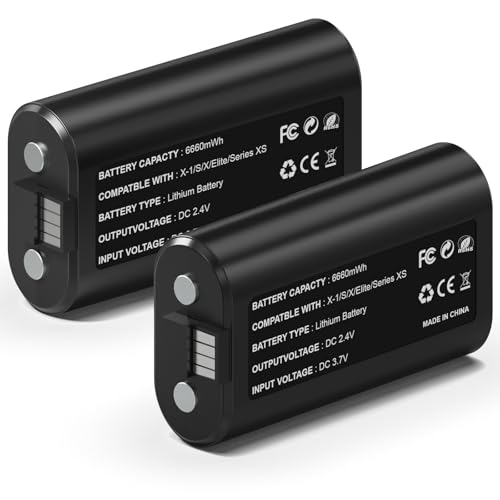
Automotive-grade cells promise stable output even when heavy haptic feedback is draining weaker batteries.
Wzygdzsw brings two 6660mWh packs leveraging automotive-level cells rated for sustained vibration scenarios. The goal here is preventing voltage droop during the intense haptic events triggered by modern shooters that require constant trigger responsiveness.
I’d target this at competitive players experiencing frequent rumble bursts that drain weaker packs prematurely during tournament-level engagements. The notable con is the higher upfront pricing per unit compared to generic NiMH equivalents lacking similar build quality.
|
7
|
Svetaecho for Rechargeable Xbox Controller Battery Pack – 2x4800mWh Long-Lasting Battery w |

Four included covers ensure fit across both console generations without hunting for adapters.
Svetaecho delivers two 4800mWh packs plus four covers split evenly between Xbox One and Series platforms. That means seamless installation regardless of which generation dominates your living room setup, supported universally without needing extra adapters.
This appeals strongly to casual families juggling mixed Xbox generations under one roof, simplifying the replacement strategy so nobody gets confused about connector variants. The only shortcoming is the modest runtime ceiling, which sits lower than the premium packs reviewed earlier.
|
8
|
Upgraded Controller Charger Station with 2x6200mWh Rechargeable Battery Packs for Xbox One |

The dock design keeps controllers upright while charging, cutting down on entertainment center clutter.
This upgraded dock station houses two 6200mWh packs with a dual-slot charger featuring distinctive X-shaped LEDs visible from above. Controllers rest vertically, significantly reducing cable tangle around entertainment centers compared to loose charging methods.
I think this is an excellent choice for collectors maintaining multiple Xbox One units alongside newer Series consoles who want a centralized hub. One issue to watch for: using third-party covers not supplied in the bundle can cause intermittent contact, requiring slight adjustments during charging.
|
9
|
OIVO Rechargeable Battery for XboxOne/Xbox Series X|S, 4 x 5580mWh Xbox Batteries, Xbx Ser |
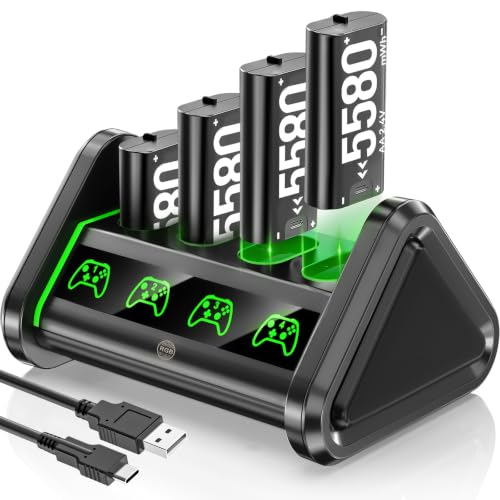
Four-cell capacity spreads the risk so one dead battery doesn’t halt an entire session unexpectedly.
OIVO supplies four 5580mWh packs with a matching charger station, offering redundancy that protects against single-point battery failures during marathon gaming weekends when swapping mid-mission is risky, especially during story climaxes.
I’d favor this for content creators streaming lengthy RPG campaigns overnight. Having guaranteed backup reserves readily available means you won’t interrupt broadcast feeds unexpectedly, since multiple loaded slots stay prepared ahead of schedule.
|
10
|
DXKK for Xbox Controller Battery Pack, 2x6200mWh Rechargeable Battery Pack for Xbox Series |

Tri-mode charging flexibility works with varied power sources, including older PCs lacking Type-C ports.
Dxkk combines two 6200mWh packs with a tri-input charger supporting Type-C, Micro-USB, and standard USB ports. This enables connection to legacy computers, wall adapters, or portable power banks without hunting for specialized cables.
This feels like a perfect match for mobile gamers attending conventions or LAN parties where unpredictable power outlets force improvisation. It solves real-world portability constraints practically everywhere you take it.
These selections reflect the actual spread of Xbox controller battery options, from single official cells to multi-pack docks covering various budgets and playstyles. Choosing the right one comes down to your specific runtime needs, how many controllers you own, and whether you prefer a dedicated dock or direct cable charging.
Maximizing Battery Life Between Charges
Small tweaks to your settings and habits can noticeably extend runtime per charge cycle across all the battery types covered here.
Dim Display and Triggers
Lowering analog trigger resistance and disabling idle auto-dimming reduces micro-vibrations that waste milliamps hourly during cutscenes or menu navigation. It sounds minor, but these settings drain reserves faster than you’d expect.
Unplug Unused Accessories
Disconnect Bluetooth headsets, keyboards, or extra controllers you aren’t actively using. Leaving inactive devices paired indefinitely draws standby current, slowly bleeding capacity behind the scenes without you noticing.
Check battery status weekly via console dashboard before planned sessions.
Turn off controller automatically after five minutes idle time through settings menu.
Remove headset or keypad attachments between uses preventing parasitic drain.
Store controllers in cool dry spots away direct sunlight avoiding heat degradation.
Replacing Aging Batteries Safely
Eventually every battery degrades beyond acceptable thresholds, and catching it early prevents sudden failures from disrupting your momentum.
If a lithium pack starts swelling visibly near end-of-life, showing bulging plastic casings, that indicates internal gas buildup from failed electrolytes. I would immediately dispose of it rather than continuing to use it, as it poses a fire hazard inside enclosed electronics.
- Replace batteries after three years regardless remaining charge level
- Dispose spent lithium units at certified e-waste centers only
- Never puncture or incinerate damaged battery casings
- Buy matching pairs maintaining consistent chemistry across controllers
- Track recharge counts noting sudden drops in runtime per cycle
Troubleshooting Common Power Problems
Intermittent disconnects or erratic behavior often trace back to simple power supply issues rather than faulty hardware needing urgent replacement.
| Symptom | Likely Cause | Quick Fix |
|---|---|---|
| Controller cuts out mid-game | Low battery warning ignored | Swap fresh AAs or recharge pack immediately |
| No power after new battery install | Incorrect polarity insertion | Flip battery orientation ensuring plus side aligns correctly |
| Charger dock lights blinking red | Foreign object detected in port | Clean contacts gently with dry cloth removing dust buildup |
When controllers randomly disconnect despite showing full charge levels, inspect the contact points for corrosion caused by old alkaline leakage. I’d clean them with a cotton swab dipped lightly in rubbing alcohol, being careful to avoid water damage to the sensitive circuits underneath.
Xbox controllers run on either AA batteries or dedicated rechargeable packs, depending entirely on whether you prioritize quick swaps or long-term sustainability. You can drop in fresh AAs right now, or clip in a compatible rechargeable pack to keep playing uninterrupted. The replacements listed above cover both approaches reliably.

- 10 Best Battery For Generator Ev Battery Bank Marine 2026 - October 27, 2026
- 10 Best Battery For Generator Ev Battery Bank Lto 2026 - October 27, 2026
- 10 Best Battery For Generator Ev Battery Bank Low Voltage 2026 - October 27, 2026