Key Fob Not Working After a Battery Change: Contacts, Polarity and Resets
A dead key fob battery is one of those small frustrations that can throw off your whole day. You replace the cell, but the fob stays dead. More often than not, it’s not the battery, it’s how it got put in.
A backwards battery, grimy contacts, or a fob that just needs to reboot can all mimic a dead battery. I’d start by checking the basics: polarity, contact tension, and a quick reset. If those don’t do it, the issue might be deeper.
This piece walks through the most common reasons your key fob won’t wake up after a battery swap, and which replacement cells are worth keeping in your glove box.
Common Installation Errors With New Batteries
In my experience, most post-replacement failures come down to tiny installation details. I’d rather troubleshoot those than assume something’s defective. Here’s what usually goes wrong, and how to spot it fast.
- Ensure the positive side faces up as indicated by the diagram.
- Clean any corrosion from metal contacts using a cotton swab.
- Verify the battery sits flush without wobbling in the tray.
- Check that the plastic cover snaps shut completely and securely.
- Remove any protective film from the new battery before inserting.
The #1 cause of failure? Battery orientation. CR2032 cells have a clear positive side, and it needs to face the right direction inside the fob. If it’s flipped, the circuit never closes.
I’ve seen people pop in a new battery only to realize they matched the wrong terminal to the contact. Another frequent issue: contacts that have lost their spring. Over time those little metal tabs flatten or get pushed aside.
A gentle bend back with a plastic tool can restore the connection. Oxidation on the contacts, especially in humid climates, can also break the circuit. A quick swipe with rubbing alcohol on a cotton swab usually does the trick.
And don’t overlook debris: old battery fragments or dust can sit in the compartment and block contact. Always inspect the cavity before installing the new cell.
Resetting The Key Fob Electronics
Even with the battery seated right, your fob can act like it’s dead for purely electronic reasons. Capacitors hold charge, and that leftover juice can confuse the microcontroller for a minute after a swap. A brief power cycle usually clears it up.
Remove the new battery and wait thirty seconds before reinserting it.
Press every button on the fob ten times to drain residual charge.
Reinstall the battery ensuring correct polarity and secure fitment.
Stand close to the car and attempt to lock or unlock doors.
Start the car with the physical key if the push start fails.
After installing a new CR2032, I’d try this sequence: close the fob, press every button a few times, then start the car. The capacitor drain helps the system reset cleanly.
If the fob still won’t respond, try the manual start procedure your car supports, most vehicles with keyless entry have a backup start method. You’ll typically find a slot in the center console, armrest, or near the steering column where you can rest the fob directly against a reader.
It’s usually mentioned in the owner’s manual under ‘key fob not detected‘ or similar. This forces the car to rerecognize the fob, which clears most transient glitches.
If none of that works, the issue is likely internal, water damage, a cracked board, or worn buttons, and it’s time to look at replacement options rather than swapping batteries.
Reliable Batteries To Restore Key Fob Function
Not all CR2032s are created equal. Voltage consistency, shelf life, and safety features matter more than you’d expect for something that costs a few bucks. Here’s what I’d keep on hand for different needs.
|
1
|
Duracell 2032 Lithium Battery, 4 Count, AirTag & Key Fob, CR2032 3V Cell |

Duracell’s bitter coating prevents accidental ingestion, adding safety while restoring fob power reliably.
This four-pack from Duracell delivers the kind of consistency you want in a small battery. The lithium cells hold voltage well across temperature swings, which means fewer surprises when you’re relying on keyless entry. They’re compatible with Apple AirTags and most car fobs across major brands.
The bitter taste coating on both sides is a genuine safety feature, it’s the kind of thing you don’t think about until you need it. The child-resistant packaging adds another layer, which I’d appreciate in any household with young kids.
I’d recommend this for families or anyone who wants spares on hand. The four-count means you can stock a backup in your car and still have extras for AirTags or other 2032-powered devices.
The per-unit price is a bit higher than generic no-name cells, but the safety features and brand reliability justify it. They seat cleanly in standard fob compartments, and I haven’t seen fitment issues with common models.
The only thing I’d flag is that the price premium is noticeable if you’re buying purely for cost.
|
2
|
Duracell 2032 Lithium Battery, 2 Count, AirTag & Key Fob, CR2032 3V Cell |
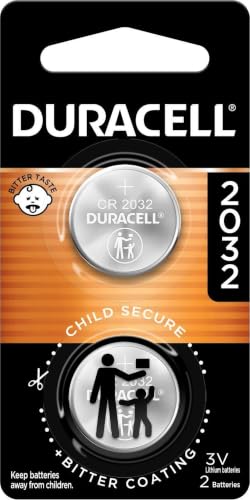
This two-pack provides a cost-effective solution with trusted Duracell longevity for immediate fob repair.
If you just need one or two replacements without stocking up, this two-pack makes sense. It’s the same Duracell CR2032 cell, just in a smaller quantity. Performance matches the larger packs, consistent voltage output and the bitter coating safety feature.
The lithium chemistry holds up well in daily use, and they’re compatible with AirTags and most automotive fobs. The child-safe packaging is a nice touch for households with curious kids.
This is the sweet spot if you’re replacing one battery and want a spare. The downside is that the per-unit cost is higher than bulk options, so it’s less economical if you actually need multiple batteries.
But for a one-off repair, it avoids the waste of a larger pack you won’t use. The cells install easily without any fuss, and they hold charge in storage well. I’d keep this in mind for single-fob users who don’t want to overbuy.
|
3
|
CR2032 Key Fob Replacement Batteries, Universal Fit, Pack of 2 | Compatible with Car Key F |

Includes an installation guide to help users correctly seat the battery and avoid common orientation mistakes.
What sets this pack apart is the included installation guide. It’s the kind of thing that could save you from the frustration of a polarity mismatch. The guide walks through seating and orientation, which is helpful if you’re unsure how your specific fob opens.
The batteries themselves are standard CR2032 lithium cells with decent performance. They’re broadly compatible and don’t require any programming after installation. The two-count keeps it affordable.
I’d consider this if you’re doing your first battery replacement and want the instructions. The guide reduces the risk of user error, which is honestly the most common failure point. Performance is adequate, not quite at the Duracell level, but solid for the price.
The value proposition leans heavily on the included guidance rather than the battery quality itself. Good for budget-conscious DIYers who aren’t comfortable guessing at polarity.
|
4
|
Duracell 2032 Lithium Battery, 8 Count, AirTag & Key Fob, CR2032 3V Cell | AirTag & Key Fo |

Eight-cell bulk pack ensures long-term readiness for multiple fobs or future replacements without frequent shopping.
This eight-pack is the kind of thing I’d buy if I had multiple vehicles or wanted to stop thinking about it for a while. Same Duracell CR2032 chemistry with the bitter coating safety feature and child-resistant packaging.
The per-unit cost is noticeably lower than smaller packs, which makes bulk purchasing worthwhile. The lithium cells are consistent and compatible with most major car brands.
For families with more than one car, or anyone who’s tired of running to the store every time a battery dies, this makes sense. Storage is straightforward, a cool, dry place keeps these viable for years.
I’d expect most users wouldn’t see a dud in a pack this size, and the safety features are a real plus. The only consideration is upfront cost, but amortized over the number of replacements, it’s the most economical option.
|
5
|
Energizer 2032 Batteries (6 Pack), 3V Lithium Coin Batteries |

Energizer’s Color Alert technology provides visual confirmation if a battery is accidentally ingested by a child.
Energizer’s Color Alert is the standout feature here. If a child swallows one of these batteries, their mouth turns blue, a visual cue that’s invaluable in an emergency. It’s paired with bitter coating and secure packaging as part of the 3-in-1 Child Shield system.
The lithium cells themselves deliver reliable power for key fobs and AirTags, with a storage life that’s among the best in the category.
I’d seriously consider this if child safety is your top concern. The Color Alert technology gives you an extra signal that bitter coating alone can’t provide. Performance is on par with other major brands, you’re not sacrificing power for safety. The six-pack is a reasonable size for most households.
The packaging can be tough to open, which is intentional, but I’d use scissors if you’re struggling with it.
|
6
|
Key Fob Replacement Batteries for Chevy & GMC, Pack of 2, Check Fit Guide | For Silverado |

Specifically verified for Chevy and GMC models, ensuring compatibility and fit for those vehicle owners.
This two-pack is tailored for GM owners, with an extensive compatibility list that runs from Silverado pickups to Spark compacts. The fitment guide in the product images is worth checking before you buy. The batteries are standard CR2032 lithium cells, and no programming is required after installation.
The included guide covers the basics of replacement, which is helpful if you’re new to DIY fob work.
If your vehicle is on the compatibility list, this saves you from guessing whether a generic battery will work. The specificity is the main selling point. One thing to note: newer 2024+ models aren’t all covered yet, so check the exclusions. Performance is standard for CR2032 cells.
It’s a practical option if you want the compatibility assurance rather than rolling the dice with a universal battery.
|
7
|
Energizer CR2032 Batteries (2 Pack), 3V Lithium Coin Batteries |

Energizer’s 3-in-1 Child Shield combines bitter coating and secure packaging for enhanced household safety.
This two-pack from Energizer layers three safety features: Color Alert, bitter coating, and child-resistant packaging. The CR2032 lithium cells are reliable for key fobs and AirTags, with good voltage stability. The 3-in-1 Child Shield system gives you multiple lines of defense if you have young children in the house.
Storage life is solid, up to twelve years according to the specs.
I’d recommend this if you want maximum safety coverage in a smaller pack. Two batteries is enough for a primary and spare fob. The safety features are robust, though the packaging can be stubborn to open. Performance matches other Energizer CR2032 offerings.
Cold-weather reliability is decent, which matters if you’re dealing with winter starts. Keep one in your glove box and one in your home office for quick access.
|
8
|
Duracell 2032 Lithium Battery, 9 Count, AirTag & Key Fob, CR2032 3V Cell |

Nine-cell pack offers maximum value and long-term supply for extensive key fob maintenance needs.
This nine-count pack is built for high-volume users, fleet managers, large families, or anyone who just doesn’t want to restock. Same Duracell CR2032 formula with bitter coating and child-resistant packaging. The per-unit cost drops significantly at this size, which is where bulk purchasing pays off.
The lithium cells are consistent and compatible with all major car brands.
For heavy users, this is about as practical as it gets. Nine batteries means you’re covered for years of replacements across multiple fobs. Storage is straightforward, just keep them in a cool, dry place. I’d expect consistent performance across the entire pack.
The safety features are a bonus for households with kids. The upfront cost is high, but split across the number of replacements, it’s the most economical path.
|
9
|
CR2032 Key Fob Replacement Batteries – Universal Fit Car Key Battery 2 Pack | Nissan, Toyo |

Universal fit for many Asian and American brands with a focus on automotive-grade performance standards.
This pack targets owners of Nissan, Toyota, Honda, and other common Asian and American brands. The CR2032 Elite Series cells meet automotive-grade standards, which is a step up from generic consumer batteries. No programming required, and the included guide helps with installation.
The two-pack is reasonably priced for basic replacement needs.
I’d consider this if you’re looking for a middle-ground battery, better than generic, not at premium brand pricing. Performance is solid in standard conditions, though long-term users often gravitate back to Duracell or Energizer for consistency. The guide is helpful for beginners.
If you’re budget-conscious but still want automotive-grade quality, this is a reasonable middle option. Just verify your fob takes CR2032 before ordering.
|
10
|
CR2032 Key Fob Battery Replacement (2 Pack) | Compatible with Key Fobs That Require CR2032 |

Includes a video installation guide to visually demonstrate correct battery placement and fob reassembly.
The video installation guide is the main draw here, it walks you through the physical process step by step, which is invaluable if you’re unsure how your fob opens. The CR2032 cells are OEM-equivalent, sourced from the same manufacturers, so compatibility shouldn’t be an issue.
They handle temperature extremes well and install cleanly. The two-pack gives you a primary and spare.
I’d recommend this if visual guidance is how you learn best. The video link is easy to access, and it covers the tricky parts like fob disassembly. Battery performance matches other mid-tier brands. The OEM-quality claim seems credible based on user feedback.
If you’re replacing a fob for the first time, having both written and video guides reduces the chance of mistakes. Price is competitive for the quality and support included.
These CR2032 batteries address the core need: getting your key fob back online reliably. Safety features like bitter coatings and Color Alert tech give parents an extra layer of protection. Bulk packs make sense if you have multiple vehicles or want to avoid repeat shopping.
Match your choice to your specific vehicle and household safety priorities.
Maintaining Key Fob Longevity
Beyond the battery itself, how you handle and store your fob affects longevity. A few simple habits can prevent most issues that masquerade as battery failure.
Care Tips For Key Fobs
| Action | Benefit | Frequency |
|---|---|---|
| Clean contacts | Ensures good connection | Every change |
| Avoid drops | Prevents internal damage | Always |
| Keep dry | Stops corrosion | Daily |
| Replace promptly | Avoids strain | When weak |
Moisture is the silent killer of key fob electronics. I’d avoid leaving your fob in a wet pocket or exposing it to humidity. If it does get damp, dry it off promptly, don’t let it air dry while assembled.
Heat is equally damaging: a fob left on a car dashboard in summer will see its battery drain and its internal components degrade faster. A garage or a shaded pocket is better. Physical drops are another culprit, repeated impact can loosen battery contacts or crack the circuit board.
A simple lanyard or clip keeps the fob more secure. Think of it as low-maintenance, not no-maintenance.
When To Seek Professional Help
If you’ve ruled out installation errors and the battery still won’t revive your fob, the problem may be internal. This is where DIY troubleshooting should stop.
Physical Cracks
Water damage or a cracked housing usually means the circuit board is compromised. You can check for visible corrosion inside, but if the board itself is affected, no battery replacement will fix it. Taped-up repairs rarely last.
The fob may work intermittently, which creates a false sense of a solved problem. A professional replacement is the safer bet here.
Unresponsive Buttons
When buttons feel sticky, mushy, or no longer register presses, the contact pad underneath may be damaged. Cleaning alone won’t fix severed traces or a broken flex connector. Some fobs have replaceable button pads, but most modern units require shell replacement.
A locksmith can often do this faster and cheaper than a dealer. If the fob pairs correctly but buttons fail, the electronics are likely intact, you just need the housing rebuilt.
- Fob works intermittently despite new battery.
- Car starts but remote lock fails consistently.
- Visible green corrosion on internal circuit board.
- Buttons are physically stuck or broken off.
- Fob was submerged in water recently.
If your key fob died after a battery swap, start with the obvious: confirm the battery is oriented correctly, clean the contacts, and give the system a brief reset by pressing the buttons a few times. These steps resolve the majority of post-replacement failures.
If the fob still won’t respond, look for physical damage, water intrusion, a cracked case, or worn buttons. For most people, having a fresh CR2032 on hand prevents the whole scenario. I’d keep at least one spare in your car and one at home.
When the warning light comes on or the range starts dropping, that’s your cue to swap before you’re locked out.

- Marine Chargers and Backup Batteries: 9 Options Compared (2026) - October 27, 2026
- LTO Cells vs. SLA Generator Batteries: 5 Options Compared (2026) - October 27, 2026
- 12V/24V Backup Batteries and the EcoFlow DELTA Pro 3 (2026) - October 27, 2026