Battery Output and Charger Input: Understanding AC-to-DC Conversion
If you’ve ever stared at a battery terminal or charger label wondering whether the power flowing in or out is DC or AC, you’re not alone.
Most people hit this exact moment of doubt when replacing a laptop battery, wiring a solar setup, or picking a charger for a ride-on toy. The answer hinges on what kind of device you’re dealing with and how it stores or converts energy.
This article breaks down the rules, explains the exceptions, and shows the chargers that match each case.
Why Batteries Store DC, Not AC Power
Batteries store energy chemically and release it as direct current, which means the voltage flows in one direction. This section explains how that works, why alternating current never ends up inside a battery pack, and what happens when an AC source has to charge a DC battery.
A battery cell produces a fixed voltage polarity. Chemical reactions push electrons out of the negative terminal and pull them in at the positive terminal, creating a steady one-way flow. That is direct current by definition.
Alternating current flips direction dozens or hundreds of times per second, which would reverse the chemical flow and destroy a typical battery.
That is why every household battery slot, car battery post, and lithium pack connector is marked with a DC symbol, and why mixing up the two will fry circuits or simply refuse to charge.
Energy Source vs. Stored Form
| Source | Stored Power | Typical Use |
|---|---|---|
| Wall Outlet | AC | Running appliances directly |
| Battery Pack | DC | Powering portable devices |
| Solar Panel | DC | Charging storage systems |
| Generator | AC | Backup home power |
How Chargers Translate AC to DC or DC to DC
The wall outlet delivers AC, but your battery needs DC. A charger bridges that gap. This section walks through the conversion paths and shows where the products below earn their role in the system.
AC steps down through a transformer to a lower voltage.
Diode bridge converts alternating current to pulsating direct current.
Smoothing capacitors and regulators stabilize the voltage level.
Final DC output matches the target battery or device requirements.
- Match the output voltage printed on both charger and device.
- Verify the plug polarity is center positive unless stated otherwise.
- Ensure the charger current rating equals or exceeds the device draw.
- Look for certified safety marks to avoid fire or shock risk.
- Use only the cell count or chemistry listed on the original charger.
Chargers That Deliver The Right Kind of Power
The products below sit at the point where a question like yours gets answered in practice. Each adapter translates whatever enters its input into the DC output a specific battery or device actually needs. Read the intros to see which voltage range and connector style lines up with your setup.
|
1
|
Belker 12W 3V 4.5V 5V 6V 7.5V 9V 12V Adjustable Voltage Universal AC/DC Adapter Power Supp |

Delivers selectable DC voltages from 3V to 12V so users can match the exact level their low-voltage device requires.
The Belker 12W adapter converts incoming AC into eight fixed DC output levels between 3V and 12V. A bundled plug kit covers common barrel sizes, and an inline switch lets the user step through each voltage without rewiring.
It suits gadgets that list a DC input anywhere in that 3V to 12V range and draw up to 1A.
Ideal for routers, LED strips, and small household electronics that still ship with a removable wall wart. The fixed tap voltages mean it cannot serve 15V or 19V laptops, and buyers with center-negative gear must order the Belker polarity-reversal cable separately to avoid a mismatch.
|
2
|
Wefomey Universal Power Supply Variable 3V~24V 3A 72W Multi Voltage Adapter | Adjustable A |
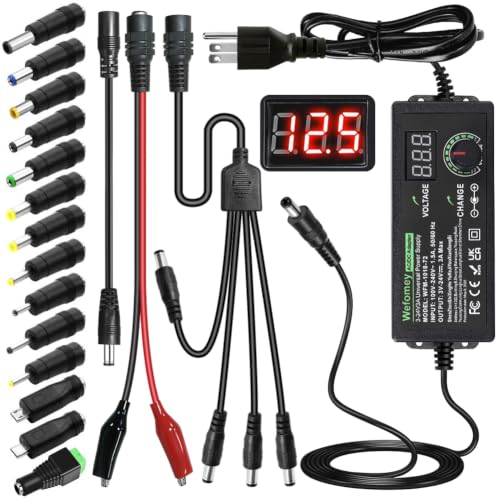
LCD readout shows real-time DC output from 3V to 24V, removing the guesswork when matching an unknown device.
Wefomey’s universal unit accepts AC and outputs an adjustable DC range from 3V up to 24V at 3A. A bright LCD panel reports the live voltage, and fourteen snap-on tips plus a polarity converter cover most barrel and USB variations.
It earns a spot in setups that jump across voltage standards.
Works well for hobbyists powering breadboard circuits, security cameras, or routers that demand a precise voltage outside common fixed adapters. The tolerance band stays within about 5 percent of the dial setting, which keeps sensitive gear safe but still requires the user to dial in the exact value.
|
3
|
TalentCell AC/DC 12V LiFePO4 Battery Charger, 14.4 14.6V/1.5A Output with Dual Alligator C |

Outputs regulated DC at 14.4V to 14.6V, the sweet spot a 12V LiFePO4 pack needs to finish charging.
TalentCell’s 12V LiFePO4 charger takes AC input and delivers a fixed DC output between 14. 4V and 14. 6V at 1. 5A. Dual alligator clips attach directly to battery posts, and an LED array flips from red to green once the pack hits full voltage.
It targets four-cell lithium iron phosphate packs that rest at 12. 8V nominal.
Best suited for standalone power stations, DIY camper builds, or emergency storage rigs based on TalentCell or compatible 4S LiFePO4 batteries. It will not revive a 14.4V lithium-ion pack and lacks the smart profile newer BMS boards sometimes request, so manual monitoring stays important.
|
4
|
12V 20A Lithium Battery Charger AC to DC Input with Quick Battery Connector | 0V Activatio |
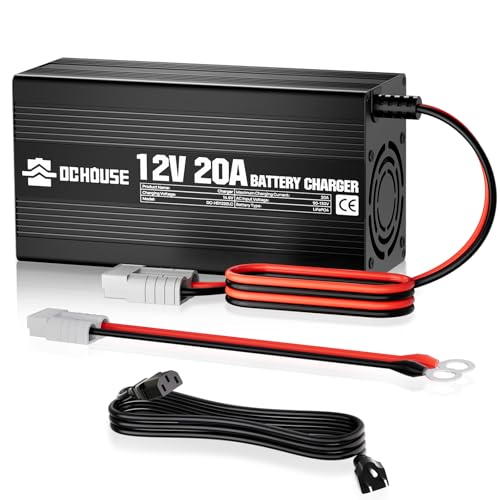
Applies a three-stage DC profile specifically tuned to wake and restore a deeply drained 12V LiFePO4 battery.
This 12V lithium charger runs a pre-charge, constant-current, then constant-voltage routine that pushes a safe DC output up to 14. 6V at 20A. A built-in fan keeps the aluminum shell cool during the high-current phase, and a 0V activation mode jumps batteries stuck at zero volts.
M8 terminals bolt straight to boat or RV battery lugs.
Geared toward owners of 12V LiFePO4 packs on boats, RVs, or off-grid solar banks who frequently drain cells below the normal low-voltage cutoff. The 300W ceiling limits simultaneous fast-charge of multiple packs, and buyers should confirm their BMS allows the 20A burst to avoid tripping internal protection circuits.
|
5
|
Massage Gun Power Adapter DC 24V or 25.2V Charger Compatible for Fitpulse, TOLOCO, Fusion, |

Outputs the precise DC 25.2V required by newer high-end percussion massage devices that need more voltage than standard kits supply.
The Massage Gun adapter steps AC down to a fixed DC 25. 2V at 1A, and its tip set includes 5. 5×2. 5 mm and 4. 8×1. 7 mm plugs that lock into Fitpulse, TOLOCO, Hypervolt, and similar ports.
A center-positive barrel keeps polarity stable, and the rated output lines up with the 24V-class motors inside most premium percussion units.
Perfect for users who swapped the original wall wart for travel, lost the cable after a move, or need a backup to keep therapy running daily. The single voltage output means it cannot feed 16.8V or 18V tools, so checking the device label prevents an expensive spark.
|
6
|
6V DC Power Adapter Charger 6V Power Supply Universal AC Adapter Power Cord with 8 Interch |

Locks the DC output to a steady 6V at 2A, the narrow window a surprising number of hobby and household devices actually call for.
This adapter accepts a wide AC range and turns it into a regulated DC 6V at up to 2A. Eight barrel tips span 2. 5×0. 7 mm through 6. 0x4. 4 mm sizes, and a built-in chip guards against overheating and overcurrent.
It targets sensors, small routers, and LED drivers that list a 6V DC input.
A solid drop-in for users keeping older Arduino boards, infrared sensors, or humidifier motors alive past their original power bricks. The fixed 6V rail means anything above that voltage, like 9V or 12V routers, is out of scope, so confirming the label saves a return.
|
7
|
16.8V 2A Charger AC/DC Power Drill Tool 14.4V 4S Lithium Battery Charger | for most Massag |

Supplies a fixed DC 16.8V at 2A that matches the full-charge level of a four-cell lithium-ion battery pack.
The 16. 8V charger converts AC into the exact DC voltage needed to bring a four-cell lithium-ion pack to a full 4. 2V per cell. Its 5. 5×2. 1 mm tip fits many power-tool bodies, and a red-to-green LED tells the user when current tapers to trickle.
It sits in the gap between common 12V and 19V laptop bricks.
Targets owners of cordless drills, flashlights, or vacuum modules that specify a 16.8V DC wall supply and accept barrel-input charging. Anyone running a 14.4V two-cell bank risks overvoltage damage, so matching the label on the original supply stays critical.
|
8
|
TalentCell AC/DC 12.6V/2A Lithium Battery Charger for 3S 12V Rechargeable Li-ion Battery P |
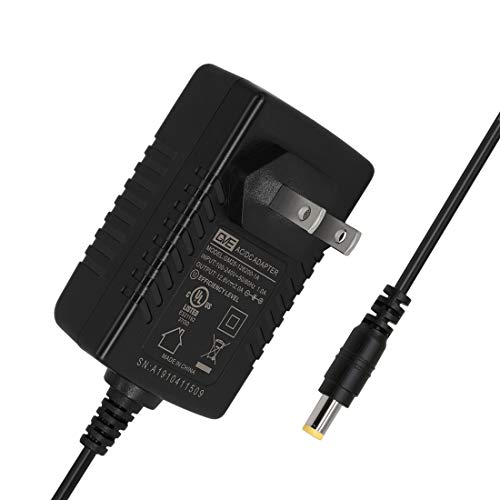
Converts AC to a safe DC 12.6V that completes one full charge cycle for a three-cell lithium-ion stack.
TalentCell’s 12. 6V charger feeds every 3S lithium-ion pack a fixed DC 12. 6V at 2A through a 5. 5×2. 1 mm center-positive connector. The LED panel shows red during bulk charge and swings to green once the cells hit 4.
2V each, and the regulated output protects packs used in TalentCell YB and PB series batteries.
Ideal for anyone topping off 11.1V laptop, Bluetooth speaker, or bike-light battery packs that accept barrel-input charge leads. It will not service 4S or LiFePO4 packs safely, and the fixed voltage means packs needing variable current taper need a separate smart balancer outside this adapter.
|
9
|
24V Charger for Kids Ride On Car Toys 24 Volt Battery Charger Wrangler SUV Kid Trax Dynacr |

Steps AC down to a fixed DC 24V at 1A, the level most children’s ride-on toy battery packs require for a full charge cycle.
This 24V charger takes AC and outputs a regulated DC 24V at 1000mA through a 5. 5×2. 1 mm center-positive plug. A dual-color LED reports charging status, and the 5-foot cable gives parents enough slack to park a ride-on near any outlet.
It lists compatibility across major 24V ride-on brands like Dynacraft, Kid Trax, and Disney models.
Essential for households juggling multiple kids’ vehicles that all need simultaneous overnight charge cycles. The modest 1A rate means large batteries can take several hours to peak, and users with broken charging ports should swap the barrel before assuming the adapter failed.
|
10
|
Universal 5V 2A ac Adapter Power Supply with 11 DC Plug Tips AC to DC5V 1.5A 1A 800mA 600m |

Converts AC into the universal DC 5V output used by USB-powered devices, single-board computers, and low-draw peripherals.
The 5V adapter accepts AC and outputs a regulated DC 5V at up to 2A, with eleven snap-on tips that cover 2. 5×0. 7 mm up through 5. 5×2. 1 mm barrels.
A built-in surge and overvoltage guard keeps Raspberry Pi rigs, routers, or LED strips running smooth, and the compact brick stays cool even near the 80 percent load ceiling.
Fits home offices with multiple small USB-based gadgets that never came with their own brick. It cannot jump up to 9V, 12V, or higher laptop rails, so checking the device label avoids an under-powered surprise mid-workday.
Across the ten adapters, the common thread is matching one regulated DC voltage and one connector style to the gear that actually needs power.
Whether the goal is topping off a 12V LiFePO4 pack, reviving a 6V sensor array, or keeping a kid’s ride-on topped up overnight, each pick carries the conversion path the question points toward.
The key reminder is simple: check the label, trust the voltage, and confirm polarity before the first plug-in.
Confirming Polarity So You Don’t Fry Your Gear
Even a perfectly matched voltage will damage a device if the plug’s polarity runs backwards. This section walks through reading the symbols and testing tips that keep the charge flowing in.
DC barrels always show a polarity dot or diagram near the voltage rating. The dot represents the center pin, and an adjacent symbol tells whether that center is positive or negative.
Matching the symbol on both the device and the adapter saves the smoke test that ends in a replacement order. When in doubt, a cheap multimeter set to DC volts will read positive or negative depending on probe placement and confirm correctness instantly.
- Read the polarity diagram printed beside the voltage value.
- Align the center pin symbol dot with the device jack.
- Set a multimeter to DC volts and probe the barrel leads.
- Reverse the probes if the reading shows a negative value.
- Store polarity-matched adapters with their devices to avoid mix-ups.
When an AC Source Has To Charge a DC Battery
Some setups mix alternating and direct current in the same system, and that is where confusion spikes. This section clarifies how solar panels, generators, and inverter chargers bridge the two forms.
Hybrid Systems and Power Flow
| Component | Input Type | Output Type | Typical Use |
|---|---|---|---|
| Inverter Charger | AC | DC | Grid-tied home storage |
| Solar MPPT Controller | DC | DC | Battery bank regulation |
| Portable Generator | AC | AC | Backup home power |
| Wall Battery Pack | AC | DC | Laptop and phone charging |
A solar panel generates DC that a charge controller feeds straight into a battery bank, so no conversion happens at all. When an AC wall outlet powers a laptop charger, an internal transformer and rectifier flip the alternating current into the clean DC voltage the laptop motherboard expects.
Understanding which conversion path applies to a given setup is what keeps cables, controllers, and batteries alive long past the warranty period.
A battery itself is always DC, but the charger or power source connected to it may take AC and convert it down to the right DC voltage. Match the output voltage and polarity to the device label, then confirm amps are sufficient before you plug in.
For a quick win today, locate the original power brick or device label and read the volts, amps, and polarity symbol aloud before ordering any replacement charger.

- Marine Chargers and Backup Batteries: 9 Options Compared (2026) - October 27, 2026
- LTO Cells vs. SLA Generator Batteries: 5 Options Compared (2026) - October 27, 2026
- 12V/24V Backup Batteries and the EcoFlow DELTA Pro 3 (2026) - October 27, 2026