Is Battery Power Ac Or Dc?
When you’re staring at a battery compartment and a wall outlet, wondering why one says AC and the other runs on DC, you’re looking at the fundamental reason why adapters exist. Batteries store and release direct current, while the power coming out of your wall is alternating current.
This article breaks down the AC-versus-DC distinction and then shows the adapters that bridge the two in real setups.
Why Batteries Run On DC Power
Recommended Products


Before sorting out adapters, it helps to understand what a battery actually delivers to a circuit. The chemistry inside a battery pushes electrons in one direction only, which is the defining trait of direct current. That steady one-way flow is why batteries work so well in small electronics.
Every battery has a positive terminal and a negative terminal. Chemical reactions inside push electrons out of the negative end and into the positive end of whatever circuit you connect. That flow never reverses direction on its own, so the current is called direct current, or DC.
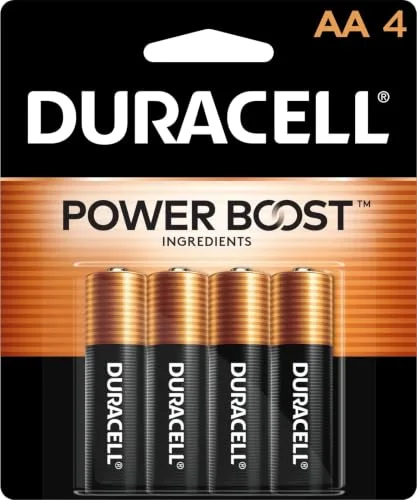
A standard AA battery delivers about 1. 5 volts of steady DC pressure. Stack three of them in series and you get 4. 5 volts, which is why so many small devices run on three AA cells.
The voltage stays constant as long as the battery has charge, and the current moves in one direction through the wire. That predictability is exactly what sensitive electronics need to operate reliably without flickering or buzzing.
The wall outlet in your home works on a completely different principle. The power company sends alternating current, where electrons reverse direction many times per second. In the United States that reversal happens 60 times per second, and in many other countries it happens 50 times per second.
Alternating current is easier to transmit over long distances because transformers can step the voltage up or down with minimal energy loss. But almost none of the chips, motors, or LEDs inside your devices can run directly on AC.
They need a steady DC supply, which is why every phone charger, laptop brick, and router adapter contains circuitry that converts AC from the wall into clean DC for the device.
AC Versus DC At A Glance
| Property | DC (Battery) | AC (Wall Outlet) |
|---|---|---|
| Direction of flow | One way only | Reverses constantly |
| Typical source | Batteries, solar cells | Wall outlets, generators |
| Voltage behavior | Steady and constant | Oscillates in a sine wave |
| Common use | Electronics, circuits | Home wiring, transmission |
| Needs conversion? | Often converted to AC for grid | Converted to DC for devices |
When You Need An Adapter Instead Of Batteries
Recommended Products


The reason adapters exist is simple. Many devices are designed to accept either battery power or a wall adapter, and the adapter has to convert AC to DC at the right voltage. Understanding that handoff makes it much easier to pick the correct power supply for any device.
Devices that run on batteries usually accept DC power directly. When you plug in a wall adapter, the adapter’s job is to take AC from the outlet and turn it into DC that matches what the batteries would have supplied.
That means voltage, current capacity, and polarity all have to line up. If a device expects three AA batteries, it wants roughly 4. 5 volts DC with the center pin positive. A mismatched adapter can underpower the device, cause erratic behavior, or damage the internal circuitry.
This is why so many universal adapters ship with multiple voltage settings and interchangeable plug tips. They let you match the adapter’s output to whatever the battery compartment would have provided, so the device sees the same electrical conditions it was designed for.
- Confirm whether your device expects AC or DC input, since almost all small electronics want DC.
- Match the adapter’s output voltage to the battery count or the device label.
- Check the current rating and stay under about 80 percent of the adapter’s maximum.
- Verify the DC plug size and whether the center pin is positive or negative.
- Look for safety certifications like UL, CE, or FCC on the adapter itself.
Count the batteries your device uses and note the total voltage they provide together.
Find the device’s DC input jack size or use a battery-eliminator style adapter with dummy cells.
Select an AC-to-DC adapter whose output voltage and polarity match the battery supply.
Insert the dummy batteries or plug in the barrel connector, then power on and test the device.
If the device behaves oddly, unplug immediately and recheck voltage, polarity, and current rating.
Adapters That Turn AC Into DC For Your Devices
Recommended Products


Since batteries supply DC and wall outlets supply AC, an adapter is the bridge between them. The picks below cover a range of voltages and connector styles, from simple 12-volt replacements to adjustable supplies with LCD readouts.
Each one solves the same core problem in a slightly different way, so match the output to your device before choosing.
|
1
|
GuanTing Universal AC Adapter 12V 2A Power Supply Charger 24W AC110V to DC12V 2000mA 1500m |
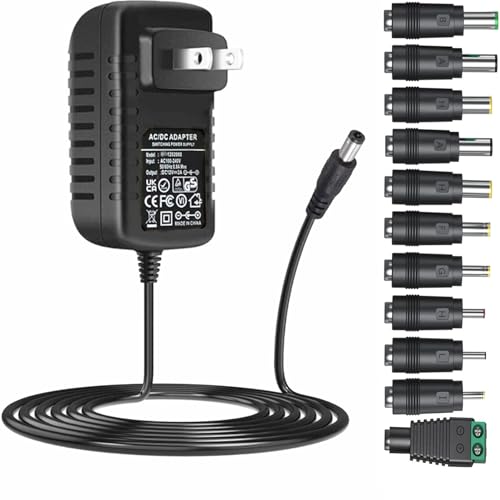
It converts AC wall power to a steady DC12V output with 11 plug tips for small electronics.
The GuanTing Universal AC Adapter takes 100 to 240 volts AC from the wall and outputs a regulated DC12V at up to 2 amps, which is exactly the kind of conversion a battery-powered or DC-input device needs. It includes 11 interchangeable DC plug tips around a standard 5.
5mm by 2. 1mm barrel jack, so it can fit LED strips, routers, cameras, and many other 12-volt gadgets. The 24-watt maximum covers devices drawing anywhere from 100mA to 2A, and the center-positive polarity matches most DC12V equipment.
This adapter suits anyone replacing a lost 12-volt power supply or converting a battery-powered 12V device to run from a wall outlet. The fireproof shell and built-in over-voltage, over-current, and short-circuit protections make it a reasonable choice for always-on devices like security cameras.
The main limitation is that it only outputs 12 volts, so it will not work for 5V, 6V, or 9V devices, and you must confirm your device’s plug size and polarity before ordering.
|
2
|
Belker 12W 3V 4.5V 5V 6V 7.5V 9V 12V Adjustable Voltage Universal AC/DC Adapter Power Supp |

It outputs selectable DC voltage from 3V to 12V, matching many battery-powered household electronics.
The Belker 12W Adjustable Voltage Adapter converts AC input into a user-selectable DC output across eight settings: 3V, 4. 5V, 5V, 6V, 7. 5V, 9V, and 12V.
That range covers the voltage supplied by one to eight AA batteries, so it can stand in for battery power in many small devices. It ships with eight interchangeable adapter plugs and maxes out at 1 amp, making it suitable for low-draw electronics like radios, toys, and LED accessories.
The center-positive polarity is standard for most devices in this class.
This is a good fit for someone with a drawer full of low-power gadgets that each use different battery counts, since one adapter covers multiple voltages. The 12-watt ceiling means it will not power anything drawing more than about 1 amp, so larger devices are out.
Also note the center-positive polarity, because devices wired center-negative will need a separate polarity-reversing cable to work safely with this unit.
|
3
|
Lenink AC Power Supply Adapter for 3 AA Battery, AA Battery Replacement Adapter for LED Li |

It replaces three AA batteries with a DC feed, eliminating the need to swap batteries constantly.
The Lenink AC Power Supply Adapter works differently from a typical wall brick. It includes three AA dummy batteries that slot into your device’s battery compartment, and a thin flat cable runs out to a wall adapter that supplies the DC power.
The dummy cells carry no charge themselves; they simply pass current from the adapter to the device’s battery contacts. This setup is equivalent to three AA batteries, so it suits LED lights, decorations, toys, and other devices that normally run on three cells.
This adapter is ideal for decorations or LED pieces that stay on for hours and would otherwise burn through disposable batteries. The nickel-plated socket and pure copper wiring add durability, and the flat cable design helps the device sit level when the compartment is on the bottom.
Just remember the dummy batteries cannot be charged, and the kit cannot power anything by itself without the wall adapter connected.
|
4
|
12V 1A Adapter Power Supply [12 Volts 1 Amps] 100V~240V AC to DC Plug 5.5 x 2.1mm & 2.5mm |
![12V 1A Adapter Power Supply [12 Volts 1 Amps] 100V~240V AC to DC Plug 5.5 x 2.1mm & 2.5mm](https://m.media-amazon.com/images/I/31eSt-oJOQS._SL500_.jpg)
It delivers a clean DC12V at 1 amp from AC wall power with a long six-foot cord.
This 12V 1A Adapter converts 100 to 240 volts AC into a regulated DC12V output, which is the standard supply for many cameras, routers, and LED strips. The barrel jack is a 5. 5mm by 2. 1mm size that also accepts 2. 5mm plugs, and the center pin is positive.
It handles devices drawing anywhere from 100mA up to 1000mA, and the built-in protections cover short circuits, over current, over voltage, and over temperature. The six-foot cord gives you extra reach compared with typical short adapter cables.
This adapter fits well in fixed installations where the outlet is far from the device, such as a camera mounted high on a wall or a router tucked behind furniture. The 1-amp ceiling is enough for most single 12-volt devices but not for anything drawing more.
The self-adapting barrel jack is convenient, though you should still verify your device’s polarity before plugging in, since reversed polarity can damage electronics.
|
5
|
Wefomey Universal Power Supply Variable 3V~24V 3A 72W Multi Voltage Adapter | Adjustable A |
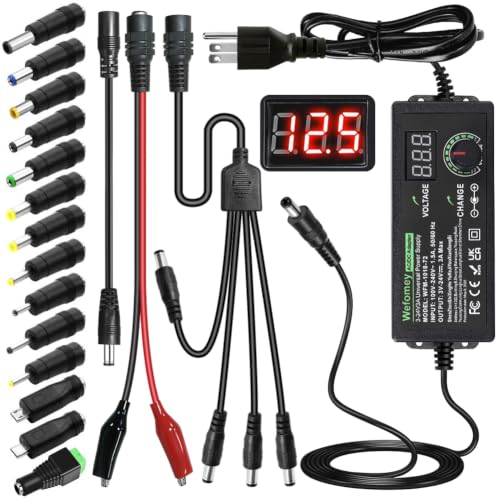
It converts AC to adjustable DC from 3V to 24V, covering nearly any battery voltage you need.
The Wefomey Universal Power Supply is the most flexible option here. It takes AC input and outputs an adjustable DC voltage from 3 to 24 volts at up to 3 amps, with an LCD screen showing the live output voltage.
The kit includes 14 DC tips, a polarity converter, alligator test leads, and a 4-way splitter cable. That means you can match almost any small electronic device, from 3V toys to 24V LED drivers, and even power several devices from one adapter using the splitter.
This adapter is aimed at hobbyists, repair technicians, and anyone who works with a variety of DC devices and does not want a drawer full of single-voltage bricks. The alligator clips make it useful for breadboard and DIY projects, and the polarity converter handles center-negative devices.
The tradeoff is complexity: you must set the voltage correctly before connecting a device, because an accidental 24V setting can damage a 5V gadget.
|
6
|
LR6 AA Battery Eliminator, AC to DC 3V 4.5V Power Supply Adapter,3 Connectors, Replace 2 o |

It replaces two or three AA batteries with a DC feed and includes a long 12-foot cord.
The LR6 AA Battery Eliminator supplies DC power to devices that normally take two or three AA batteries. It includes dummy battery cells and a 12-foot cord from the outlet to the connector, which is unusually long for this type of adapter.
The kit comes with 12 blank batteries and is UL listed, so it meets a recognized safety standard. It suits LED lights, decorations, and other low-draw items that would otherwise need frequent battery changes.
This is a practical pick for seasonal decorations or devices placed far from an outlet, where the 12-foot reach makes a real difference. It saves money over time by eliminating disposable battery purchases, and it is a small environmental win as well.
The main caution is that the blank batteries must never be used with real batteries or charged, and the adapter only works for devices that take two or three AA cells.
|
7
|
6V DC Power Adapter Charger 6V Power Supply Universal AC Adapter Power Cord with 8 Interch |

It converts AC to a regulated DC6V output with eight plug tips for small 6-volt devices.
This 6V DC Power Adapter takes standard AC input and outputs a steady DC6V at up to 2 amps. That voltage matches devices that run on four AA batteries or a 6-volt DC input, such as humidifiers, scanners, speakers, and small cameras.
It includes eight interchangeable DC plugs, including a 5. 5mm by 2. 1mm barrel jack and several smaller sizes, and the center pin is positive. The smart chip inside handles over-temperature, overload, over-voltage, over-current, and short-circuit protection.
This adapter works well for anyone replacing a lost 6-volt supply or converting a battery-powered device to wall power. The 2-amp capacity covers a wide range of small electronics, and the multiple tips reduce the chance you will need a separate adapter for each device.
The limitation is that 6 volts is a less common standard, so double-check your device label before ordering, and confirm the jack size since the wrong tip will not make reliable contact.
|
8
|
DC 6V 2A Power Supply Adapter | 100-240V AC Input, 5.5×2.5mm Connector, dc Plug, AC/DC Tra |

It provides a fixed DC6V output from AC input with a standard 5.5mm by 2.5mm connector.
This DC 6V 2A Power Supply Adapter converts 100 to 240 volts AC into a regulated DC6V output at up to 2000mA. It uses a 5. 5mm by 2. 5mm barrel connector with center-positive polarity, which is a common size for routers, switches, and security cameras. The 4.
6-foot cord is a reasonable length for desktop or shelf use, and the adapter is designed to operate comfortably under 80 percent of its full load to avoid overheating. It is a straightforward single-voltage replacement supply.
This adapter fits devices that need a dedicated 6-volt supply and do not require adjustable output. The fixed voltage removes the risk of accidentally setting the wrong level, which makes it safer for non-technical users.
The catch is that it only includes one connector size, so if your device uses a different jack, you will need an adapter tip. It also will not work with radios or tape players, which the manufacturer specifically notes.
|
9
|
Lenink 1 to 3 AC Power Supply Adapter Kit with On/Off Switch for AA Battery, Replace 3 AA |

It replaces three AA batteries across three devices at once with a single AC-to-DC adapter.
The Lenink 1 to 3 AC Power Supply Adapter Kit takes AC from the wall and feeds DC power to as many as three devices that each use three AA batteries. It includes nine dummy battery cells, an extension cord with an on-off switch, and the main adapter.
The switch lets you cut power without unplugging, which is handy for decorations you only want lit part of the time. The thin flat cable is designed to route neatly around battery compartment covers so devices sit flat.
This kit is best for someone running several identical battery-powered items, such as a set of LED decorations, and who wants to stop buying AA cells in bulk. The single switch controls all connected devices together, which is convenient but means you cannot turn them on individually.
Also note that the adapter only handles low-to-medium current draws under 1 amp, and the dummy batteries must never be charged.
Each adapter above solves the same core problem: your device wants DC, your outlet provides AC, and something has to bridge them. The right pick depends on your device’s voltage, current draw, and connector size.
Fixed-voltage adapters are simpler and safer for one device, while adjustable supplies cover a wider range for hobbyists. Battery eliminators are the cleanest option when you want to stop buying disposable cells entirely.
Matching Voltage, Polarity, And Plug Size Safely
Recommended Products


Getting the adapter is only half the job. The other half is making sure the electrical match is correct, because a wrong voltage or reversed polarity can quietly damage a device. These checks take a minute and prevent most of the problems people run into.
Voltage is the first thing to match. If your device runs on four AA batteries, it expects about 6 volts DC, so a 6V adapter is correct and a 12V adapter is not.
Current rating works differently: the adapter’s amp rating should meet or exceed what the device draws, because a device only pulls what it needs. That is why a 2A adapter can safely power a device that only draws 500mA.
The one rule to respect is staying under roughly 80 percent of the adapter’s maximum for continuous use, which keeps it cool and extends its life. Polarity is the third piece, and it is the one people overlook most often.
The center pin can be positive or negative, and connecting the wrong polarity can destroy circuitry instantly. Finally, the barrel jack size has to physically fit, since a loose connection causes intermittent power and can arc.
Common Battery Counts And Their DC Voltage
| Battery Setup | Nominal Voltage | Typical Adapter |
|---|---|---|
| 2 AA cells | 3V DC | 3V DC adapter |
| 3 AA cells | 4.5V DC | 4.5V or 5V DC adapter |
| 4 AA cells | 6V DC | 6V DC adapter |
| 8 AA cells | 12V DC | 12V DC adapter |
| 1 lithium cell | 3.7V DC | 3.7V or 5V DC adapter |
- An adapter with no voltage or polarity labeling is a gamble you should skip.
- Never use an adapter rated for less current than your device draws under load.
- Avoid forcing a plug that does not fit, since a loose tip can cause arcing.
- Do not assume all barrel jacks are the same size, because 2.1mm and 2.5mm differ.
- Skip uncertified adapters with no UL, CE, or FCC marking for safety.
Keeping Adapters And Battery Eliminators Running Longer
Once the right adapter is in place, a little care keeps it working for years. Heat is the main enemy, and most failures trace back to running a unit too close to its limit or blocking its airflow. These habits make a real difference.
Adapters convert AC to DC using internal components that generate heat, so ventilation matters. Do not bury an adapter under a pile of cables or press it against a wall.
Give it open air, and if it feels hot to the touch during normal use, you are probably running it too close to its maximum rating. A cooler adapter lasts longer and delivers steadier voltage.
For battery eliminators, inspect the dummy cells occasionally for corrosion or loose contact, since a poor connection inside the compartment can cause flickering. Keep the thin cable away from sharp edges and moving parts.
If you use an adjustable supply, double-check the voltage setting before each connection, because a bumped dial can send too much voltage to a sensitive device.
Unplug the adapter and check the cord and connector for cracks, fraying, or bent pins.
Feel the adapter during normal use and note if it runs unusually hot.
Wipe dust off the vents and casing with a dry cloth to keep airflow clear.
For battery eliminators, remove dummy cells and check contacts for corrosion.
Reconfirm the voltage and polarity settings before reconnecting an adjustable supply.
When An Adapter Is The Wrong Answer
Recommended Products

Adapters solve most AC-to-DC problems, but not all of them. Some devices should stay on batteries, and some situations call for a different solution entirely. Knowing when to skip the adapter saves you money and prevents damage.
Portable devices that move around with you, like a handheld radio or a flashlight, are better off on batteries because a cord defeats their purpose.
High-draw devices such as power tools or large audio amplifiers need far more current than a small wall adapter can supply, so they usually come with their own dedicated power supply or charger.
If a device is sealed and has no DC input jack, adding an adapter means modifying the case, which voids warranties and risks shorts. There is also the question of safety certification: a cheap unbranded adapter that saves a few dollars is not worth the fire risk.
When in doubt, check the device’s manual or label for the exact input specification, because the manufacturer designed it around a specific voltage, current, and polarity.
- The device is designed to be portable and moves between locations regularly.
- The device draws more current than any small adapter you can reasonably buy.
- There is no DC input jack and adding one requires opening a sealed case.
- The device label specifies a voltage no standard adapter provides.
- The only available adapter lacks safety certification and feels flimsy.
Batteries are DC, wall outlets are AC, and an adapter is what lets a DC device run from AC power. The next step is simple: check your device’s label or battery count, note the voltage and polarity, and pick the adapter that matches.
If you are tired of buying AA cells, a battery eliminator is the cleanest upgrade. If you just need to power one 12-volt gadget, a fixed-voltage brick is enough. Match the specs first, and the rest falls into place.

- 10 Best Battery For Generator Ev Battery Bank Marine 2026 - October 27, 2026
- 10 Best Battery For Generator Ev Battery Bank Lto 2026 - October 27, 2026
- 10 Best Battery For Generator Ev Battery Bank Low Voltage 2026 - October 27, 2026