How To Replace Ford Key Fob Battery?
Your Ford key fob starts acting up, maybe the doors won’t lock with a single press, or the push-to-start button demands you hold the fob right up to the column. That’s your battery’s way of saying it’s tired. The good news?
You don’t need to book a dealership visit or deal with reprogramming. All you need is the right battery size and a few minutes with a small flathead screwdriver.
Here’s how to spot the right replacement, what to look for in a fob battery, and the most practical options available right now.
Why Your Ford Key Fob Battery Dies
Recommended Products


Before you grab anything off the shelf, it’s worth understanding why your fob is playing dead, and how to tell if it’s the battery or something else entirely.
Ford key fobs are designed to draw power even when idle, so the battery drains slowly over time, often between two and four years, depending on how often you use it.
Cold weather can speed up that decline, too, since the chemical reaction inside the battery slows down when temperatures drop. That’s why a fob that worked fine in summer might suddenly refuse to cooperate the first time you use it in freezing weather.
The first signs usually show up in remote lock/unlock functions, while push-to-start might still work if you hold the fob against the backup slot. If swapping a fresh battery doesn’t fix the issue, the problem is more likely your fob itself or a glitch in the car’s receiver system.
A Ford key fob is essentially a tiny radio transmitter running on a single 3V lithium coin cell. Every time you press a button, it sends a signal to the car, and it’s always listening for the vehicle’s response during passive entry or push-to-start.
That constant standby drain is why the battery wears out over time rather than just when you press buttons. Cold weather can make matters worse by slowing the battery’s chemical activity, so a fob that worked fine in summer might suddenly fail on the first cold morning.
If the car still starts when you hold the fob against the backup slot but remote lock/unlock stops working, that’s a classic sign of a dying battery. If a fresh battery doesn’t solve it, the issue is probably the fob’s internal components or the car’s receiver.
- The fob works only when you stand right next to the driver’s door.
- The dash displays a low key fob battery warning or a no-key-detected message.
- Lock and unlock buttons need two or three presses to respond.
- Push-button start asks you to place the fob in the backup slot.
- The fob worked fine last week and now barely responds at all.
Which CR Battery Does Your Ford Fob Take?
Recommended Products


Ford doesn’t use just one type of battery across its lineup, it depends on the fob’s age and model, not just the year. Picking the wrong size is the most common mistake people make when trying to fix their key fob. Here’s how to avoid it.
Common Ford Fob Battery Sizes
| Battery Code | Typical Fobs | Voltage | Notes |
|---|---|---|---|
| CR2450 | 2017-2025 smart fobs (F-150, Explorer, Edge, Bronco, Mustang) | 3V | Widest coverage for push-button start fobs |
| CR2032 | Older flip-key and standard remote fobs (pre-2015 many models) | 3V | Also used in many AirTags and remotes |
| CR2025 | Some older Ford remotes and Lincoln fobs | 3V | Thinner than CR2032, not interchangeable |
| CR1632 | A few compact Lincoln fobs | 3V | Less common, check the old cell first |
Open the fob with a small pry tool or flat screwdriver along the seam.
Slide the old coin cell out and read the four-digit code printed on it.
Match that code exactly , CR2450 and CR2032 are not interchangeable.
Note the fob’s model number on the back if you want to cross-check a fitment guide.
Buy a two-pack so you have a spare when the next cell dies in a few years.
Batteries That Make The Ford Fob Swap Easy
Recommended Products


Once you’ve confirmed your fob’s battery type, the replacement itself is quick, just a couple of minutes with a small pry tool. The options range from simple bare batteries to full kits that include tools, videos, and even spare cells.
My read is that if you’ve never opened a key fob before, a kit with an install guide is worth the extra cost. If you’re confident in your fob’s battery type, a straightforward two-pack gets the job done without extra frills.
|
1
|
Key Fob Replacement Batteries for Ford & Lincoln, 2 Pack, Check Fit Guide | For F150 Explo |

A two-pack of CR2450 cells designed specifically for 2017-2025 Ford and Lincoln smart fobs, no dealer needed.
This is the most common battery size for modern Ford and Lincoln fobs, covering everything from the F-150 and Explorer to the Edge, Fusion, and Bronco. The listing includes a fitment guide in the product images, so you can double-check that your fob matches before buying.
Each pack comes with two premium 3V CR2450 cells, meaning you’ll have one for your current fob and a spare for the next time the low-battery warning pops up. No programming is required, and the description walks you through the swap step by step.
This is a solid pick if you already know your fob uses a CR2450 and just want fresh cells without paying for dealer labor. The two-pack means you’ll always have a backup, but keep in mind you’ll still need a small flathead or pry tool to open the fob case.
It also won’t fit older flip-key or standard key remotes, which use a different battery type.
|
2
|
Energizer 2450 Lithium Coin Battery, 2 Pack | Child-Resistant Packaging; watch battery for |

Energizer CR2450 cells with a 12-year shelf life, perfect for keeping a spare ready in your glovebox.
Energizer’s 2450 lithium coin battery is the trusted name-brand option for Ford fobs that need a CR2450. The child-resistant packaging is a nice touch if you have kids, and Energizer guarantees these cells will last up to 12 years in storage.
That means a spare you buy today will still work when you need it years from now. These cells are a direct replacement for common codes like L52, DL2450, and 5029LC, and they work in everything from keyless entry systems to medical devices.
If you prefer a brand you recognize and want a spare that won’t degrade over time, this is a great choice. The 12-year shelf life makes the second battery genuinely useful rather than something you’ll toss after a couple of years.
The downside is that you’ll need to confirm your fob takes a CR2450 on your own, and you’ll have to supply your own tool to open the case, no fitment guide or install video included.
|
3
|
Key Fob Battery Replacement for Ford & Lincoln CR2450, Pack of 2 |
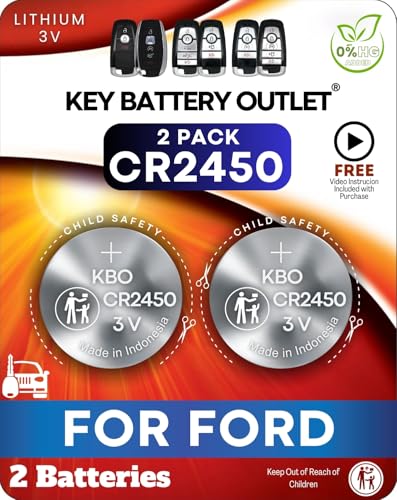
A two-pack CR2450 kit with an install video, so you can replace the battery without worrying about scratching the case.
This kit includes two CR2450 cells plus a step-by-step install video, which is something most bare-battery listings skip. The batteries are designed to match the original equipment manufacturer (OEM) specs, ensuring a precise fit and reliable performance.
The listing references common remote codes like M3N-A2C931426 and HC3T-15K601-AB, so you can cross-check before buying. A fitment guide in the images helps confirm your fob matches.
The install video is the real standout here, it shows exactly where to pry and how much pressure to use, which helps avoid cracking the fob case on your first try. That makes this a good pick if you’ve never opened a key fob before.
The limitation is that it only covers CR2450 fobs, so older flip-key or standard remotes are out of scope. You’ll still need your own pry tool unless you already have a small flathead.
|
4
|
Key Fob Battery Replacement for Ford & Lincoln | F150 Explorer Edge Fusion Bronco Escape M |

Elite Series CR2450 cells with a five-year shelf life, ideal for keeping a long-term spare in your car.
This two-pack uses Elite Series CR2450 cells, marketed for a longer lifespan than standard coin cells. It fits 2017-2025 Ford and Lincoln intelligent access smart fobs, covering the same modern lineup as most CR2450 kits.
The listing notes a use-by date of 12/31/2033, which works out to a five-year-plus shelf life on the spare. No programming is required, and the description includes a detailed replacement guide. It’s not compatible with older flip-key or standard key remotes.
If you want a spare that will still be good years from now, the long shelf life is the selling point. The two cells cover your current fob and one future replacement, so you’re set for a while.
The honest limitation is that the brand isn’t as well-known as Energizer or Duracell, and there’s no included pry tool or video. You’ll need to confirm your fob takes a CR2450 and supply your own opener.
|
5
|
Key Fob Replacement Batteries for Ford, Pack of 2, Check Fit Guide | For F150 Escape Focus |

CR2032 cells for older Ford remotes, covering a huge range of pre-2015 models and flip keys.
This two-pack flips to the other common Ford battery: the CR2032, which fits older standard remotes and flip keys. It covers a wide range of models, including everything from the F-150 and Escape to the Focus, Taurus, and Mustang, going back to the late 1990s.
The listing is clear that it does not fit 2015-2024 trims with push-to-start, which use a different fob and cell. Each pack includes two premium CR2032 3V batteries and a fitment guide in the images.
This is the right pick if you drive an older Ford with a traditional key fob rather than a smart fob. The model coverage is unusually broad, so you can likely find your vehicle in the list.
The limitation is significant: if your car has push-button start, this battery will not work, and the listing says so plainly. Double-check your fob type before ordering, since the CR2032 and CR2450 are not interchangeable.
|
6
|
Key Fob Battery Replacement for Ford & Lincoln CR2450, Pack of 1 | Explorer, Expedition, F |

A single CR2450 cell with an install video, ideal if you only need to fix one fob right now.
This pack contains one CR2450 cell rather than two, which suits anyone who only needs to replace a single fob battery today. It’s designed for select Ford and Lincoln fobs that require CR2450, including the Explorer, Expedition, Fusion, Edge, Bronco, Ranger, Mustang, and Lincoln models.
The listing references common remote codes like M3N-A2C931426 and HC3T-15K601-AB so you can verify compatibility. A fitment guide and an install video are both included to walk you through the swap.
The single-cell format keeps the cost low if you’re fixing one fob and don’t want a spare sitting around. The included video is a nice touch for anyone nervous about prying open the case.
The obvious limitation is that you get no backup cell, so if the replacement ever fails early, you’ll be buying again. It also only fits CR2450 fobs, not the older flip-key remotes that take a CR2032.
|
7
|
Duracell 2032 Lithium Battery, 4 Count, AirTag & Key Fob, CR2032 3V Cell |

A four-count Duracell CR2032 pack that also covers AirTags and other CR2032 devices around the house.
Duracell’s 2032 four-pack is the go-to option for Ford fobs that take a CR2032. It works with Apple AirTags, all major car key fobs including Ford, and a long list of other CR2032 devices like fitness trackers, glucose monitors, and tire pressure sensors.
The cells have a bitter-tasting coating to deter accidental ingestion by children, and the packaging is child-safe. Duracell rates these as lasting longer than Energizer 3-in-1 in the 2032 size.
The four-count format makes this a good pick if you have several CR2032 devices at home and want one box to cover them all. The child-safety features are a real plus in households with young kids.
The limitation is that this is a CR2032, not a CR2450, so it will not fit modern Ford smart fobs with push-button start. Confirm your fob takes a CR2032 before ordering, or you’ll be stuck with four cells that don’t fit.
|
8
|
CR2450 Key Fob Battery Replacement for Ford/Lincoln (2017-2025) F150 Explorer Edge Fusion |
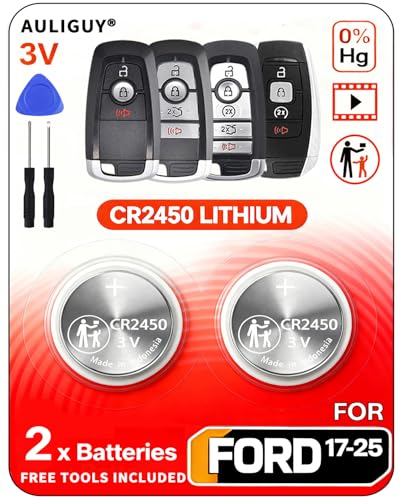
A two-pack CR2450 kit with an opening tool and video, covering the widest 2017-2025 Ford and Lincoln range.
This kit bundles two CR2450 cells with a dual-purpose opening tool and a step-by-step install video. The battery is sourced from the same manufacturer Ford uses, according to the listing, and it covers an unusually wide range of 2017-2025 Ford and Lincoln smart fobs.
That includes everything from the Bronco and EcoSport to the F-150 through F-550, Fusion, Mustang, Ranger, and Lincoln models like the Aviator and Navigator. The included pry tool is shaped to open the fob without scratching the plastic case, which is the most common mistake on a first attempt.
The included pry tool is the standout feature, it’s designed to open the fob without damaging the case, which is the most common mistake on a first attempt. Combined with the video and the broad compatibility list, this is the most complete kit in the group.
The limitation is that it only fits CR2450 smart fobs, so older flip-key remotes are not covered. If your fob takes a CR2450, though, this covers almost everything you need.
|
9
|
Key Fob Battery Replacement for Ford & Lincoln Remote (Check Fitment Guide) |

An OEM-equivalent CR2032 kit with tools and video for older Ford and Lincoln remotes without push-to-start.
This kit targets the older Ford and Lincoln key remotes that take a CR2032 rather than a CR2450. It covers a long list of models from the late 1990s through the 2020s, excluding 2015-2024 trims with push-to-start.
The battery is described as original OEM, sourced from the same manufacturer Ford uses, for seamless compatibility. An opening tool and installation videos are included, so you can pry the case open without damaging it. No remote reprogramming is required after the swap.
The included pry tool and video make this a practical pick if you have an older Ford remote and have never opened one before. The broad model coverage means most pre-2015 Ford and Lincoln remotes are likely covered.
The limitation is the push-to-start exclusion, if your car starts with a button, this battery will not fit your fob. Check the second product image to confirm compatibility before ordering.
The right choice depends on two things: your fob’s battery type and whether you want a simple replacement or a full kit. Most 2017-2025 Ford and Lincoln smart fobs use a **CR2450**, while older flip-key or standard remotes take a **CR2032**.
If you’ve never opened a key fob before, a kit with a pry tool and video is worth the extra cost, it makes the job easier and reduces the risk of damaging the case. If you already know your battery type, a straightforward two-pack gets the job done without extra frills.
How To Swap The Battery Without Cracking The Fob
Recommended Products


Replacing the battery is quick, but the fob’s case is the fragile part. A few simple habits keep the plastic tabs intact and the seal tight so your fob keeps working after the swap.
Press the physical key release button and pull the emergency key out of the fob.
Insert a small flathead or pry tool into the slot where the key came out.
Twist gently to pop the two halves apart , do not force it if it resists.
Lift the old coin cell out with the pry tool, noting which side faces up.
Drop the new cell in with the positive (+) side facing up and press the halves back together.
Test lock, unlock, and push-button start before snapping the emergency key back in.
- Prying at the seam with a metal knife instead of the key slot can crack the case.
- Forcing the halves apart when a hidden screw is still holding them together.
- Touching the flat faces of the new coin cell with bare fingers leaves oil and shortens life.
- Installing the cell upside down , the positive side must face up in most Ford fobs.
- Skipping the test press and only discovering the fob is dead when you are away from home.
After The Swap: When It Still Won’t Work
A fresh battery usually fixes a weak fob, but sometimes the problem is deeper. Here’s how to tell if it’s the battery, the fob, or something else in your car.
If swapping a fresh battery doesn’t fix the issue, the problem is likely something else. First, check the battery orientation, if it’s installed upside down, the fob won’t work at all. Next, inspect the metal contacts inside the fob; they might be bent or dirty.
A quick clean with a cotton swab and isopropyl alcohol can sometimes restore function. If you have a second fob, try that one, if it fails too, the issue is probably with the car’s receiver or the fob’s programming, not the battery.
If only one fob fails, the fob itself might have a damaged button or antenna, which a battery swap won’t fix.
Symptom To Likely Cause
| Symptom | Likely Cause | Next Step |
|---|---|---|
| Fob dead after new battery | Cell installed upside down | Reopen and flip the cell |
| One fob dead, other works | Damaged fob electronics | Replace the fob, not the battery |
| Both fobs dead at once | Car receiver or BCM issue | Check the car, not the fobs |
| Fob works only up close | Weak cell or blocked antenna | Try a fresh cell, then check the fob |
| Intermittent lock and unlock | Dirty or bent contacts | Clean contacts with isopropyl alcohol |
Keeping A Spare Ready And Knowing When To Replace
Recommended Products


Ford fob batteries don’t fail on a strict schedule, so a little planning keeps you from being stranded. These habits make the next replacement a non-event.
- Keep one spare CR2450 or CR2032 in the glovebox, sealed in its original packaging.
- Note the install date on the spare with a marker so you know its age.
- Replace the cell every two to three years even if the fob still works.
- Store spare cells away from heat and direct sunlight to protect shelf life.
- Check the low-battery warning on the dash instead of waiting for a no-start.
A spare battery costs a fraction of what a dealer would charge for a diagnostic visit, and it’s the simplest way to avoid being stranded. If you’re not sure which battery your fob uses, check the label inside the old battery, it’ll say either CR2450 or CR2032.
Buying a two-pack ensures you’ll always have a backup, and storing one in your glovebox means you’re ready for the next time the low-battery warning pops up.
Replacing a Ford key fob battery is one of the quickest and easiest car maintenance tasks you can do yourself, it just takes knowing your fob’s battery type and a little patience. My advice?
Start by checking the battery label inside your fob (CR2450 for most 2017-2025 smart fobs, CR2032 for older remotes), then grab a two-pack so you always have a spare. Today, open the fob, swap the battery, and you’ll save yourself the hassle, and cost, of a dealer visit.
The whole job takes about two minutes, and you’ll avoid that frustrating low-battery warning for another two to four years.

- 10 Best Battery For Generator Ev Battery Bank Marine 2026 - October 27, 2026
- 10 Best Battery For Generator Ev Battery Bank Lto 2026 - October 27, 2026
- 10 Best Battery For Generator Ev Battery Bank Low Voltage 2026 - October 27, 2026