How To Replace Thermostat Battery?
A thermostat battery almost never dies at a convenient moment. One cold morning the display goes dark, the schedule vanishes, and the furnace stops responding.
Fixing it means tracking down the exact internal cell for your model , usually a TL284443 or similar part number , and opening the unit without cracking the faceplate. Below I’ll walk through which battery your thermostat actually takes, how the swap works, and which replacement cells fit which generations.
Why Your Thermostat Battery Dies
Recommended Products


Before you click buy on anything, it helps to know how these cells actually fail. The symptoms usually point to one of two problems.
Nearly every smart thermostat hides a sealed lithium-polymer cell inside the housing, either soldered or clipped in place. These cells typically fade after two to three years of daily charge cycles.
As capacity drops, my read is you’ll notice it in the small stuff first: missed Wi-Fi reconnects, random resets, the unit dropping offline between scheduled updates. A badly degraded cell can swell enough to press against the faceplate or block the display.
The part number printed on the old battery , TL284443 on most Nest units , is the only dependable way to match an exact voltage and capacity, so check it before ordering anything.
- Check the faceplate or side edge for the part number before ordering.
- Power off the HVAC breaker to avoid shorting exposed wires.
- Photo the wire positions before disconnecting anything.
- Don’t force clips; most pop open with gentle pressure.
Matching The Right Replacement
Recommended Products


A matching voltage isn’t enough. Physical dimensions and the connector shape matter just as much as the mAh figure, and I would check both against your old cell before committing.
| Model Family | Part Number | Typical Voltage | Connector Type |
|---|---|---|---|
| Nest Gen 1 | TL363844 | 3.7 V | 2-pin snap |
| Nest Gen 2/3/E | TL284443 | 3.7 V | 2-pin snap |
| Thermostat E | TL284443 | 3.7 V | 2-pin snap |
Batteries To Restore Your Thermostat Today
Recommended Products


These replacement cells cover the most common Nest and Google part numbers. Most of the listings below also bundle the tools you’ll need, so you’re not hunting for a plastic pry bar mid-repair.
|
1
|
For Nest Thermostat Battery 3rd Generation: TL284443 Battery Replacement | for Nest Learni |

A direct-fit TL284443 cell for 3rd-gen Nest units, rated 650 mAh, with a prying tool in the box.
This one targets the Nest Learning Thermostat 3rd Generation and A0013 models specifically. It’s a 3. 7 V, 650 mAh lithium-polymer cell built to the original footprint, so the housing should close flush again.
The bundled plastic prying tool is a small thing, but it lowers the odds of cracking the faceplate when you lever the old cell out.
My read is this suits Gen 3 owners dealing with a swollen or fully depleted battery who just want an uncomplicated swap. The catch is capacity , 650 mAh sits below the upgraded options on this list, so plan on another replacement in roughly two to three years.
|
2
|
RRUHHK TL284443 Battery, 3.7V 780mAh (2026 Upgrade) Higher Capacity Battery Replacement fo |

A 780 mAh step up for TL284443 slots, with the screwdriver and tape needed for a tidy reinstall.
RRUHHK bumps capacity to 780 mAh while holding the 3. 7 V output, and the compatibility list runs wide: Nest Gen 2, Gen 3, Thermostat E, T3008US, T4000ES, T3007ES, and A0013.
The kit covers the reassembly side too , a magnetic screwdriver, a scraper, and double-stick tape , which is most of what you need once the old cell is out.
I would shortlist this one if longer runtime between charges is the goal and you’d rather not source tools separately. The high-density cell is rated for up to 2,100 cycles, though few installs ever get near that count. Support runs twelve months through Amazon messaging.
|
3
|
OHZHAO Upgraded 980mAh TL284443 Battery, High Capacity Li-Polymer Replacement Battery for |

The highest-capacity TL284443 option here at 980 mAh, in the same housing, for Gen 2 and 3 models.
OHZHAO pushes capacity to 980 mAh without changing the 3. 7 V output or the TL284443 shape. The Li-ion cell is billed as Class A material and carries CE, FCC, UL, PSE, and ROHS certification.
A built-in microchip guards against overcharge and overheating , relevant when the cell cycles daily with your HVAC.
This makes sense for households where a weak Wi-Fi signal forces constant reconnects, since the bigger cell absorbs those power spikes better. The trade-off is cost per cycle, though the twelve-month support window softens early failures. One note: support is email-only, so expect slower back-and-forth than a phone line.
|
4
|
Cameron Sino New 380mAh Replacement Battery for Nest A0013, Learning Thermostat 2nd Genera |
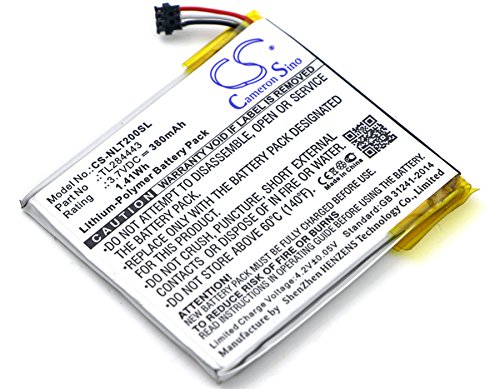
A basic 380 mAh cell for older 2nd and 3rd Gen Nests where interior space is tight.
Cameron Sino keeps it simple: a 380 mAh replacement for the Nest A0013 across 2nd Gen and 3rd Gen hardware, at the standard 3.7 V with the OEM connector pitch. Nothing else comes in the box, so you’ll need your own prying kit.
I’d treat this as a stopgap when a higher-capacity cell is out of stock or over budget. It’s the smallest capacity on the list, so the next swap comes sooner. The absence of listed certifications is worth noting if you’re ordering from a region with strict import rules.
|
5
|
CHEELBORSI TL284443 Battery for Nest Learning Thermostat 2nd 3rd Generation, Compatible wi |

A 1000 mAh cell for Gen 2, 3, and Thermostat E owners who want the longest runtime on this list.
CHEELBORSI rates this TL284443 replacement at 3.7 V and 1000 mAh , the highest figure covered here. Built-in protection covers overcharge, over-discharge, and overheating, and the listing backs it with a twelve-month warranty and email support.
A good fit if your heat schedule swings across wide temperature ranges, which drains cells faster than steady setpoints. The limitation is cycle life, capped at 500 per the spec sheet. And while email support promises a 24-hour reply, that window can stretch during busy seasons.
|
6
|
For Nest Thermostat Battery 3rd Generation: TL284443 Battery Replacement | for Nest Learni |

A 650 mAh Gen 3 cell that also fits Thermostat E, installation tool included.
This one closely mirrors the first entry but aims at Thermostat E and Gen 3 hardware , same 3.7 V, same 650 mAh. The included tool helps pop the E model open without marring the plastic latch, and the dimensions match the OEM part.
It’s a sensible pick if your E thermostat has started throwing low-battery errors a couple of years in. Since capacity matches the Gen 3 version, you’re restoring original performance rather than gaining runtime. If the first charge cycle goes wrong, returns route through Amazon.
|
7
|
MPF Products 200mAh TL363844 Battery Replacement Compatible with Nest Learning Thermostat |

A 200 mAh cell for the original 1st Gen Nest T100577 module, no wire trimming required.
MPF Products offers a 3.7 V, 200 mAh TL363844 battery for the original Nest Learning Thermostat, part T100577. You get a free installation tool and a one-year replacement warranty, and the label puts the watt-hour rating at 0.74 Wh.
This is really for Gen 1 holdouts still running firmware updates on original hardware. Capacity is the smallest on the list, so expect shorter stretches between charges than newer cells deliver. The warranty covers defects, not the gradual capacity fade that sets in after year one.
|
8
|
Upgraded Replacement Battery for TL284443【450mAh】 Battery Compatible with Nest Learning Th |

A 450 mAh middle-ground cell spanning Gen 2 and 3, with basic install tools.
This upgraded cell rates 3.7 V and 450 mAh for TL284443 sockets across Gen 2 and 3 Nest hardware. The package includes a repair tool kit and calls for a three-cycle calibration after install. Over-discharge protection is there to keep the cell stable through HVAC brownouts.
It lands between the budget and premium options on capacity, which will suit plenty of people. One caution: the calibration steps can trip up first-time tinkerers if rushed, so read them through before you start. Support goes through seller messaging rather than a dedicated hotline.
|
9
|
WRUMI for Nest Thermostat 2nd Gen Battery: TL284443 Battery Replacement |
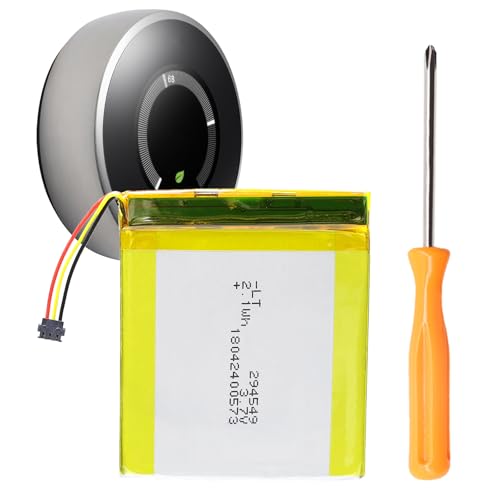
A 650 mAh Gen 2 cell for TL284443 sockets in older T200577 hardware.
WRUMI aims this 3.7 V, 650 mAh TL284443 battery at the Nest 2nd Generation T200577. The cell matches the original dimensions, so the housing snaps back without gaps, and over-current plus short-circuit protection round out the safety features.
A reasonable match for Gen 2 owners replacing the factory battery for the first time. Daily-schedule performance should mirror OEM, but there’s no runtime upgrade here. The listing skips any cycle-life claim, so long-term longevity is an open question , something I’d ask the seller about before ordering.
Between them, these nine cells cover the TL284443 and TL363844 footprints across most Nest generations. Higher mAh ratings buy longer runtimes; bundled tools save you a separate order. My advice: confirm your exact model number first, then shortlist by capacity and what comes in the box.
Installing The New Battery Safely
Recommended Products


Once you’ve confirmed the model number and gathered the tools, the swap itself is a patient half-hour, not a project.
Turn off the HVAC breaker to remove power from the thermostat.
Remove the faceplate by pressing the retention tabs on both sides.
Locate the old battery and photograph the wire and connector orientation.
Use the supplied prying tool to gently lift the old cell from its pocket.
Insert the replacement battery and reconnect the wires in the same order.
Snap the faceplate back on and restore power at the breaker.
- Double-check the part number before peeling off the old battery.
- Keep screws in a magnetized tray to avoid losing them inside the wall.
- Inspect the circuit board for corrosion around the connector pins.
- Power cycle once after reinstall to let firmware detect the new cell.
Avoiding Common Replacement Mistakes
A few small missteps are what turn a thirty-minute fix into a service call , and most of them are avoidable with a little care.
| Error | Risk | Prevention |
|---|---|---|
| Wrong part number | Battery won’t fit | Read label before ordering |
| Force opening | Cracked faceplate | Press tabs evenly |
| Ignoring polarity | Short circuit | Match wire colors |
| Skipping calibration | Wrong runtime | Run 3 full cycles |
Match the part number first , TL284443 for Gen 2/3/E, TL363844 for Gen 1 , then swap the cell with the power off and the faceplate handled gently.
After reinstall, run three full charge cycles to calibrate the new battery, and watch that Wi-Fi reconnects stay stable before you call the job done.

- 10 Best Battery For Generator Ev Battery Bank Marine 2026 - October 27, 2026
- 10 Best Battery For Generator Ev Battery Bank Lto 2026 - October 27, 2026
- 10 Best Battery For Generator Ev Battery Bank Low Voltage 2026 - October 27, 2026