How To Test Li Ion Battery?
Figuring out if a Li-ion battery is actually healthy takes more than just plugging it into a device and hoping for the best. I usually look at three things: voltage under load, actual capacity versus what the label claims, and internal resistance.
If you’re sorting through old 18650 cells or checking a new pack before trusting it with expensive gear, having the right tester stops you from guessing. Here is how I break down the metrics that matter and the tools that read them.
Why Li-Ion Batteries Fail Without Testing
Recommended Products

Li-ion cells quietly lose their edge over time. Capacity drops, internal resistance climbs, and suddenly a flashlight dims in half the time it used to.
The tricky part is that a degraded cell can still show a perfectly normal resting voltage, which tricks a lot of people into thinking the battery is fine.
Measuring the actual energy it can deliver and how hard it has to work to push that current out is the only way to know what you are really dealing with.
I always remind people that voltage alone is a liar when it comes to lithium-ion health. A cell might sit at 3. 9V on your desk, but the moment you ask it to power something demanding, the voltage sags because the internal resistance has spiked from age or heat damage.
Every charge cycle, every deep discharge, and every afternoon left in a hot car chips away at the chemistry.
Capacity testing forces the battery to prove itself by draining it under a controlled load, while measuring internal resistance tells you how much energy is being wasted as heat inside the cell.
Without both numbers, you are basically flying blind, risking sudden shutdowns or, worse, pushing a compromised cell too far.
- Device runtime drops significantly despite a full charge
- Battery feels excessively hot during use or charging
- Voltage readings fluctuate wildly under load
- Swelling or physical deformation is visible
- Charging time increases noticeably for the same usage
- The device shuts off unexpectedly, even with a high charge percentage
Key Metrics to Measure in a Li-Ion Battery
Recommended Products


When I evaluate a battery tester, I am looking at how it handles three specific measurements: voltage, capacity (in mAh), and internal resistance. Each one answers a different question about the cell’s remaining life, and knowing which metric you actually need dictates which tool makes sense for your bench.
| Metric | What It Reveals | Ideal Range | Red Flag |
|---|---|---|---|
| Voltage | Current charge level and stability | 3.7V – 4.2V (per cell) | Below 3.0V or above 4.3V |
| Capacity (mAh) | Total energy storage capability | 80-100% of rated capacity | Below 70% of original rating |
| Internal Resistance | Efficiency and heat generation | Below 100mΩ (new cell) | Above 200mΩ |
| Discharge Rate | How fast the battery delivers power | Consistent with specifications | Drops sharply under load |
Voltage is the easiest thing to check, but as I mentioned, it only tells you the state of charge right now, not the state of health.
Capacity, measured in milliamp-hours, is the real test, it requires discharging the cell through a known load to see exactly how much energy is left compared to the original spec. Dedicated testers automate this so you do not have to sit there with a stopwatch and a multimeter.
Internal resistance is the metric most casual users skip, but it shouldn’t be. When resistance goes up, efficiency goes down, and the cell runs hotter. Good testers apply a brief pulse or small load to calculate that resistance drop.
If you rely on these batteries for anything critical, my read is that you need a tool tracking all three parameters, not just a simple go/no-go light.
Testers That Accurately Assess Li-Ion Battery Health
Recommended Products


A good Li-ion battery tester should tell you exactly what is happening inside the cell without making you do the math yourself. I shortlisted the options below based on how they handle voltage, capacity, and resistance across different cell types.
Whether you are sorting salvaged 18650s or checking multi-cell RC packs, these tools give you the raw data you need to figure out if a battery is worth keeping.
|
1
|
DWEII 1pcs 18650 Lithium Battery Capacity Tester Module MAh MWh Digital Battery Power Dete |

Four-channel tester measures capacity, internal resistance, and voltage for 18650 cells simultaneously.
If you are sorting through batches of 18650 cells, the DWEII module is built specifically for that workflow. It gives you four independent channels to run capacity tests (up to 99999mAh) and measure internal resistance, voltage, current, and power all at once.
I like that the LCD shows everything on a single screen instead of forcing you to scroll through menus.
Powering it via Type-C keeps the setup modern, and because it handles the charge and discharge cycles automatically, you can set up four cells and walk away while it does the work.
My read is that this fits best on a hobbyist’s bench or in a repair shop where you process multiple cylindrical cells regularly. It runs on DC5V with a 10W discharge load, which covers standard 18650 testing well.
Keep in mind the listed measurement error sits around 10%, so if you need laboratory-grade precision, this isn’t it. Also, the manual isn’t physically included, you have to message the seller through their storefront page to get the PDF, which is an annoying extra step for first-time setup.
|
2
|
Magnetic Battery Tester for AA AAA C D 9V, Buttons, Ni-MH, Alk, Li-ion |

Magnetic slot secures diverse battery types for quick voltage and health checks.
For a quick sanity check across a messy drawer of mixed batteries, this magnetic tester is hard to beat. It handles everything from standard AA, AAA, C, D, and 9V alkalines to 3. 7V Li-ion cells like 18650s and even button cells.
Instead of giving you raw numbers to decipher, the LCD categorizes the health as good, weak, or poor based on voltage.
The magnetic slider design means you can operate it with one hand, and since it recharges via USB-C, you don’t need to hunt down obscure replacement batteries for the tester itself.
I would shortlist this for household use or a general workshop where you just need to know if a battery is dead or ready to go. The one-touch V-SELECT button and optional buzzer make it very fast to cycle through different chemistries.
However, it doesn’t measure capacity or internal resistance, so it won’t tell you if a rechargeable Li-ion cell is slowly degrading. It’s a triage tool, not a diagnostic one. The 15-hour battery life is decent, though heavy daily sorting will require frequent top-ups.
|
3
|
RC Cellmeter 7 Digital Battery Capacity Checker Controller Tester Voltage Tester for LiPo |

Digital checker displays cell voltages, total voltage, and remaining capacity for LiPo and Li-ion.
The RC Cellmeter 7 is a staple for anyone flying drones or running RC cars who needs to verify a pack before heading out.
It reads individual cell voltages, total pack voltage, highest/lowest cell readings, the voltage gap between them, and remaining capacity percentage for 2 to 7 cell lithium packs (as well as 4-7 cell NiMH/NiCd). It’s incredibly lightweight, meaning it easily stays in your field bag.
Knowing the voltage gap between your highest and lowest cell is crucial, if that number is large, your pack is unbalanced and shouldn’t be pushed hard.
This is purely a field-check tool for RC pilots. I appreciate its simplicity; you plug it into the balance lead and read the screen. But it doesn’t test internal resistance, nor does it actively discharge or balance the cells itself.
Note that it draws power directly from the battery you are testing, so it won’t turn on unless connected to a compatible pack. If you need deep diagnostics, look elsewhere, but for a quick pre-flight safety check, it does exactly what it promises.
|
4
|
RC Cellmeter 8 Digital Battery Capacity Checker Controller Tester Voltage Tester for LiPo |

8-in-1 cellmeter adds precision and user-friendly design for multi-cell Li-ion packs.
Stepping up from the 7-cell version, the RC Cellmeter 8 supports 8-in-1 configurations and brings a noticeably larger LCD to the table. It covers LiPo, Li-ion, NiMH, and NiCd packs, reading total voltage, per-cell voltage, and capacity.
The one-click measurement button is a welcome addition when your hands are cold or you are rushing at the track. It also includes safety thresholds, like a minimum operating voltage of 1. 2V, which helps prevent accidentally draining a cell too low during the check.
I would lean toward this over the Cellmeter 7 simply for the readability of the screen and the slightly broader compatibility. It remains a voltage and capacity checker rather than a full diagnostic suite, so you still won’t get internal resistance readings or automated balancing.
Like the previous model, it powers itself from the battery under test, so keep that in mind if you expect it to work standalone out of the box. For RC enthusiasts wanting a clearer, safer interface, it hits the mark.
|
5
|
Battery Tester for AA AAA C D 9V, Button, Ni-MH, Alk etc 11 Types Batteries |

Universal tester with leads covers 11 battery types, including Li-ion and button cells.
Using test leads instead of fixed slots changes how you interact with a battery tester, and this universal model takes advantage of that.
Because you just touch the probes to the terminals, it accommodates an enormous range of sizes, from tiny LR621 button cells to massive 26650 Li-ion cylinders, plus standard AA, AAA, C, D, and 9V formats. The large LCD breaks down voltage, capacity percentage, and internal resistance.
I find the lead-based approach especially useful for checking batteries that are soldered in place or difficult to pry out of a device casing.
If you repair electronics or flashlights, having a probe-style tester saves a lot of time dismantling things just to check the power source. It measures internal resistance, which puts it ahead of basic slot testers for evaluating Li-ion health.
The trade-off is speed: touching probes to terminals takes a second longer than just dropping a cell into a spring-loaded bay. It comes with AAA batteries to run the unit and an 18-month warranty, but you do have to manually select the voltage type using the dial before testing.
|
6
|
Tenergy 5-in-1 Battery Meter, Intelligent Cell Meter Digital Battery Checker/Balancer for |
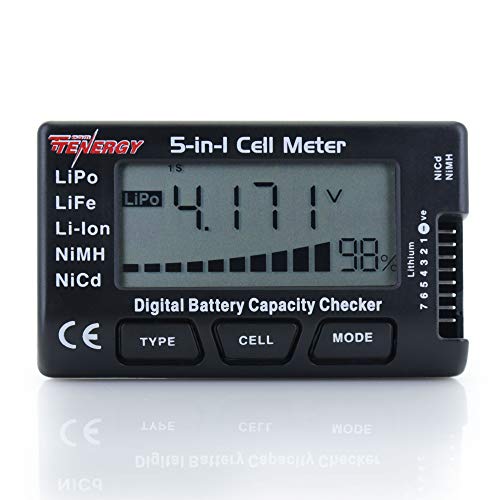
5-in-1 meter estimates voltage, balances cells, and tests internal resistance for Li-ion packs.
The Tenergy 5-in-1 goes beyond just reading numbers by actively managing the battery pack. It estimates voltages for 2-7 cell LiPo, LiFePO4, and Li-ion packs, as well as 4-7 cell NiCd/NiMH setups.
What sets it apart is the built-in balancer and discharger, which pulls current at 180mA to level out cells or bring a pack down to an adjustable threshold before charging. Discharging prior to a charge cycle is a habit many RC veterans swear by to maximize runtime.
It powers itself entirely from the connected pack, requiring no wall outlet.
I consider this a maintenance tool rather than just a checker. The ability to balance cells and condition the pack before charging addresses the root causes of premature battery death. However, it strictly requires a balance connector for lithium packs, so bare two-wire Li-ion cells won’t work here.
Also, it displays capacity as a percentage rather than exact mAh values, which might frustrate users who want to log precise degradation curves over time. For pack management, though, it earns its spot on the bench.
|
7
|
QWORK RC Battery Capacity Checker 2-7S LiPo Li‑ion NiMH – 2 Pack, Multi‑Mode Voltage Displ |

2-pack multi-mode checker displays per-cell voltage, max/min voltage, and capacity for RC batteries.
I like the value proposition of getting two units, especially since RC hobbies tend to involve multiple rigs. It plugs directly into the balance lead for instant feedback. The limitation is the same as other basic checkers: it reads data but doesn’t act on it.
There is no balancing, no discharging, and no support for single-cell formats like loose 18650s. If you just need to verify pack balance quickly in the field without spending much, this dual-pack approach works well.
Perfect for RC hobbyists who need quick, reliable field checks on multiple batteries. The inclusion of two testers in the pack is a bonus for users with multiple setups. However, it doesn’t support single-cell testing or charging, limiting its versatility.
The reliance on balance connectors also means it won’t work with all battery types out of the box.
|
8
|
ZORZA 1Pcs Type-C 18650 Battery Capacity Tester Lithium Battery Internal Resistance Tester |

4-channel tester with auto charge/discharge cycles and internal resistance measurement.
The ZORZA Type-C tester is designed for serious 18650 sorting. It features four independent channels that automatically run charge and discharge cycles while measuring internal resistance and capacity.
I appreciate the inclusion of high-temperature protection and active heat dissipation, which are non-negotiable when you are pushing current through four lithium cells simultaneously. You can program up to 9 automatic cycles to thoroughly condition stubborn cells, and the dual Type-C ports handle power input cleanly.
It supports flat-top 18650s specifically.
My read is that this is a dedicated workstation tool for rebuilding laptop batteries or assembling custom packs. The automation saves hours compared to single-channel testers. Be aware that it is tailored for standard Li-ion chemistry and explicitly does not support lithium iron phosphate (LiFePO4) cells.
You will also need to supply your own power cord, as one isn’t included. The ability to toggle the interface between Chinese and English is a practical touch depending on where you sourced it.
|
9
|
FLY RC Cellmeter 7 Digital Battery Capacity Checker Controller Tester Voltage Tester for L |

Digital checker displays cell voltages, total voltage, and remaining capacity for LiPo and Li-ion.
The FLY RC Cellmeter 7 mirrors the functionality expected from a reliable field checker, supporting 2-7 cell LiPo, LiFe, Li-ion, NiMH, and NiCd packs. It reads out individual cell voltages, total pack voltage, and remaining capacity percentage.
Its primary selling point is how unobtrusive it is, the lightweight build and straightforward interface mean you can plug it in, read the numbers, and unplug it in seconds. For drone pilots, verifying that no cell has dropped dangerously low during storage is a routine task this handles effortlessly.
If you already own a similar checker, this FLY RC model serves as a direct alternative. It prioritizes portability and speed over advanced diagnostics, skipping internal resistance measurement entirely.
Just remember it relies on the battery you are testing for power, so it cannot check a completely dead cell that lacks the voltage to boot the screen. It does exactly what it advertises for RC applications without adding unnecessary bulk to your gear bag.
|
10
|
OVONIC C30 Battery Checker with Servo Tester, 1-8S LiPo LiHV Life Li-Ion Battery Voltage T |
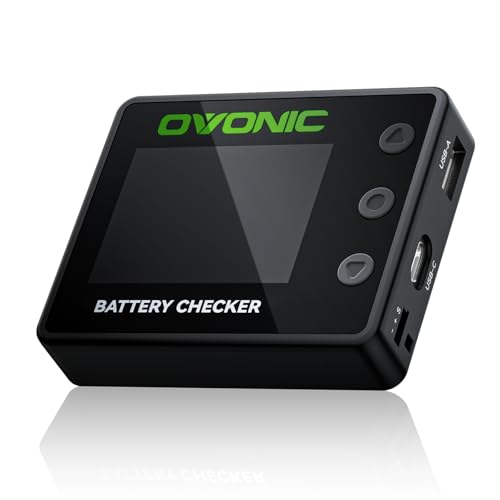
Multi-functional tester with cell balancing, USB power output, and servo testing for Li-ion packs.
The OVONIC C30 blurs the line between a battery checker and a multi-tool. It reads 1-8S packs across LiPo, LiHV, LiFe, and Li-ion chemistries, showing total and per-cell voltages.
Beyond that, it actively balances cells at 100mA per channel, tests PWM/PPM signals for servos, and functions as a power bank with 30W USB-C and 22. 5W USB-A outputs. If you are at the field and your phone dies, you can pull power from your flight battery through the C30.
It consolidates several separate gadgets into one footprint.
I would recommend this to RC builders who want a Swiss Army knife for the workbench. The servo testing and power output features add genuine utility beyond just reading voltage.
The 100mA balance current is relatively slow compared to dedicated chargers, so think of it as maintenance balancing rather than rapid correction. It doesn’t measure internal resistance, which is a notable gap given its otherwise extensive feature list.
It leans toward the premium end price-wise, but you are paying for the consolidation of tools.
Sorting through these testers, it becomes clear that your choice depends entirely on what format of Li-ion battery you handle most often. Loose 18650 cells demand multi-channel capacity testers with resistance readings, while RC packs need balance-lead checkers that highlight voltage deltas.
Pick the tool that matches your specific workflow, and you will stop throwing away good cells or trusting bad ones.
How to Interpret Your Li-Ion Battery Test Results
Recommended Products


Getting the numbers off the screen is only the first step. I have seen plenty of people misread a healthy battery as dead, or worse, keep using a dangerous one because they misunderstood what the tester was telling them.
Knowing how to interpret voltage sag, capacity loss, and resistance spikes is what actually protects your gear.
- 4.2V per cell: Fully charged (Li-ion)
- 3.7V per cell: Nominal voltage, ~50% charge
- 3.0V per cell: Discharged, requires charging
- Below 2.5V: Deeply discharged, may be damaged
- Above 4.3V: Overcharged, risk of damage or failure
A resting voltage of 3. 7V on a Li-ion cell looks fine on paper, but it hides the reality of degradation. That is why I always cross-reference voltage with capacity percentage and internal resistance.
If your tester shows a cell holding less than 70% of its original rated mAh, it is usually time to retire it from demanding applications. Internal resistance is the other silent alarm. Fresh 18650 cells typically read well under 100 milliohms.
Once you see that number climb past 200mΩ, the cell is wasting significant energy as heat, causing voltage to sag heavily under load. A battery is only truly healthy if it holds its capacity, maintains low resistance, and delivers stable voltage when working hard.
If any one of those pillars fails, the cell is compromised.
Maintenance Tips to Extend Li-Ion Battery Life
Testing reveals current health, but how you store and charge those cells dictates how fast they degrade next. I always emphasize a few baseline habits to keep internal resistance low and capacity intact for as many cycles as possible.
Store batteries at 40-60% charge in a cool, dry place (ideally 15-25°C) to minimize degradation.
Avoid full discharges; recharge when voltage drops to 3.5V per cell to prevent deep discharge damage.
Use a smart charger with balancing capabilities for multi-cell packs to ensure even charging across all cells.
Limit exposure to high temperatures, both during use and storage, as heat accelerates capacity loss.
Test batteries periodically (every 3-6 months) to monitor health and catch issues before they worsen.
Disconnect batteries from devices during long-term storage to prevent parasitic drain.
Safety Precautions When Testing Li-Ion Batteries
Recommended Products


Lithium-ion chemistry does not forgive mistakes. Pushing a damaged cell too hard during a test, or using a tester rated for the wrong voltage, can trigger thermal runaway. I treat every testing session with a baseline level of respect for the energy stored in these cells.
- Always test batteries in a fireproof area or on a non-flammable surface
- Wear safety glasses when handling damaged or swollen batteries
- Never leave a battery tester unattended during operation
- Inspect batteries for physical damage or swelling before testing
- Use insulated tools to avoid short circuits when connecting leads
- Disconnect batteries immediately if they emit smoke, heat excessively, or smell unusual
- Follow the tester’s voltage and current limits to avoid overloading the device
Swollen or physically dented Li-ion cells should never go on a standard tester. Their internal separators may already be compromised, and applying a discharge load could short the cell internally, leading to fire.
Always match your tester’s voltage rating to the battery, plugging a 12V pack into a 5V-only module will destroy the equipment and potentially ignite the battery. I also insist on testing in a ventilated area.
If a cell overheats and vents, it releases toxic, flammable gases that you do not want accumulating in a closed room. Respecting the chemistry and the limits of your testing hardware is the only way to gather data safely.
Testing a Li-ion battery involves measuring voltage, capacity, and internal resistance to assess its health and safety. Start by selecting a tester that matches your battery type and testing needs, then follow the maintenance and safety guidelines to extend lifespan and prevent hazards.
Pick one tool from the list above and run your first test today to see where your batteries truly stand.

- 10 Best Battery For Generator Ev Battery Bank Marine 2026 - October 27, 2026
- 10 Best Battery For Generator Ev Battery Bank Lto 2026 - October 27, 2026
- 10 Best Battery For Generator Ev Battery Bank Low Voltage 2026 - October 27, 2026