What Color Is Positive On A Battery?
Working with batteries means knowing which terminal is positive, get it wrong, and you risk damaging your device or worse. Battery polarity indicators take the guesswork out of the process, giving you a clear, immediate way to confirm the positive and negative terminals before making a connection.
Understanding Battery Polarity
Every battery has a positive and negative side, and mixing them up can lead to malfunctions or safety risks. Polarity indicators exist to eliminate that uncertainty, so you can connect with confidence.
Batteries generate direct current through a chemical reaction, with electricity flowing from the positive terminal (cathode) to the negative terminal (anode). A polarity indicator is a simple but essential tool that visually or audibly confirms which end is which, so you never have to second-guess your connections.
Safety
Reversed polarity isn’t just a minor inconvenience, it can fry circuits, drain batteries prematurely, or even trigger a fire in extreme cases. A polarity indicator acts as a safeguard, ensuring the current flows the right way before you power up a device.
Efficiency
Getting the polarity right also maximizes efficiency. When a battery is connected correctly, the device draws power smoothly, which helps preserve the battery’s lifespan and keeps performance steady. No wasted energy, no unexpected shutdowns.
How Battery Polarity Indicators Work
Polarity indicators don’t all work the same way. Some rely on colored LEDs, others use digital readouts or beeps to signal which terminal is positive.
These tools come in different forms, but their purpose is the same: to remove doubt when working with batteries. LED-based models light up in distinct colors for positive and negative, while digital displays show voltage levels for a more precise read.
Some even include audible alerts, so you can confirm polarity without staring at a screen.
Common Methods Used by Battery Polarity Indicators
| Method | Description |
|---|---|
| LED Indicators | Light up in different colors to indicate the positive and negative terminals. |
| Digital Displays | Provide precise voltage readings to identify the battery’s status. |
| Audible Alerts | Provide a sound indication of the battery’s status. |
Picks To Identify Positive On A Battery
If you’ve ever hesitated before connecting a battery, a polarity indicator can save you the trouble. Here’s a look at some of the most effective options for quickly and reliably identifying the positive terminal.
|
1
|
3PCS 4S Li-Ion Battery Meter Monitor Level Indicator Module Battery Power Tester for Volta |

This product uses LED indicators to show battery level and polarity.
The 3PCS 4S Li-Ion Battery Meter Monitor Level Indicator Module keeps things simple with a slim design and five blue LEDs that light up sequentially as voltage rises.
Press the red button to check the battery level in real time, and the display shuts off after 10-15 seconds to conserve power. It’s a no-frills way to monitor a 4S Li-Ion battery’s status at a glance.
This is a solid pick if you want a lightweight, portable indicator for 4S Li-Ion batteries. The LED progression makes it easy to judge charge levels, though the lack of a digital readout means you won’t get exact voltage numbers. Still, for quick checks, it’s hard to beat the simplicity.
|
2
|
Haldzemo 1S 2S 3S 4S 5S 6S 7S 8S 1-8S Lithium Battery Capacity Indicator Module 4 Sections |

This product provides a digital display for precise battery level monitoring.
The Haldzemo 1S-8S Lithium Battery Indicator covers a wide range of lithium battery configurations, from 1S to 8S, with a digital display that shows real-time power levels. Just connect the positive and negative ports, and the screen updates instantly, no guesswork involved.
This model is great for anyone working with multiple battery types, thanks to its broad compatibility. The digital readout is clear and precise, but keep it dry, as it’s not rated for water resistance. For indoor or controlled environments, it’s a dependable choice.
|
3
|
K Tool International XDCHT504 Xtra Duty Cordless Circuit Tester, DC Voltage Detection Tool |
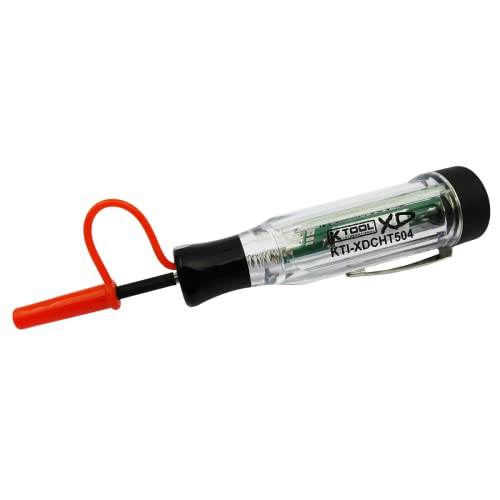
This product features dual-color LED indicators for clear polarity identification.
The K Tool International XDCHT504 Cordless Circuit Tester is built for automotive work, with red and green LEDs that light up to indicate positive or negative polarity. It also includes an audible beep, so you can confirm a circuit’s status without staring at the tool.
This tester is ideal for mechanics or DIYers who need fast, hands-free polarity checks. The dual-color LEDs are easy to read, and the beep adds an extra layer of confirmation. The only downside? It’s cordless, so you’ll need to keep track of its battery life.
|
4
|
Craedli 2PCS DC 0-100V Mini Voltmeter, LED Digital Display Panel Voltage Indicator, Revers |

This product provides a clear LED digital display for accurate voltage readings.
The Craedli 2PCS DC 0-100V Mini Voltmeter delivers a crisp digital readout on a compact LED screen, making it easy to monitor voltage in real time. The display remains visible in bright or dim conditions, and the 0-100V range covers most common battery setups.
If you need precise voltage readings in a small package, this voltmeter fits the bill. The LED display is bright and easy to read, though it doesn’t explicitly flag polarity, so you’ll need another method to confirm positive and negative terminals.
|
5
|
DGZZI 2PCS Single String Mini Lithium Battery Indicator Capacity Module 3.7 to 4.2V 4 Cell |

This product uses LED indicators to show battery level and polarity.
The DGZZI 2PCS Single String Mini Lithium Battery Indicator uses a trio of colored LEDs, green, yellow, and red, to show battery status at a glance. It’s calibrated for accuracy within ±1%, so you get a reliable sense of charge levels without a digital display.
This is a straightforward, visual way to check lithium battery levels. The color-coded LEDs make it easy to assess status quickly, though the lack of a numerical readout might leave some users wanting more detail.
|
6
|
12V 24V 36V 48V 60V 72V Golf Club Cart Battery Monitor Meter for Yamaha EZGO Motorcycle LE |

This product provides a clear LED bar graph display for accurate battery level monitoring.
The 12V-72V Golf Club Cart Battery Monitor Meter is built for golf carts and similar vehicles, with a bar graph display that shows remaining charge across a wide voltage range. It’s compatible with lithium, lead-acid, and other battery types, and you can switch between voltage settings as needed.
This monitor is a practical choice for golf cart owners, offering a clear visual of battery levels. The bar graph is intuitive, but like some others, it doesn’t directly indicate polarity, so you’ll need to pair it with another tool for that.
|
7
|
Anyongora Auto Test Light 3-48V (Car/SUV) | Heavy duty 3-48V circuit tester with dual pola |

This product features a clear LED digital display for accurate voltage readings.
The Anyongora Auto Test Light combines a digital voltage readout with dual-color polarity indicators, lighting up red for positive and green for negative. It’s a two-in-one solution for checking both voltage and polarity in automotive circuits.
This product is suitable for users who need a precise and accurate way to monitor their voltage levels and identify the polarity of their batteries. The LED digital display and dual-color polarity indicator provide clear and easy-to-read information, making it convenient to use.
However, the product is not waterproof, which may be a concern for users who need to use it in wet environments.
|
8
|
3PCS 2S Li-Ion Battery Meter Monitor Level Indicator Module Battery Power Tester for Volta |
This product uses LED indicators to show battery level and polarity.
The 3PCS 2S Li-Ion Battery Meter Monitor Level Indicator Module is nearly identical to its 4S counterpart, but tailored for 2S Li-Ion batteries. Five blue LEDs light up in sequence as voltage increases, offering a simple visual reference for battery levels.
If you’re working with 2S Li-Ion batteries, this is a lightweight, easy-to-use option. The LED indicators are intuitive, but as with the 4S version, you won’t get exact voltage numbers, just a clear sense of charge status.
|
9
|
LED Battery Level Indicator, Universal Golf Cart Battery Meter Support 12V 24V 36V 48V 60V |

This product provides a clear LED bar graph display for accurate battery level monitoring.
The LED Battery Level Indicator offers a bar graph display to show remaining charge, making it easy to track battery levels at a glance. It’s a simple, no-nonsense tool for keeping tabs on power status.
This indicator is best for users who want a quick visual check of battery levels. The bar graph is easy to interpret, though it doesn’t include polarity detection, so you’ll need to verify that separately.
|
10
|
Jayron Mini LED Battery Indicator, DC 12/24V Lifepo4 Battery Fuel Gauge for Golf Carts, Fo |
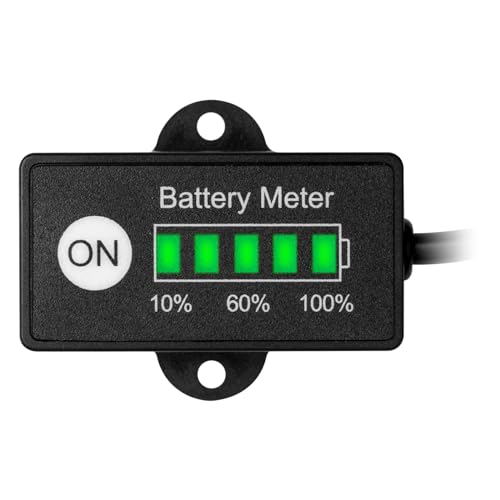
This product provides a clear LED display for accurate battery level monitoring.
The Jayron Mini LED Battery Indicator is a compact, straightforward way to monitor battery levels. Its LED display shows remaining power in a clear, easy-to-read format, though it doesn’t include polarity detection.
This product is ideal for users who need a quick and easy way to monitor their battery levels. The LED display provides clear and easy-to-read information, making it convenient to use.
However, the product does not provide a polarity indicator, which may be a concern for users who need to identify the positive and negative terminals of the battery.
From LED indicators to digital displays, these battery polarity tools offer different ways to confirm the positive terminal and monitor charge levels. Whether you need a quick visual check or a precise voltage readout, there’s an option here to match your workflow.
How To Use Battery Polarity Indicators
Using a polarity indicator correctly is simple, but there are a few key steps to follow.
Connect the positive and negative terminals of the battery to the corresponding terminals of the battery polarity indicator.
Press the red button to turn on the LED light and display the battery level.
Identify the positive terminal based on the color of the LED light.
Release the red button to turn off the LED light after a delay of 10-15 seconds.
- Always ensure the battery is disconnected from the device before using the battery polarity indicator.
- Follow the manufacturer’s instructions for connecting the battery to the battery polarity indicator.
- Handle the battery polarity indicator with care to avoid damage.
- Store the battery polarity indicator in a safe and dry place when not in use.
Common Mistakes To Avoid
A few common missteps can lead to inaccurate readings or even damage. Here’s what to watch out for.
Never check polarity while the battery is still connected to a device. This can cause shorts or damage to the tool or the battery itself. Always disconnect first, then test. Also, skipping the manufacturer’s connection instructions can lead to wrong readings or a fried indicator, so follow the guide closely.
Handling
These tools are built to last, but they’re not indestructible. Dropping or jarring the indicator can knock components out of alignment, so handle it with care.
Storage
Moisture is the enemy of electronics. Store your polarity indicator in a dry, safe place when it’s not in use to avoid corrosion or malfunction.
A polarity indicator is a small but critical tool for anyone working with batteries. It removes the risk of reversed connections, helping you work faster and safer. Just remember to disconnect the battery before testing, follow the instructions, and store the tool properly to keep it in good condition.

- 10 Best Battery For Generator Ev Battery Bank Marine 2026 - October 27, 2026
- 10 Best Battery For Generator Ev Battery Bank Lto 2026 - October 27, 2026
- 10 Best Battery For Generator Ev Battery Bank Low Voltage 2026 - October 27, 2026