Do Batteries Go Out Of Date? Key Factors To Consider
Batteries age, but not all have a hard expiry date. Do batteries go out of date? Some do, particularly when heat, leaks, or deep discharges push energy beyond safe limits. The crux lies in distinguishing calendar age from usable life: chemistry, storage conditions, and usage dictate when replacement is necessary.
Battery aging follows a straightforward rule: capacity declines over time and use, but the rate varies by chemistry and storage. Alkaline and lithium primary cells tend to hold charge longer on the shelf, while NiMH and Li-ion lose capacity with cycles and age.
Key Takeaways
- Chemistry drives aging. Li-ion and LiFePO4 often retain capacity longer than NiMH.
- Storage temperature matters. A cool, dry place minimizes self-discharge and capacity loss.
- Charge cycles matter. Rechargeables degrade with cycles; more cycles result in quicker capacity fade.
- Shelf life reality. Primary cells age over time, even if unused; they don’t have endless shelf life.
- State of charge for storage. Avoid full charges and deep discharges for long-term storage; partial charge is optimal.
- Expiry labeling varies. Most batteries lack a universal expiry date; check for date codes or best-by markers on packaging.
Understanding Battery Aging
Recommended Products



Batteries age through calendar aging and cycle aging. Calendar aging occurs over time, eroding chemical reactions and seals, while cycle aging results from charging and discharging; every cycle wears materials down. Consequently, a fresh battery may perform worse after months in a hot closet than a slightly older one stored properly. You’ll notice this as reduced run time, longer recharge times, or sluggish device performance.
Every chemistry reacts differently to aging. Primary cells like alkaline and lithium avoid some cycle wear seen in rechargeable packs, but they still lose capacity over time or when exposed to varying temperatures. Rechargeable batteries – NiMH, Li-ion, and LiFePO4 – are affected by cycles, temperature, and state of charge. For instance, a Li-ion cell loses capability after numerous fast charges or sustained heat, while a NiMH pack may self-discharge more rapidly with age. You must balance five factors: chemistry, cycles, heat, storage state, and charger type.
A battery that spends months in a hot environment will degrade faster than one kept cool. This means your devices may feel snappier after replacing aged cells, while chargers may not deliver full power as they did when the pack was new. For longevity, treat storage and use as separate controls.
How Different Chemistries Age
Chemistry determines how quickly a battery loses capacity, behaves under load, and tolerates storage mistakes. Aging isn’t a single dial; it’s a blend of usage, storage conditions, and temperature. You don’t have to replace a battery at the first sign of aging; assess whether the performance loss matters for your needs.
| Chemistry | On-shelf stability | Recharge life (if rechargeable) | Best storage guidance | Key risk to watch |
|---|---|---|---|---|
| Alkaline | Long | N/A | Cool, dry place | Leakage risk as time passes |
| Lithium primary | Very good | N/A | Dark, room temperature | Capacity fades over time, not use |
| NiMH | Moderate | Hundreds of cycles (typical) | Cool, dry, partial charge for storage | Self-discharge and slower capacity recovery |
| Li-ion | Moderate | Several hundred to thousands of cycles (typical) | 20-25 C; partial state of charge for storage | Thermal sensitivity and high-temperature aging |
| LiFePO4 | Good | High cycle count possible | 20-25 C; partial state of charge for storage | Thermal spikes still harmful |
Li-ion and LiFePO4 packs are known for longevity with proper cycling and temperature management. NiMH performs adequately in moderate energy devices but ages more quickly in high-heat environments. Alkaline and other primary cells maintain stability on the shelf but won’t recover capacity once degraded.
Factors That Shorten Battery Life

Heat accelerates aging. Charging and using a battery in a hot environment reduces capacity faster than in cooler settings. Deep discharges also stress many chemistries; Li-ion cells, for example, dislike being run flat repeatedly. A faulty or mismatched charger can push voltage or current beyond design limits, leading to degradation or protective shutdown. Aging compounds these effects, resulting in a cumulative performance drop.
Improper storage practices also contribute to wear. Storing a pack at full charge for extended periods can speed up calendar aging in Li-ion batteries. Conversely, leaving a battery fully discharged for long periods can cause sulfation in NiMH and lead-acid packs. Mixing old and new cells in a pack creates uneven aging, stressing the pack and reducing overall performance.
To mitigate these issues: store batteries cool, dry, and out of direct sunlight; use chargers designed for the chemistry; avoid leaving devices plugged in overnight on high-capacity fast chargers; and keep packs away from heat sources like radiators or sunny windows.
Do Batteries Expire on the Shelf?
Shelf expiry isn’t universal. Some batteries have date codes or “best by” marks, but these are approximate. A label might suggest peak performance within a window, yet older packs can still work in low-drain devices. The key question is whether the battery meets your device’s needs. If a device fails to power up reliably or runtime shortens noticeably, it’s time to test or replace the battery. Focus on matching performance to your device’s demand rather than chasing a calendar date.
Treat shelf dates as rough guidelines. For high-use devices, prioritize fresh packs that maintain capacity over time. For emergency backups, you may keep packs longer, but rotate and test them regularly to avoid surprises.
Essential Tools for Monitoring Battery Health

Energizer Recharge Pro Rechargeable AAA and AA Battery Charger With 4 NiMh Rechargeable AA Batteries, Provides a Full Charge in 3 Hours
The Energizer Recharge Pro Charger ensures your rechargeable batteries maintain optimal performance, extending their lifespan and reducing waste from expired batteries.
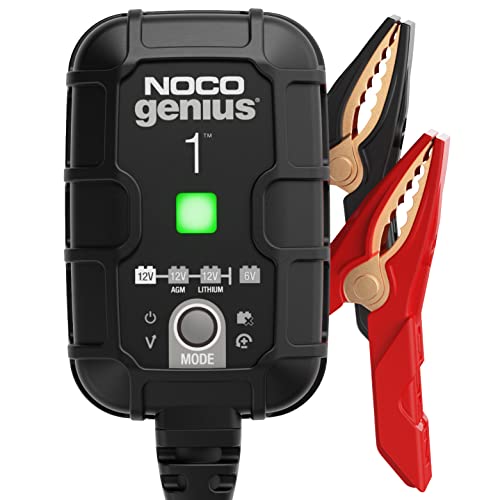
NOCO GENIUS1: 1A 6V/12V Smart Battery Charger – Automatic Maintainer, Trickle Charger & Desulfator with Overcharge Protection & Temperature Compensation – for Lead-Acid & Lithium Batteries
The NOCO GENIUS1 Smart Battery Charger helps prevent battery degradation by maintaining charge levels, ensuring your batteries remain functional longer and reducing the risk of them going out of date.
How to Extend Battery Life
Extend battery life by managing health as an ongoing process rather than a one-time purchase. Start with the basics: use the correct charger for the chemistry, avoid heat, and don’t mix old and new cells in a pack. Store batteries in moderate temperatures and partial states of charge for rechargeables. Refresh devices that demand peak performance regularly; older devices run longer with newer cells.
Practical routines help. Maintain a steady rotation of devices and batteries to keep them active. Use proper chargers rather than generic multi-chemistry chargers that may push limits. Label and rotate inventory to avoid relying too heavily on aging packs.
- Inspect devices for swelling or corrosion before use.
- Store packs in a cool, dry place away from heat.
- Use the correct charger designed for the chemistry.
- Avoid full charges for long storage with Li-ion packs; aim for partial charge.
- Keep old and new cells separate in storage and devices.
- Exercise rechargeable packs occasionally to slow capacity fade.
Helpful pick
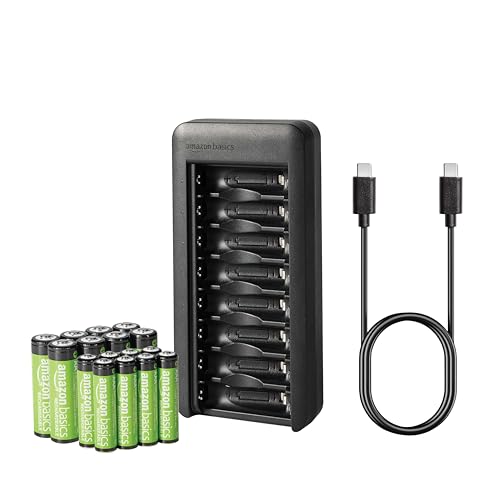
Amazon Basics Rechargeable Low Self Discharge NiMh Battery with 8-Bay Charger, 8 AAA 800mAh + 8 AA 2000mAh, USB C Port, No AC Power Adapter, Black
This charger ensures you use the correct charger for your rechargeable batteries, extending their lifespan effectively.
When to Replace: A Practical Decision Framework
Replace the battery or pack if your device runs noticeably shorter on a single charge or if the pack shows visible damage, leaks, or swelling. Unsure about performance? Run a simple test: compare runtime against a new pack of the same chemistry and capacity in a low-stress scenario. The decision should be practical, not sentimental: if performance loss affects daily use, replacement is warranted.
For devices with critical functions, such as medical or safety gear, replace batteries early. Relying on a device for important tasks warrants a cautious approach; don’t stretch functionality for a few dollars in savings. Balance cost, reliability, and risk tolerance.
Real-World Scenarios and Recommendations
Battery aging manifests differently in everyday situations. A remote control that dies faster in winter than summer is common, while a camera draining more quickly after heavy use signals the need for new cells. Understanding your device’s demands helps you decide when to replace rather than chase an uncertain expiry date. Keeping a small log of device runtimes can help you spot when aging becomes a problem.
For example, a child’s toy using alkaline cells will likely outlast the toy’s electronics, but leaks and corrosion can end its usefulness sooner. Laptop batteries age based on cycles and heat, leading to performance degradation. A flashlight using Li-ion may hold a charge for years if stored correctly, but heat spikes or high-current discharges can quickly shorten its life.
| Option | Why it helps | Price | Link |
|---|---|---|---|
| POWEROWL 8 Bay AA AAA Battery Charger, USB High-Speed Charging, Independent Slot, for Ni-MH Rechargeable Batteries, No Adapter | This charger allows you to maintain your rechargeable batteries, ensuring they perform well in varying conditions. | Check price | View → |
| POWEROWL Rechargeable AA Batteries with Charger, 8 Pack of 2800mAh High Capacity Low Self Discharge Ni-MH Double A Batteries with Smart 8 Bay Battery Charger (USB Fast Charging, Independent Slot) | With high capacity and low self-discharge, these batteries are perfect for devices that drain power quickly. | Check price | View → |
FAQ
Do batteries need to be replaced for safety reasons?
Batteries can become hazardous if damaged, swollen, or leaking. Replace immediately if you notice swelling, cracks, or warm discharge. Do not use damaged packs, and dispose of them according to local guidelines. Consult the device manufacturer’s recommendations if in doubt.
How can I tell if a Li-ion battery is still good?
If a Li-ion battery delivers expected runtime and does not swell or generate excessive heat during use or charging, it’s still usable. Noticeable rapid capacity loss or unusual heat generation indicates the need for replacement. A professional battery health check can confirm aging patterns.
Is it better to store batteries fully charged or partially charged?
For Li-ion, a partial charge (roughly 40-60% state of charge) is better for long-term storage. Fully charged Li-ion packs can age faster when stored for extended periods, especially at higher temperatures. For primary cells, storage conditions matter more than an exact charge level.
Do all batteries expire at the same rate?
No. Expiration rates vary by chemistry, usage, and storage. Primary cells age differently from rechargeable packs, and temperature, discharge patterns, and charging methods all influence practical life.
What’s the best way to minimize battery waste?
Choose rechargeable chemistries when feasible, use devices until a battery truly needs replacement, store and charge correctly, inspect packs regularly for damage, and recycle batteries through approved programs.
In summary, batteries do not all expire on a fixed date. Their usable life depends on chemistry, storage, and usage. By managing temperature, avoiding overcharging, and rotating packs with a practical replacement mindset, you keep devices reliable without chasing artificial deadlines.
For a simple takeaway: know your chemistry, store smartly, charge purposefully, and test regularly. Replace when performance no longer meets your needs, not when a date passes on the package. Your future self will thank you.

- 10 Best Battery For Generator Battery Safety Option 2026 - October 12, 2026
- 10 Best Battery For Generator Battery Safety 2026 - October 12, 2026
- 10 Best Battery For Generator Battery Rv Upgrade 2026 - October 12, 2026